


You can fully automate diamond inventory updates online by connecting a structured data feed or API to your website and marketplaces, applying incremental sync logic, and running validation rules before any record goes live. Here is the short version of how to get started:
- Identify your single source of truth — one system (your ERP, diamond platform, or supplier feed) that holds the authoritative stock status, price, and certificate data.
- Choose a feed or API connector — IDEX XML, a REST API, or an Excel-to-API bridge depending on your technical setup.
- Stage and test — run a dry sync against a staging environment and spot-check a sample of SKUs before touching live listings.
- Enable incremental updates — push only changed records on each cycle rather than re-importing your full catalog.
For a production-ready starting point, Jewelcloud’s DiamondLink® and Product Feed handle feed formatting, certificate linking, and multi-channel export out of the box. Request a staged sync to see how your data maps before committing to a full rollout.
Key Takeaways
Automated diamond inventory management works when you start with clean data, use incremental syncs, and validate every record before it reaches a live channel.
| Point | Details |
|---|---|
| Single source of truth | Pick one system that owns authoritative stock, price, and certificate data before building any integration. |
| Incremental over full re-import | Incremental syncs update only changed records, keeping cycles fast and reducing the risk of brief availability errors. |
| Validate before publishing | Run every record through a validation layer — missing certificates, zero prices, and unconfirmed status codes go to a review queue, not live listings. |
| Memo logic needs explicit rules | Encode memo states (out, recalled, sold) as discrete status values; a generic inventory system will not handle this correctly without custom logic. |
| Jewelcloud for diamond-aware feeds | Jewelcloud’s DiamondLink® and Product Feed handle certificate linking, memo status, and multi-channel export with field structures built for the diamond trade. |
Table of Contents
- Why automating diamond inventory updates matters for your business
- What should you automate first in your diamond inventory?
- How are automated diamond inventory updates actually built?
- How to implement automated inventory updates step by step
- How Jewelcloud addresses automated diamond inventory updates
- What does automated inventory setup typically cost, and when will you see ROI?
- What security and privacy practices protect your inventory data?
- How should you handle errors and exceptions in automated updates?
- What compliance and industry standards apply to diamond inventory automation?
- The part of automation most dealers get wrong
- Jewelcloud makes your first automated sync straightforward
- Sources
Why automating diamond inventory updates matters for your business
Manual inventory management in the diamond trade carries a specific kind of risk that other retail categories rarely face: a single stone can carry a five-figure price tag, and a listing error — wrong availability, wrong certificate number, wrong price — can trigger a sale you cannot fulfill or a return that damages a client relationship.
Automation addresses that risk at the source. When stock status, pricing, and certificate data flow directly from your system to every sales channel, the gap between what you have and what shoppers see closes to minutes or seconds rather than days. Fewer listing errors mean fewer awkward calls to customers. Faster time-to-list means a stone that arrives on memo this morning can be live on your website by afternoon.
The business case extends beyond accuracy. Memo management is one of the most labor-intensive workflows in wholesale diamond dealing. Tracking which stones are out on approval, when they are due back, and whether they have been sold requires constant manual reconciliation unless that logic is built into your automation layer. Multi-channel dealers face the same problem at scale: a stone sold through RapNet that is still showing available on your Shopify store is a fulfillment problem waiting to happen.
Platforms like DiamondTrack document real-time inventory sync, automated certificate and image handling, and marketplace-ready exports to RapNet and IDEX that reduce exactly this kind of manual update burden.
What should you automate first in your diamond inventory?
Not every field carries the same risk if it goes wrong. Prioritize automations by the combination of how often the data changes and how costly an error is.
| Field | Change Frequency | Error Cost | Effort to Automate |
|---|---|---|---|
| Stock status / availability | Very high | Very high | Low |
| Price / markup | High | High | Low–Medium |
| Memo status and alerts | High | High | Medium |
| Certificate ID and lab PDF | Low | Very high | Medium |
| Website listing sync | High | High | Low |
| Images and media | Low | Medium | Medium–High |
Stock status is the first automation to build. A stone that is sold, on memo, or reserved must be marked unavailable across every channel the moment that status changes. This single field, automated correctly, prevents the majority of fulfillment errors.
Price and markup comes next. Diamond prices shift with Rapaport movements, and manually updating hundreds of listings after a price sheet change is both slow and error-prone. Automated markup rules applied at the feed level let you set a formula once and have it recalculate across your catalog automatically.
Memo alerts require a slightly more nuanced approach. The logic needs to track memo-out date, expected return, and sale confirmation, then update availability accordingly. CaratLogic treats memo lifecycle automation as a core enterprise feature, alongside multi-location real-time control and RapNet-ready formatting.
Certificate linking is lower frequency but extremely high stakes. A GIA or IGI certificate number tied to the wrong stone, or a PDF that fails to attach, creates a trust problem with buyers. Automate certificate retrieval from labs and attach PDFs at the record level, but validate the match before publishing. DiamondTrack supports automated certificate syncing from GIA, IGI, and GCAL, which removes the manual step of downloading and uploading lab documents.
Images and media can wait until your core data fields are stable. Automating images before your SKU mapping is clean often results in mismatched photos, which is harder to catch and fix than a missing image.
Pro Tip: Never automate a field that contains incomplete or inconsistent data. New stones with partial certificate information, missing carat weights, or unconfirmed clarity grades should go through a validation queue before any automated rule touches them.
How are automated diamond inventory updates actually built?
There are three common technical approaches, and the right one depends on your catalog size, update frequency, and the platforms you sell through.
Scheduled data feeds (XML/CSV)
The IDEX XML format is the closest thing the diamond industry has to a universal feed standard. Your inventory system exports a structured file on a schedule (hourly, every 15 minutes, or triggered by a change event), and a connector on the receiving platform ingests it, maps fields, and updates listings. TransPacific Software describes a Python-based engine that handles IDEX XML feeds with incremental updates, custom markup formulas, and automated cleanup for Magento, Shopify, and WooCommerce — avoiding full re-imports on every cycle.
REST or SOAP APIs
APIs give you real-time or near-real-time updates and are the right choice when your inventory changes frequently throughout the day. Your platform pushes a change event (a stone sold, a memo created, a price updated) and the API writes that change to connected channels immediately. This approach requires more development work upfront but produces the tightest sync.
Excel-to-API bridges
For dealers who manage inventory in spreadsheets, DiamondSync offers an Excel-upload-to-API workflow that pushes spreadsheet data to connected platforms in real time, with documented connectors for platforms like Nivoda and VDB. It is a practical low-code path for smaller operations that are not ready to build a full API integration.
Field mapping checklist
Whichever approach you use, every integration needs these fields mapped correctly before go-live:
- SKU / Stock ID — your unique identifier, consistent across every system
- Stock status — available, on memo, sold, reserved
- Certificate ID and lab — GIA, IGI, GCAL, or other, with PDF attachment path
- Shape, carat, color, clarity, cut — the 4Cs plus cut grade
- Price and markup rule — cost, markup formula, and published retail price
- Images — primary photo URL and any additional angles
- Dimensions and measurements — table, depth, girdle, culet
Pro Tip: Incremental updates are faster and safer than full re-imports. On a catalog of several thousand stones, a full re-import can take minutes and may briefly show incorrect availability during the process. An incremental sync touches only changed records, typically completing in seconds.
Essentia supports automated uploads to RapNet, IDEX, and Polygon, certificate retrieval from labs, and exports in multiple formats, illustrating how a feed-based system can cover both marketplace distribution and website publishing from a single data source.
How to implement automated inventory updates step by step
A staged rollout protects you from publishing bad data at scale. Follow this sequence:
- Pick your source of truth. One system owns the authoritative record. Every other channel reads from it, never the reverse. If your ERP and your diamond platform both hold stock records, decide which one wins before you write a single mapping rule.
- Create field mappings. Document how each field in your source system maps to each target platform. Pay particular attention to status codes — your ERP’s “OUT” may need to translate to Shopify’s “0 inventory” and IDEX’s “memo” flag simultaneously.
- Set validation rules. Define what a publishable record looks like: certificate ID present, at least one image, price above zero, status confirmed. Records that fail validation go to a review queue, not to your live catalog.
- Build a staging environment. Run your first sync against a staging store or a test feed endpoint. Never test against production listings.
- Dry run and spot-check. After the staging sync, pull a random sample of 20–30 SKUs and verify that stock status, price, certificate, and images all match your source system exactly.
- Set go-live gating criteria. Define what “good enough” looks like before you flip the switch: for example, fewer than 1% of records in the validation error queue, all memo-status stones correctly flagged.
- Enable monitoring and alerts. Set up notifications for sync failures, validation error spikes, and certificate-attachment failures. Decide who receives those alerts and what the response protocol is.
- Document your rollback path. Know how to revert to a manual state if the automated sync produces bad data. Keep a snapshot of your pre-automation listings and preserve sync logs for at least 30 days.
MDCommerce (ManageDiamonds) adds RFID-based physical counting to this workflow, which speeds reconciliation between your physical stock and your digital records during the validation phase — particularly useful for dealers with large in-store inventories.
Pro Tip: Build your monitoring dashboard before go-live, not after. The first 48 hours of a live sync are when errors surface. If you are watching the right metrics from day one, you catch and fix problems before shoppers see them.
How Jewelcloud addresses automated diamond inventory updates
Jewelcloud’s DiamondLink® and Product Feed are built specifically for the diamond and jewelry trade, with field structures that reflect how diamonds are actually described and sold.
Key capabilities include:
- Structured, standardized product data formatted for the complexities of diamond inventory: 4Cs, certificate IDs, lab PDFs, dimensions, and media
- Real-time and near-real-time sync that pushes availability changes to retail partner sites and online catalogs without manual intervention
- Certificate and image handling built into the feed layer, so lab documents attach automatically rather than requiring a separate upload step
- Memo status support so stones out on approval are correctly flagged across all connected channels
- Multi-channel export compatible with Shopify, Magento, WooCommerce, and custom site plugins, as well as marketplace-ready formatting aligned with IDEX and RapNet conventions
- Incremental update logic that avoids full re-imports and keeps sync cycles fast
For suppliers and wholesalers, Jewelcloud functions as a digital distribution channel that pushes your inventory to qualified retail partners without requiring each retailer to build a custom integration. Retailers, in turn, can expand their online assortment with live supplier data and publish it directly to their storefront. The diamond vendor benefits page outlines the specific value for dealers distributing inventory through the platform.
What does automated inventory setup typically cost, and when will you see ROI?
Cost and timeline vary by catalog size, the number of target platforms, and how clean your source data is. Here is a realistic breakdown:
- Subscription or platform license: Most diamond inventory platforms charge monthly fees. Jewelcloud’s vendor membership tiers are publicly listed and cover feed access and retail network distribution.
- Integration and setup fees: Custom integrations (Shopify app configuration, Magento module setup, IDEX feed mapping) typically involve a one-time setup cost, either billed by the platform or by an integration partner.
- Mapping and customization: If your source data uses non-standard field names or status codes, expect additional time for mapping work — usually a few days for a clean catalog, longer if data cleanup is needed first.
- Ongoing maintenance: Feed format changes, new marketplace requirements, and platform updates require periodic maintenance. Budget for this as an ongoing line item.
Typical timeline milestones run over several weeks for a mid-size catalog, including phases for discovery and mapping, staging and dry runs, pilot incremental sync, and a phased rollout by channel.
The ROI case is straightforward. Labor saved on manual updates, fewer fulfillment errors, and faster time-to-list on new stones all contribute. DiamondSync illustrates the low-code end of this spectrum: an Excel-to-API workflow that reduces manual uploads and human error without requiring a full ERP integration. At the enterprise end, CaratLogic documents the value of live status updates, memo alerts, and quote-to-invoice automation for wholesalers managing large multi-location inventories.
What security and privacy practices protect your inventory data?
When you expose diamond inventory through an API or feed, you are sharing commercially sensitive data: your pricing, your stock levels, your supplier relationships, and in some cases your cost basis. Treat that data with the same care you would apply to any financial system.
Use API key authentication or OAuth 2.0 for any REST API connection. Never transmit inventory data over unencrypted HTTP. All feed endpoints and API calls should run over HTTPS, and credentials should rotate on a defined schedule.
Scope your access carefully. A retail partner who consumes your product feed needs read access to availability and pricing. They do not need write access to your inventory records. Define the minimum permission set for each integration and enforce it at the API or feed level.
Audit who has access and when they last used it. Revoke credentials for partners or integrations that are no longer active. An unused API key with broad permissions is a liability.
For cloud-based platforms, confirm that your vendor stores data in SOC 2-compliant infrastructure and that your inventory data is logically isolated from other tenants. Ask specifically about data retention policies: how long does the platform keep historical sync logs, and can you export them if you need to switch providers?
How should you handle errors and exceptions in automated updates?
No automated sync runs perfectly forever. The question is not whether errors will occur, but whether your system catches them before they affect customers.

Build a validation layer between your source system and your live channels. Every record that fails a validation rule (missing certificate, price of zero, no image, unrecognized status code) should land in a review queue with a clear error message, not silently drop or publish with bad data.
Set alert thresholds rather than alerting on every individual error. A single failed record is noise.
Log every sync cycle with a timestamp, record count, success count, and error count. When something goes wrong, you need to know exactly which records were affected and when. Logs also give you the audit trail to demonstrate to a retail partner or marketplace that a listing error was caught and corrected within a defined window.
For memo exceptions specifically, build a separate alert for stones that are approaching their memo return date without a confirmed sale or return. This is the kind of business-logic exception that a generic inventory system will miss but that a diamond-aware platform handles natively.
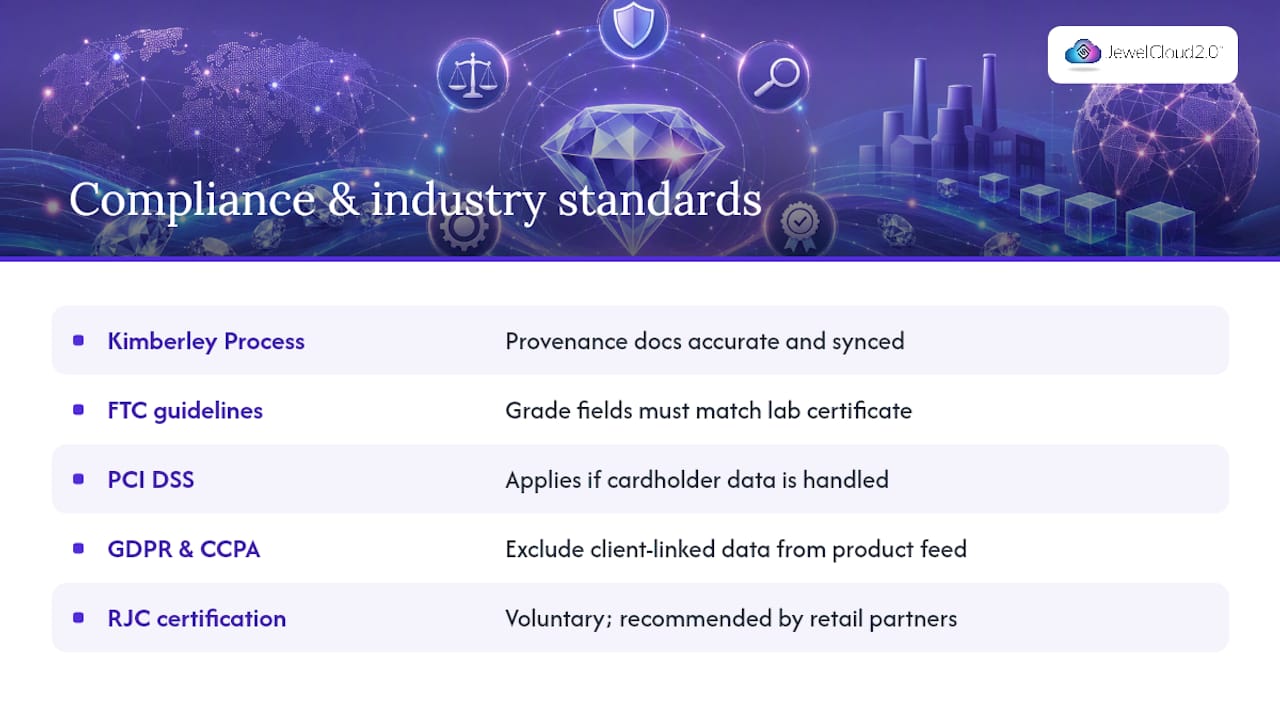
What compliance and industry standards apply to diamond inventory automation?
Diamond inventory automation touches several overlapping compliance areas that US-based dealers need to keep in mind.
Kimberley Process and conflict-free sourcing documentation must remain accurate and accessible regardless of how you automate. If your inventory system stores provenance data, that data must sync correctly alongside the stone record. Automating a listing without its sourcing documentation attached is a compliance gap, not just a data quality issue.
FTC guidelines on diamond grading claims require that any automated listing accurately reflects the lab report it references. If your feed publishes a clarity grade of VS1 but the attached certificate says VS2, that is a potential FTC compliance issue, not just a listing error. Validate grading fields against certificate data before publishing.
PCI DSS applies if your inventory platform touches payment data. Most diamond inventory systems sit upstream of the payment layer, but if your integration passes any cardholder data through the same pipeline, PCI scope applies to that connection.
GDPR and CCPA are relevant if your inventory feed includes any customer-linked data — memo records tied to a client name, for example. Keep client data out of your product feed layer entirely, and confirm that your platform vendor’s data processing agreements cover your jurisdiction.
The Responsible Jewellery Council (RJC) certification, while voluntary, is increasingly expected by retail partners and provides a framework for supply chain traceability that maps well onto the data fields you are already automating.
The part of automation most dealers get wrong
Most automation projects that run into trouble do so for one of three reasons, and none of them are technical.
The first is automating dirty data. A feed that pushes incomplete records, mismatched certificate numbers, or stale prices at high speed does more damage than a manual process. The discipline of cleaning and validating your source data before you automate is not optional — it is the foundation the whole system rests on.
The second is skipping the staging phase. Dealers who go straight from “we built the integration” to “it’s live” almost always discover their first real errors in front of customers. A staging environment costs a few hours to set up and can save days of damage control.
The third, and the one that surprises people most, is underestimating memo logic. Memo management looks simple until you try to encode it: a stone can be on memo to one client, recalled, placed on memo to a second client, and then sold — all within a week. That state machine needs to be explicit in your automation rules, or your availability data will be wrong at exactly the moments it matters most.
One more caution worth stating plainly: when you expose your inventory through an API, you are creating an access point to commercially sensitive data. Governance around who holds API credentials, how those credentials are rotated, and what happens when a retail partner relationship ends is not a technical afterthought. Build that governance into your integration plan from day one.
Jewelcloud makes your first automated sync straightforward
Getting your diamond inventory live and in sync across your retail network does not require a months-long IT project. Jewelcloud’s diamond vendor benefits are built for exactly this starting point: structured data, certificate-linked records, and a feed that retail partners can consume without custom development on their end.

When you connect with the Jewelcloud team, the first conversation covers your current data source, the platforms you sell through, and a sample file review to scope the mapping work. Most suppliers have a staging sync running within days, not weeks. From there, you can expand to additional retail partners or sales channels incrementally, without rebuilding your integration each time. If your business also needs a custom-built storefront, vendor web design is available alongside the feed setup.
To get started, visit the Jewelcloud vendor membership page and request a demo or staging sync. Come prepared with your current inventory format, the platforms you want to connect, and any certificate or memo workflows that need special handling.
Sources
- DiamondTrack Online - The #1 Diamond Inventory Management Software in North America
- CaratLogic | Diamond ERP & Inventory Software for the Trade
- Essentia – Diamond Software System, Manage Stock Online
- IDEX feed integration — TransPacific Software
- DiamondSync - Diamond Inventory Management & Excel to API Sync
- Cloud & Mobile RFID Jewelry Inventory Software | Manage Diamonds