


A jewelry catalog earns its keep only when every session, click, and add-to-cart traces back to a specific SKU and its inventory status. Catalog performance tracking jewelry teams can trust comes down to four measurement layers: engagement, clicks, product-level behavior, and revenue signals. Miss one, and you’re merchandising blind.
TL;DR:
- Catalog tracking must include detailed product-level engagement signals, such as hotspot clicks and view details, to distinguish between browsers and buyers effectively.
- Incomplete feed data, especially missing jewelry-specific attributes like metal type or gem details, can lead to suppression from sales channels and affect product visibility.
- Daily monitoring for stockouts and disapprovals, combined with weekly analysis of high-view, low-click SKUs, helps optimize inventory and merchandising strategies.
- Structuring product data consistently from the start and integrating server-side tracking are essential for accurate attribution and preventing lost sales due to technical gaps.
- Focus on key metrics like add-to-cart rate and sell-through trends to develop reliable, actionable insights without overloading on less relevant data points.
Table of Contents
- What Metrics Actually Reveal Catalog Health?
- How Do You Wire Your Catalog for End-to-End Tracking?
- Why Does Feed Quality Determine Whether Your Catalog Even Shows Up?
- What Cadence Turns Metrics Into Decisions?
- Which Merchandising Tests Actually Move the Numbers?
- Setting Realistic Expectations for Catalog Analytics
- Getting Your Catalog Tracking Infrastructure Right
- Sources
- FAQ
What Metrics Actually Reveal Catalog Health?
Not every metric deserves your attention every week. The ones that matter fall into four buckets, and each answers a different question about your assortment.
Engagement metrics tell you whether shoppers stick around. Session duration and pages per session show intent, while bounce rate flags friction. A healthy catalog bounce rate typically sits below 50%; anything higher usually means your landing pages, load speed, or category structure need a look.
Click and product engagement metrics get more granular. Click-through rate per page tells you which spreads or categories pull attention. Hotspot click rate (clicks on a tagged product within a lifestyle image) separates browsers from buyers. Watch the gap between product views and actual clicks, too. A wide gap usually means the photo or price point isn’t closing the sale.
Revenue signals connect all of it to dollars: add-to-cart rate, purchase rate, average order value, and revenue attributed directly to catalog sessions versus other channels.
- Add-to-cart rate under 2% on a viewed product often signals a pricing or imagery problem
- Purchase rate that lags add-to-cart rate by a wide margin points to checkout friction or shipping-cost surprise
- AOV trending down while units sold hold steady suggests shoppers are trading down in your assortment
These metrics only mean something once you tie them to a SKU’s role. A timeless-role piece, like a classic solitaire, should show steady views and consistent purchase rate over months. A seasonal piece needs a short, sharp spike. An experimental SKU with high views but near-zero add-to-cart is telling you something: cut it, reprice it, or reshoot it before it drains catalog real estate from better performers.
How Do You Wire Your Catalog for End-to-End Tracking?
GA4 is the starting point for most jewelry retailers, and it does a reasonable job capturing session behavior, traffic source, and outbound clicks. Where it falls short is product-level nuance. GA4 won’t natively tell you that a shopper clicked the hotspot on a 1.5 carat oval halo ring versus scrolled past it, so catalog platforms need to push their own product-engagement events to fill that gap.
Here’s the practical sequence for wiring it correctly:
- Set GA4 as your baseline. Track sessions, referral source, and page-level engagement for the catalog domain.
- Layer in catalog-specific events. Your catalog or feed platform should fire events for hotspot clicks, product tag views, and “view details” actions, not just page loads.
- Add server-side tracking. Browser privacy settings and ad blockers routinely strip client-side signals, so server-side collection preserves attribution accuracy when cookies get blocked.
- Map catalog clicks to e-commerce and CRM events. Use UTM parameters or a shared customer ID to connect a catalog click to the add-to-cart and purchase event in your e-commerce platform, then sync that record into your CRM so sales teams see the full path.
- Run heatmaps or session replay periodically. These tools show you exactly where a shopper’s cursor hesitated before abandoning a product page, which raw metrics never explain.
Pro Tip: Run a heatmap audit quarterly, not constantly. Once you’ve fixed the layout issues it surfaces, the marginal insight from watching more sessions drops fast, and your time is better spent on the merchandising decisions the data already gave you.
Why Does Feed Quality Determine Whether Your Catalog Even Shows Up?
You can have flawless tracking and still lose sales if your feed data is incomplete. Jewelry carries attribute requirements most other retail categories don’t: metal type, metal stamp or karat, gem type, carat weight, ring size, and treatment or certification status. Miss one of these on a listing and the consequence isn’t a lower ranking. It’s often outright suppression from the channel.
A mismatched price between your feed and your site does something similarly damaging: it breaks attribution, because the platform can no longer confidently tie a click to the purchase event you record downstream.
Three numbers to watch weekly:
- Sync latency: how long it takes an inventory change to reflect across every channel
- Disapproval rate: the percentage of SKUs rejected or flagged for missing or invalid attributes
- Oversell incidents: orders placed on stock that had already sold elsewhere
Real-time gold-feed and inventory sync isn’t optional once you sell across more than one channel. Immediate synchronization prevents overselling and keeps your net margin calculations honest as metal prices shift. A weekly triage of disapprovals catches attribute problems before they cost you a season’s worth of visibility on your highest-margin pieces.
What Cadence Turns Metrics Into Decisions?
Metrics without a schedule just sit in a dashboard. Here’s the rhythm that actually drives action:
- Daily: Check for stockouts on top sellers, active sync errors, and any new disapprovals. These are fires, not trends, and they need same-day attention.
- Weekly: Pull an inventory velocity report and flag high-view, low-click SKUs for a merchandising fix. Review any live experiments and decide whether to extend or kill them.
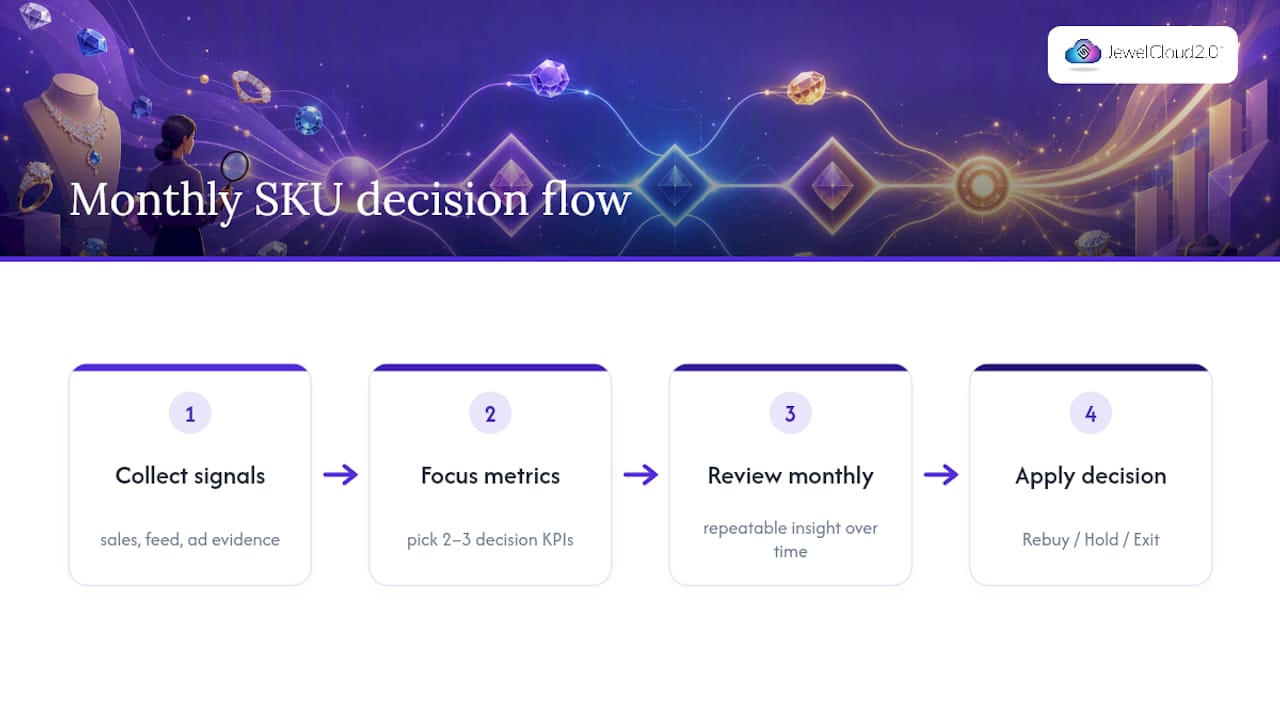
- Monthly: Review sell-through by SKU role, calculate GMROI, and make formal re-buy, hold, or exit calls on the assortment. This is also when you benchmark against last month and last year to see whether you’re actually improving or just riding a seasonal wave.
Assign clear ownership for each cadence. A simple triage ticket, logged with the SKU, the metric that triggered it, and the owner’s name, keeps weekly reviews from turning into open-ended discussion. Prioritizing 2 to 4 KPIs per outcome area, cash, profit, availability, and execution, keeps the team focused instead of drowning in twenty half-watched charts.
Which Merchandising Tests Actually Move the Numbers?
Placement and sequencing changes are the cheapest lever you have. Moving a high-margin piece higher in a category page, or reordering a lifestyle spread so the hero product gets top billing, often shows up in CTR and session duration within a single reporting cycle.
- Swap product photography on any SKU with high views but low click-through. Nine times out of ten, the image isn’t showing the piece at the angle or scale a shopper needs to judge it.
- Test price visibility. Some jewelry shoppers abandon a product page the moment price feels hidden or buried in a “request a quote” flow.
- Run A/B tests with enough traffic to matter. A page pulling under a few hundred sessions a week won’t give you a statistically reliable read in under a month, so plan test duration around your actual traffic volume, not a fixed calendar.
Past layouts that worked become templates. If a placement test lifted engagement on one seasonal collection, apply the same structure to the next one before you invent something new.
Pro Tip: Document every test with a before-and-after screenshot alongside the metric change. Six months from now, that library saves you from re-running an experiment you already have an answer for.
Setting Realistic Expectations for Catalog Analytics
Perfect data isn’t the goal here. Repeatable insight is. If you can reliably tell which SKUs to rebuy, hold, or exit every month, your tracking setup is working, even if a few edge cases in attribution stay fuzzy forever.
Expect quick wins within a few weeks: fixing an obvious feed gap or a broken product image usually shows up in the numbers fast. Structural gains, like a real improvement in sell-through across a whole category, take a few months of consistent triage and testing.
The most common mistake I see is treating every metric as equally urgent. Teams drown in dashboards instead of picking the two or three numbers tied to an actual decision. The second mistake is blaming marketing for what’s really a feed problem. Fix your attribute completeness first. Ad performance often improves on its own once the underlying data is clean.
— Anthony
Getting Your Catalog Tracking Infrastructure Right
Building this kind of tracking from scratch means stitching together GA4, your e-commerce platform, a CRM, and heatmap tools while also normalizing jewelry attributes your feed provider never anticipated. Structured, standardized product data means metal type, gem details, carat, and certification status arrive consistent from the start, which is exactly what prevents the suppression and attribution breaks covered above.

For suppliers, the JewelCloud® Product Feed distributes clean, structured listings to a network of retail partners, so your catalog launches faster and stays visible instead of getting flagged for missing fields. If you’re ready to see what a properly wired feed does for your assortment data, start with a feed audit, put a weekly triage habit in place, and look at the Jewelry Vendor Membership to get your catalog in front of qualified retail buyers.
Sources
Go deeper with catalog management guidance for retailers, feed normalization steps for suppliers, and structured product data standards for wholesale.
- What is digital catalog analytics and why it matters
- Jewelry Business Analytics Dashboard: The Strategic Command Center for 2026
- Why jewelry & watches feeds underperform on Amazon — and how to fix the data
FAQ
Which Catalog Metric Should I Track First?
Start with add-to-cart rate against product views. It’s the fastest signal for whether a listed piece is priced, photographed, and described well enough to move a shopper toward a purchase decision.
How Do I Attribute a Sale Back to a Catalog Session?
Connect catalog clicks to your e-commerce platform’s checkout events using UTM parameters or a shared customer ID, then push that record into your CRM. Server-side tracking helps preserve this link when browser privacy settings block client-side signals.
What Causes Jewelry Listings to Get Suppressed?
Missing mandatory attributes like metal stamp, ring size, or gem type commonly trigger suppression rather than a ranking penalty. Weekly disapproval triage catches these issues before they cost visibility on high-margin SKUs.
How Often Should I Review Inventory Sync Health?
Check sync latency and disapproval rates daily, and review full inventory velocity weekly. Monthly reviews should focus on sell-through by SKU role and GMROI to guide assortment decisions.
Does JewelCloud Help With Feed Quality and Distribution?
Yes. The JewelCloud® Product Feed standardizes jewelry-specific attributes and distributes structured data to retail partners, reducing the attribute gaps that cause suppression and broken attribution.