


Integrate diamond inventory and pricing by pulling an authenticated supplier feed into a PIM or middleware layer, then syncing to your storefront through incremental updates or webhooks. That is the approach that scales without generating ghost inventory. Your immediate next step is requesting API credentials and a sample feed from your suppliers, or evaluating a platform like Jewelcloud that already handles the mapping and normalization for you.
TL;DR:
- Real-time feeds with webhooks are preferable for high-volume catalogs to prevent overselling, though they require more engineering effort.
- Proper schema mapping and validation before launch are critical to avoid ghost inventory, which is the most common failure in diamond eCommerce integrations.
- Jewelcloud’s DiamondLink® provides standardized, normalized supplier data, including certificates and media, reducing building time and ongoing maintenance.
- API authentication must be secured with rotated keys and scoped credentials, while webhook handlers should be idempotent to prevent duplicate listings.
- Caching strategies should differ for price and availability data, with price cached longer, to balance speed and data freshness at scale.
Table of Contents
- What Diamond APIs and Data Feeds Actually Look Like
- How Do You Build the Integration Step by Step?
- Auth, Webhooks, and Rate Limits: The Developer Details
- Handling Data Volume Without Slowing Your Storefront
- Testing and Launch: Avoiding Ghost Inventory
- How Jewelcloud Handles Diamond API Integration for You
- Build vs. Buy: Which Route Actually Fits Your Team?
- Ready to Skip the Build and Launch Faster?
- Developer Docs Worth Bookmarking
- Sources
What Diamond APIs and Data Feeds Actually Look Like
Before you write a line of integration code, you need to know what you are receiving. Supplier feeds generally fall into three categories: inventory feeds (stock counts and availability), pricing feeds (base cost, markup rules, currency), and content feeds (certificate scans, images, video, grading data). Some suppliers bundle all three into one payload; others split them across separate endpoints.
Format varies by provider. JSON over REST is now the standard for modern platforms, but plenty of suppliers still push CSV files over FTP, and some legacy systems rely on RSS or Atom feeds for catalog updates. Webhooks are increasingly common for real-time stock changes.
Regardless of format, a handful of fields matter more than the rest:
- Stock or SKU ID (the unique identifier tying your listing to the supplier’s record)
- Carat, cut, color, clarity, and certificate number
- Certificate authority link (GIA, IGI, or equivalent)
- Price, currency, and last updated timestamp
- Media URLs for images and video
Real-time feeds cost more in engineering effort but eliminate the lag that causes overselling. Periodic feeds (hourly or daily) are easier to build but risk showing diamonds that sold hours ago. IZIOS’s developer portal documents endpoints like GET /api/diamonds/search and GET /api/diamonds/{stockId}, a common shape you will see across the industry.
How Do You Build the Integration Step by Step?
A working diamond API integration follows a predictable sequence, whether you are a solo developer or a five-person team.
- Get credentials and read the auth model. Note whether the supplier uses API keys, OAuth tokens, or IP whitelisting, and whether tokens expire.
- Map the supplier’s schema to your canonical product model. This is where a PIM earns its keep, since every supplier names fields differently even when the underlying data is identical.
- Choose your ingestion method. Full imports work for small catalogs; incremental polling suits medium volume; webhook-driven updates are the only realistic option once you are tracking tens of thousands of stones.
- Layer in your business rules. Apply markup tiers, currency conversion, and any manual pricing overrides before data reaches the storefront.
- Ingest media and certificate files reliably. Broken image links or missing certificates kill conversion faster than almost anything else on a diamond product page.
- Set your sync cadence and backfill logic. Decide how often you refresh price versus availability, and how you handle a supplier feed that goes down mid sync.
- Stage, verify, and release in canary fashion. Push to a staging environment first, reconcile a sample against the supplier’s live data, then roll out to a small percentage of live traffic before going fully live.
Pro Tip: Run your first canary release against your lowest-traffic category page, not your homepage. If a mapping error slips through, you will catch it before it touches your best-converting inventory.
Most integration failures trace back to skipping step two. Teams that rush schema mapping to hit a launch date end up rebuilding it within three months once mismatched attribute enums start producing duplicate or mismatched listings.
Auth, Webhooks, and Rate Limits: The Developer Details
Getting the plumbing right separates a stable integration from one that breaks every time a supplier changes their schema.
Authentication. Store API keys and tokens in a secrets manager, not in application code or environment files checked into version control. Rotate keys on a schedule, and use scoped credentials wherever the supplier supports them, so a compromised key exposes only inventory data, never account or billing access.
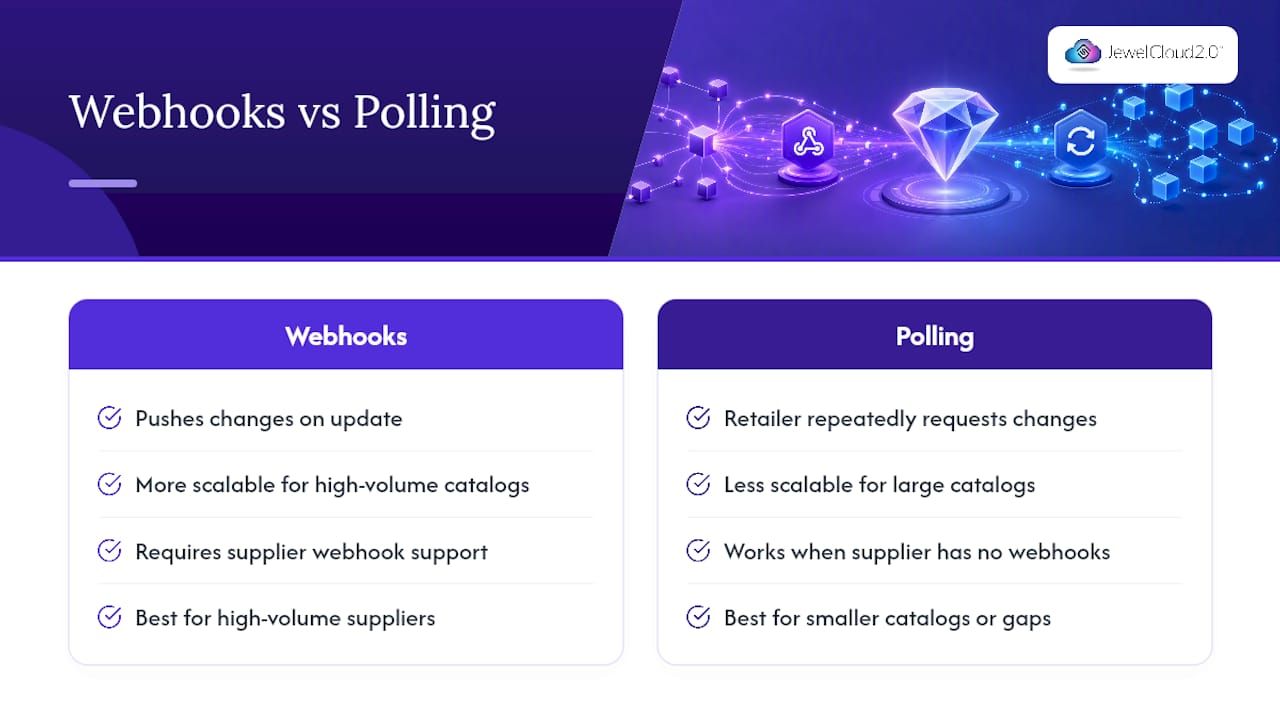
Webhooks versus polling. Webhooks are the more scalable pattern for high-volume catalogs, according to IZIOS’s developer documentation, because they push changes the instant they happen rather than forcing you to ask repeatedly. Polling still makes sense for smaller catalogs or suppliers that have not built webhook support. Whichever you use, design your webhook handler to be idempotent: a duplicate event should never create a duplicate listing.
Pagination and bulk retrieval. Large inventories need cursor-based pagination, not offset pagination, which slows down and can skip records as the underlying dataset changes mid-request.
Retries and backoff. Build exponential backoff into every API call, log every rate-limit response, and alert your team before you hit a hard cutoff, not after.
Handling Data Volume Without Slowing Your Storefront
Diamond catalogs get big fast, and speed matters as much as accuracy once you are past a few thousand SKUs.
Caching should not be one-size-fits-all. Price data can tolerate a longer cache window than availability, since a stale price is an annoyance while stale availability sells a stone that is already gone. Normalize every supplier’s attributes into a canonical set of enums so “VS1” from one feed and “vs1” from another resolve to the same value.
Deduplication matters just as much when you pull from multiple suppliers, since the same physical stone sometimes appears in more than one feed with a different stock ID. Track supplier provenance on every record so you know which feed a listing came from if a price dispute or data error surfaces later.
- Cache price fields for minutes, not hours
- Cache media and certificate URLs for days
- Flag price swings above a set threshold for manual review before they go live
- Log every dedup decision so you can audit it
Nivoda’s marketplace reportedly exposes catalogs around 1.6 million listings with updates roughly every 15 minutes, a useful benchmark for what “real time” means at scale. A PIM or middleware layer absorbs that volume so your storefront queries a clean, deduplicated dataset instead of hitting raw supplier feeds on every page load.
Testing and Launch: Avoiding Ghost Inventory
Ghost inventory, listings for stones that already sold, is the single most damaging failure mode in diamond ecommerce, and it is almost entirely preventable with the right pre-launch checks.
- Import into staging first and reconcile a sample of records against the supplier’s live system.
- Run automated sanity checks: price ranges that make sense for the category, no duplicate stock IDs, every listing carrying a valid certificate reference.
- Load-test for sync bursts, not just steady traffic, since supplier feeds often push large batches at once.
- Roll out with a canary release and a documented rollback plan before flipping the switch for all traffic.
- Manually verify the customer-facing experience: images load, certificates link correctly, and the add-to-cart flow works on a real listing end to end.
Skipping the manual verification step is the most common shortcut teams regret. Automated checks catch data problems; they rarely catch a broken button.
How Jewelcloud Handles Diamond API Integration for You
Jewelcloud’s DiamondLink® capability exists to solve exactly the schema normalization and feed handling work described above, so retailers do not have to build a PIM layer from scratch. Supplier data arrives standardized: consistent attribute enums, canonical SKUs, and certificate links already validated before they reach your storefront.
Jewelcloud’s approach covers the practical needs retailers run into most:
- Ingests certificates and media from participating suppliers and attaches them directly to canonical product records
- Applies the product feed structure so retailers receive fields already mapped, not raw supplier exports
- Supports vendor onboarding so diamond suppliers can list inventory without retailers managing dozens of separate feed formats
- Reduces the risk of ghost inventory by centralizing availability updates across participating vendors
Retailers evaluating whether to build or buy should start by requesting a sample feed and reviewing how it maps against their current catalog structure.
Build vs. Buy: Which Route Actually Fits Your Team?
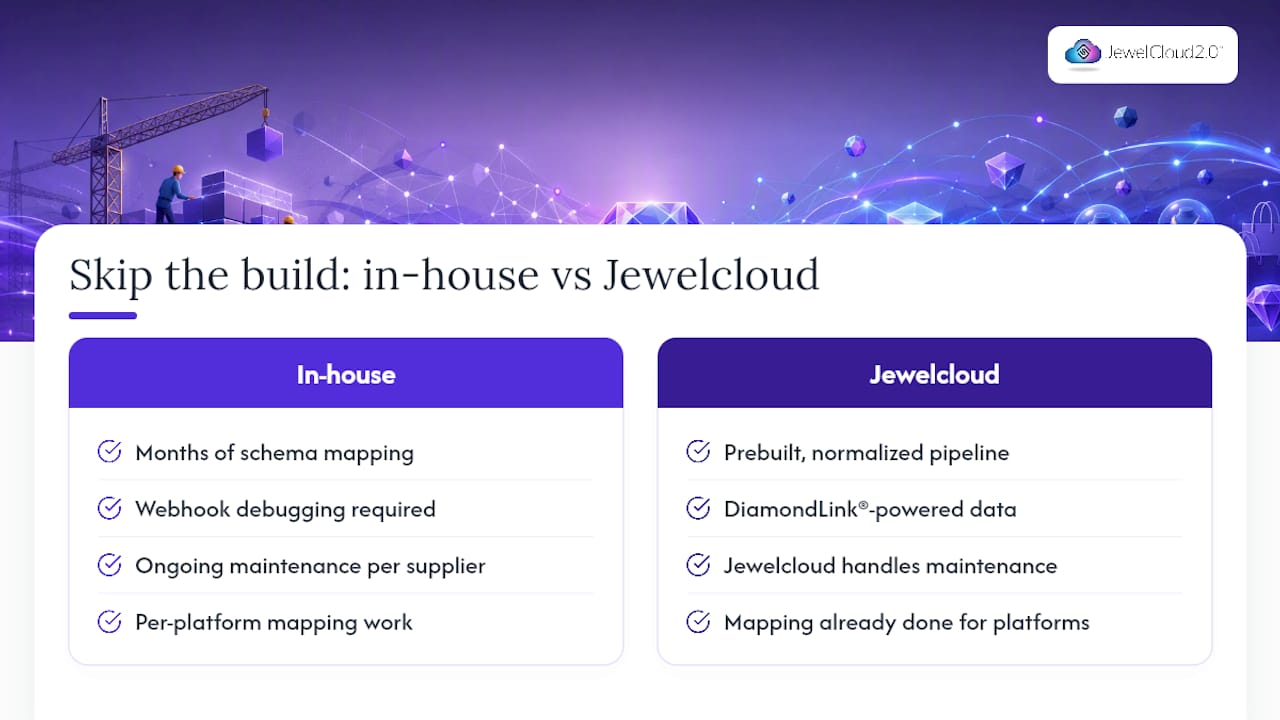
A DIY integration makes sense when you have a dedicated engineering team, need a bespoke feature no platform offers, or are integrating a single proprietary supplier with an unusual schema. Expect three to six months of build time and ongoing maintenance every time a supplier changes their API.
For most retailers, a platform route gets you to market faster with fewer long-term maintenance costs. You trade some customization for speed and stability. Once your integration is stable, the same discipline applies to distribution strategy: treat multi-channel expansion the same way you treated your first feed, with staging and verification before scale.
— Anthony
Ready to Skip the Build and Launch Faster?
Building a diamond API integration in-house means months of schema mapping, webhook debugging, and ongoing maintenance every time a supplier updates their feed. Jewelcloud gives you that normalized, DiamondLink®-powered data pipeline already built, so your team spends time on merchandising instead of parsing CSV files. A typical onboarding conversation covers your current supplier list, what your storefront platform needs, and how quickly you can get a sample feed flowing into a staging environment. Whether you run Shopify, WooCommerce, Magento, or a custom site, the mapping work is already done on Jewelcloud’s side. Visit Jewelcloud to start a conversation about vendor access and see how fast your catalog can go live.
Developer Docs Worth Bookmarking
Start with IZIOS’s developer portal for real endpoint examples and webhook patterns. Review Jewelcloud’s product feed requirements checklist before you map your first schema.
Sources
- Developer Portal | APIs & Data Feeds | IZIOS
- Nivoda Review 2026: The Ultimate Guide to the World’s Leading Diamond Marketplace