


The minimum canonical set is nine fields: report_lab, report_number, carat_weight, shape, color_grade, clarity_grade, cut_grade, measurements, and fluorescence, plus inscriptions and plotted-diagram assets when the lab provides them. Every field needs a machine-readable code alongside its display text, and the report_number should link back to the issuing lab’s own lookup or API record. That combination, structured data plus a verifiable source, is what separates a feed a marketplace can trust from one it has to double-check.
TL;DR:
- Standardized fields such as report_lab, report_number, carat_weight, and measurements are essential for reliable data transfer across platforms and must follow strict formatting rules.
- Using a report-results API ensures data authenticity, real-time verification, and asset retrieval, reducing errors compared to static PDFs.
- Proper mapping and validation of supplier data prevent integration failures, with recommended small-scale testing to identify formatting and header inconsistencies.
- Structuring certificate data within marketplace schemas like additionalProperty improves search visibility and consumer trust, especially for key attributes like carat, certification, and origin.
- Different labs such as GIA, IGI, and AGS have nuanced grading report formats, requiring lab-specific normalization to maintain data accuracy and consistency.
Table of Contents
- What “Diamond Certificate Fields” Actually Means for Your Feed
- Canonical Certificate Fields Checklist for Feeds
- Field Formats, Codes, and Measurement Rules
- Pulling Authoritative Data From Grading-Report APIs
- Mapping Supplier Data and Catching Errors Before They Ship
- Structuring Certificate Data for Search and Marketplace Feeds
- Why Each Certificate Field Actually Matters
- How GIA, IGI, and AGS Certificates Actually Differ
- Reading Certificate Fields to Judge Real Value and Authenticity
- Why Standardization Is the Real Unlock, Not Just a Formatting Preference
- Getting Your Certificate Data Feed-Ready With JewelCloud
- Sources
What “Diamond Certificate Fields” Actually Means for Your Feed
If you sell loose diamonds or diamond jewelry through wholesale channels, you already know what a grading report looks like on paper. Diamond certificate fields are the structured, standardized version of that same information: the discrete data points a feed, an API, or a product catalog needs to represent a diamond’s grading report accurately, without a human reading a PDF.
That distinction matters more than it sounds. A retail jeweler reading a physical certificate cares about clarity plots and cut proportions in context. A product feed cares about whether “clarity_grade” is populated with a valid enum value your e-commerce platform recognizes, whether “carat_weight” is a number and not a string with a comma in it, and whether the report number resolves to something a shopper (or a fraud check) can verify. Diamond grading standards exist for the stone. Certificate fields exist for the system that has to move that stone’s data across ten different retail storefronts without breaking.
This is the layer JewelCloud works in every day, structuring vendor data so it survives the trip from a supplier’s inventory sheet to a retailer’s live listing.
Canonical Certificate Fields Checklist for Feeds
Build your feed template around a fixed set of keys, and treat anything outside this list as a nice-to-have. Here is the priority order that keeps a feed both complete and lightweight:
- report_lab (required): the issuing laboratory, such as GIA, IGI, or AGS. Store the abbreviation, not a free-text lab name.
- report_number (required): the certificate’s unique identifier, formatted as a string even though it looks numeric, since leading characters and formatting vary by lab.
- report_type (recommended): distinguishes a full grading report from a dossier or an identification-only document.
- carat_weight (required): numeric, two decimal places, no units suffix in the value itself.
- shape_and_cutting_style (required): round, cushion, oval, and so on, paired with a shape_code.
- color_grade (required): D through Z scale value, with a color_grade_code for fancy-color stones.
- clarity_grade (required): FL through I3, paired with clarity_grade_code.
- cut_grade (required for round brilliants; optional for fancy shapes where GIA doesn’t issue one): Excellent through Poor.
- measurements (required): dimensional string plus, ideally, split numeric fields.
- polish and symmetry (recommended): both graded Excellent through Poor.
- fluorescence (required): None, Faint, Medium, Strong, Very Strong.
- inscriptions (recommended): laser-inscribed report number or brand mark, when present.
- plotted_diagram_assets (recommended extra): URL array pointing to the clarity plot image and PDF facsimile.
- is_lab_grown (required): boolean flag, since natural and lab-grown diamonds should never share an ambiguous field.
- report_date (recommended extra): issue date, useful for flagging stale or superseded reports.
Getting the feed field requirements right the first time saves you from the reconciliation headache of discovering, three thousand SKUs in, that half your suppliers never populated fluorescence at all.
Field Formats, Codes, and Measurement Rules
Consistency at the format level is what actually makes a feed usable across platforms, not just complete. Follow these rules when you’re setting up your schema:
- Pair every display field with a code field. “clarity_grade” carries the human-readable value (“VS1”); “clarity_grade_code” carries a normalized enum your system can filter and sort on without string matching. The GIA Report Results API follows this exact pattern, and mirroring it keeps your feed compatible with lab data straight out of the box.
- Format measurements by shape category. Round diamonds use the pattern “minimum diameter, maximum diameter x depth” (for example, “6.51, 6.55 x 4.02 mm”). Fancy shapes use “length x width x depth,” according to the DiamondGradingReportResults reference. Don’t collapse these into one universal format. They aren’t the same shape of number.
- Standardize carat weight to two decimal places, stored as a numeric type, never a string. “1.00” and “1.0” should not exist as separate values in the same catalog.
- Treat is_treated and is_lab_grown as booleans, not free-text notes. A retailer’s filter logic depends on being able to query these as true/false, not parse a sentence.
- Store assets as arrays, even when there’s only one image today. A a single plotted diagram now can become a diagram plus two photos and a PDF facsimile later, and your schema shouldn’t need a rebuild to accommodate that.
Pulling Authoritative Data From Grading-Report APIs
PDFs are static, occasionally forged, and painful to parse at scale. Grading-report APIs are none of those things, which is why an API-first workflow has become the practical default for anyone syncing certificate data across multiple retail partners.
The GIA Report Results API is the clearest example of what this looks like structurally. A query against a report_number returns report_date alongside a DiamondGradingReportResults object containing shape_and_cutting_style, carat_weight, color_grade, clarity_grade, and cut_grade, each with its paired code field. That’s the entire canonical checklist arriving in one structured response instead of six fields you had to transcribe by eye from a scanned certificate.
A few practical notes for building against it:
- Pull assets, not just text. The API can return plotting diagrams, stone images, and PDF facsimiles as linked assets, which you can store directly in your plotted_diagram_assets array.
- Prefer report-number lookups over stored screenshots. A live query confirms the report still exists and hasn’t been revised or voided.
- Cache the response, not the source PDF. Structured JSON is what your feed logic should actually run against.
- Treat the API as your source of truth, and treat any manually entered certificate data as a fallback only for labs without API access.
This is functionally the same discipline JewelCloud applies to vendor feeds: authenticity and currency come from querying the source, not archiving a static file that can quietly go out of date.
Mapping Supplier Data and Catching Errors Before They Ship
No two suppliers name their fields the same way, and that gap is where most feed integrations actually break. One supplier sends “Cert #.” Another sends “CertNum.” A third sends “Reportno.” All three mean report_number, and your system needs to know that before the record ever reaches a retailer’s storefront. Supplier platforms openly acknowledge this: Liquid Diamonds’ own supplier documentation lists multiple accepted header variants for the same certificate fields, which tells you this problem isn’t an edge case, it’s the norm.
The fix is a dedicated fields-map translation layer sitting between raw supplier files and your canonical schema. Build it once, version it per supplier, and update it whenever a new header variant shows up.
Pair that mapping layer with a validation pass on every import:
- Required-field presence check: reject records missing report_lab, report_number, or carat_weight outright.
- Enum membership check: confirm clarity_grade_code and color_grade_code match your accepted value list.
- Numeric range check: flag a carat_weight of 45.00 as the data error it almost certainly is.
- Measurement-format check: run a pattern match to confirm round versus fancy formatting was applied correctly.
- Asset-link health check: verify every plotted-diagram URL actually returns an image before it goes live.
Header mismatches, missing code fields, and inconsistent measurement formatting account for most of the breakage teams see when a new supplier feed goes live for the first time.
Pro Tip: Run every new supplier’s first batch as a small sample import, 20 to 50 SKUs, before you accept the full file. Fail-fast on a small batch costs you an afternoon. Fail-fast on 10,000 records costs you a week of manual cleanup.
Structuring Certificate Data for Search and Marketplace Feeds
Schema.org’s Product type wasn’t built with jewelry in mind, so it has no first-class fields for carat weight, clarity, or certification. The practical workaround, and the one Lumio’s jewelry and watches guidance recommends, is Product.additionalProperty.
Use additionalProperty entries with consistent naming across your entire catalog:
- Stone carat: numeric value, matching your carat_weight field exactly.
- Stone cut: your cut_grade display value.
- Stone certification: a compound value combining issuer (report_lab) and number (report_number), so a shopper or search crawler can trace the claim back to its source.
- Condition and origin tokens: keep is_lab_grown as its own clearly labeled property rather than folding it into a description string, since marketplaces increasingly require that disclosure to be structured, not narrative.
Getting this right has a direct payoff: platforms and search engines that can parse structured stone attributes tend to surface richer listings and convert better than ones relying on description-text keyword matching alone.
Why Each Certificate Field Actually Matters
Every field on this checklist exists to answer a specific buyer question, and understanding that purpose helps you prioritize when a supplier’s data is incomplete.
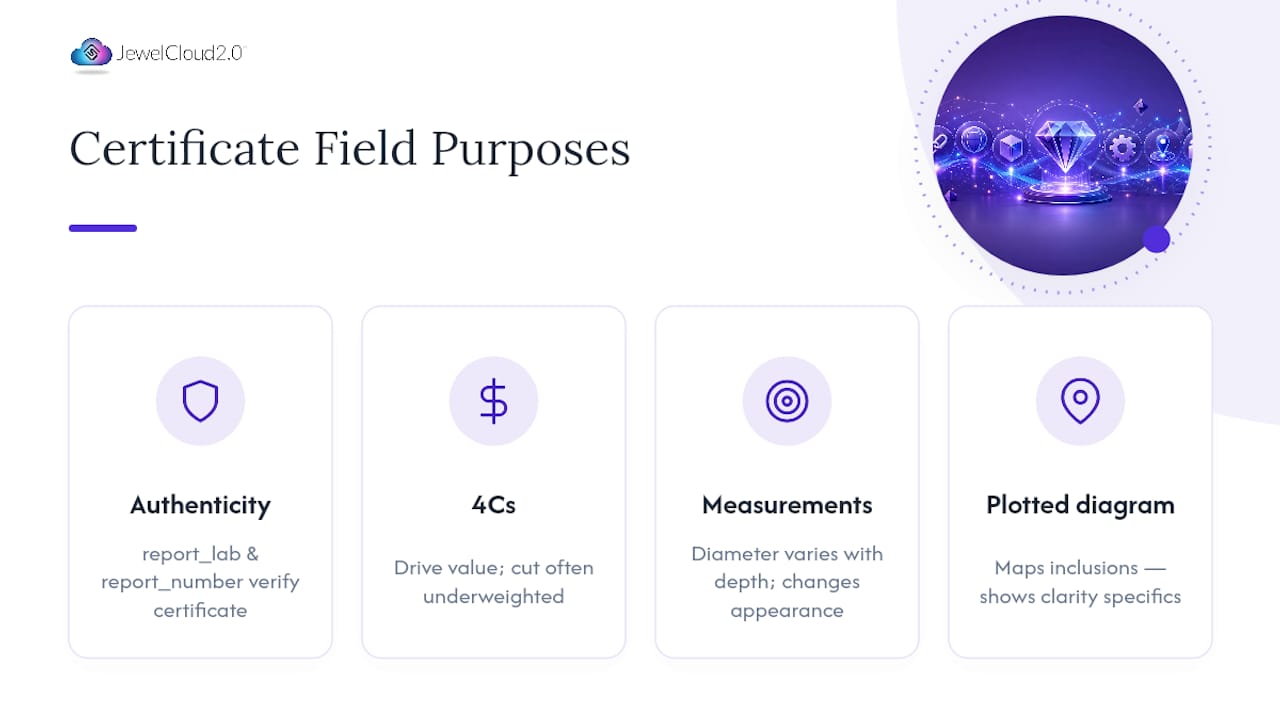
Report_lab and report_number establish authenticity. Without them, every other field is just an unverified claim. Carat weight, color, clarity, and cut (the 4Cs) drive value more than any other combination of fields, and cut in particular is the grade most buyers underweight relative to its actual price impact on a round brilliant. Measurements matter because two stones with identical carat weight can look meaningfully different in diameter depending on how deep they’re cut, which affects how large a diamond appears on the hand.
Fluorescence gets overlooked constantly, but it changes how a stone reads under different lighting, and some buyers actively prefer faint fluorescence in certain color grades. Polish and symmetry are quieter quality signals, small deductions here rarely tank a stone’s price, but consistently poor grades across both usually point to a lower-quality cutting job overall. Inscriptions, when present, offer a physical anchor tying the stone back to its exact certificate, which matters enormously for resale and insurance verification down the line. Plotted diagrams show a clarity grade isn’t just a letter grade. It’s a specific map of inclusions in a specific stone, which is exactly why serious buyers ask to see it rather than trust the grade alone.
How GIA, IGI, and AGS Certificates Actually Differ
The 4Cs framework is shared across major labs, but the fine print underneath it isn’t identical, and that inconsistency is precisely why feed teams need a normalization layer instead of trusting raw data as-is.
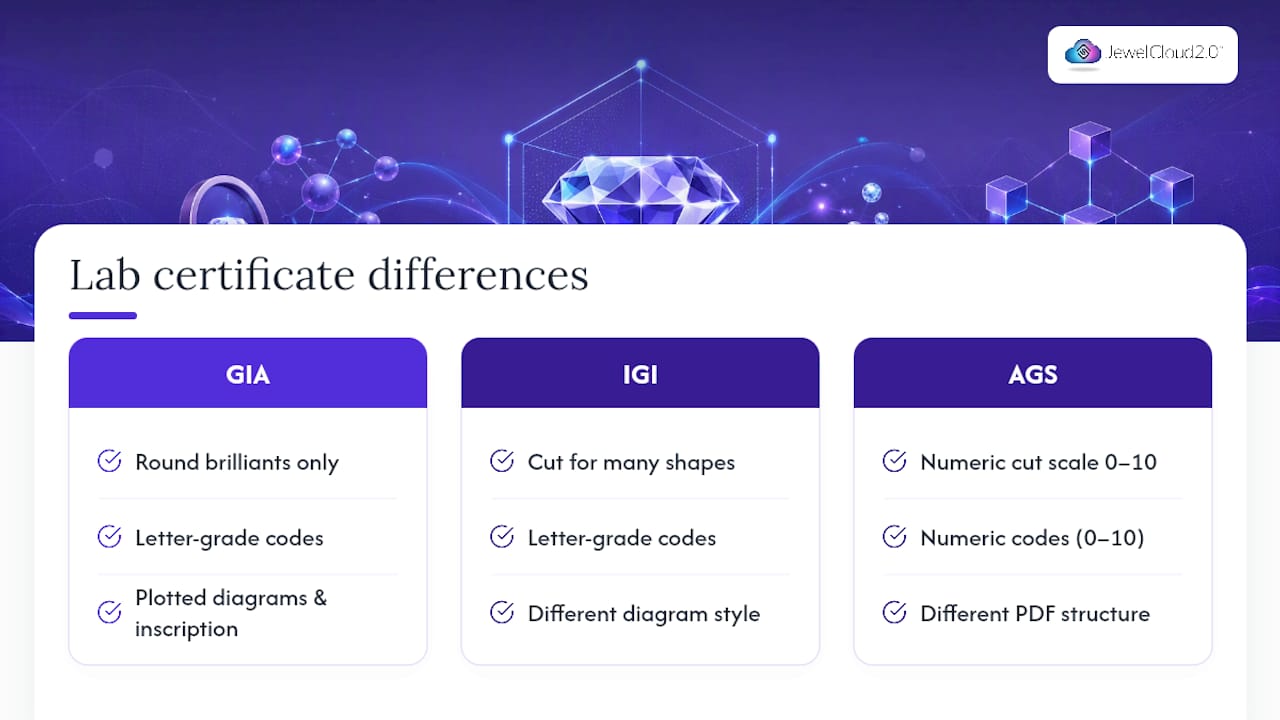
GIA’s cut grade applies only to standard round brilliants; fancy shapes get no cut grade at all on a GIA report, just polish and symmetry. IGI, by contrast, issues cut grades on a broader range of shapes, which means a fancy-cut stone with an IGI report may show a cut_grade value where the equivalent GIA report leaves that field blank. If your validation rules assume cut_grade is always required, IGI-certified fancy shapes will fail a check that shouldn’t apply to them.
AGS uses a numeric cut grading scale (0 to 10) internally, distinct from the letter-grade language most retail buyers recognize, which means your color_grade_code and cut_grade_code mappings need lab-specific translation tables, not one universal enum list. Reporting formats differ too: GIA’s plotted diagrams and inscription conventions aren’t laid out identically to IGI’s, so an asset-parsing script built against one lab’s PDF structure will often choke on another’s.
None of this makes one lab’s grading “better” in an absolute sense, though GIA’s grading tends to run more conservatively on average, which is part of why its reports carry the strongest resale confidence. It does mean your fields-map needs a report_lab dimension built in from day one, not bolted on after your first IGI shipment breaks your import.
Reading Certificate Fields to Judge Real Value and Authenticity
A complete certificate tells you far more than a price tag does, if you know which fields to weigh against each other rather than reading them in isolation.
Start by cross-checking carat weight against measurements. A stone that’s heavier than its diameter suggests is likely cut deep, which can make it look smaller than its weight implies when it’s actually on the hand. Next, weigh clarity grade against the plotted diagram rather than the letter alone. An SI1 stone with one small, well-placed inclusion near the edge can look cleaner to the eye than a VS2 with a inclusion sitting under the table.
Authenticity verification starts with the report_number, not the paper certificate itself. Certificates get photocopied, edited, and occasionally faked; a live lookup against the issuing lab’s own database (or an API query, if you’re working at feed scale) confirms the report still exists, matches the stone in hand, and hasn’t been revised since issue. Treat any stone whose seller can’t produce a verifiable report_number as a hard pass, regardless of how good the paperwork looks. Finally, weigh fluorescence and treatment flags (is_treated) as value modifiers, not deal breakers on their own. Strong blue fluorescence on a high-color stone can occasionally mute its face-up color slightly, which some buyers see as a negative and others barely notice.
Why Standardization Is the Real Unlock, Not Just a Formatting Preference
Most of the friction in diamond wholesale doesn’t come from bad diamonds. It comes from good diamonds attached to inconsistent data. A retailer who has to manually reconcile five different header formats before a stone can even go live isn’t going to list it quickly, and slow listing means lost selling windows during peak buying periods.
What convinces us this matters isn’t theoretical. Structured, standardized certificate data is the difference between a retailer syncing a supplier’s entire new collection in an afternoon versus a data team spending a week cleaning spreadsheets before a single SKU goes live. That gap compounds across every supplier relationship a retailer maintains. If you’re a supplier weighing whether standardization is worth the upfront setup cost, pilot it small: pick 20 to 50 SKUs, run them through a proper fields-map, and measure how much faster they go live on a retail partner’s site compared to your last unstructured batch.
— Anthony
Getting Your Certificate Data Feed-Ready With JewelCloud
This workflow uses structured, standardized certificate fields that sync cleanly instead of arriving as a pile of mismatched spreadsheets. Where a manual data cleanup takes a retail partner days per supplier, a properly mapped feed lets that same inventory go live the same day it’s submitted.

If you’re a diamond supplier evaluating how to distribute standardized data at scale, start with the diamond vendor benefits page to see how feed submission and distribution actually work inside the platform. Suppliers looking specifically at diamond distribution channels should also look at DiamondLink®, JewelCloud’s dedicated pathway for getting graded stones in front of qualified retail buyers without building custom integrations for every partner. For retailers assessing whether structured field templates and mapping tools solve their catalog headaches, the JewelCloud product feed page breaks down the formats and templates available today. Whichever side of the transaction you’re on, the jewelry vendor benefits overview is a solid next stop to see how the membership structure fits your catalog size.
Sources
- GIA Report Results API
- DiamondGradingReportResults reference
- Jewelry and watches — Guides | Lumio
- Supplier Frequently Asked Questions - Liquid Diamonds
1 comment
Hi,
Really helpful guide I didn’t realize how important checking certificate details and report numbers is when evaluating a diamond. I’ve also been using this site for weight-loss savings: https://rolandmedicalweightloss.com/discount-codes/