


A B2B-first diamond dealer digital storefront is a secure, API-driven catalog with a 4-Cs product schema, certificate links, and dealer-account pricing. A typical build process runs over a phased multi-week program. The core requirement is not just a website — it is a structured data pipeline that keeps high-value inventory accurate, provenance-verified, and priced correctly for each customer tier.
Your must-have checklist before you build anything:
- Inventory API credentials (API key or OAuth token from your feed source)
- 4-Cs product schema (Cut, Color, Clarity, Carat, plus shape, measurements, and fluorescence)
- Certificate links tied to GIA, IGI, or another recognized grading lab
- Dealer-account pricing with role-based visibility controls
- PCI-DSS-compliant payment gateway
- Staging environment for data reconciliation before go-live
- Kimberley Process provenance flag in your product data
Pro Tip: Freeze your product schema before you import a single SKU. Changing field names mid-import breaks mapping rules and forces a full re-sync.
Key Takeaways
A B2B diamond storefront requires a structured data pipeline, certificate verification, and dealer-tier pricing before front-end work begins.
| Point | Details |
|---|---|
| Schema first | Freeze your 4-Cs product schema before importing any SKUs to avoid costly re-syncs. |
| Certificate links at import | Validate GIA or IGI certificate numbers during the feed pipeline, not after launch. |
| Phased 8–12 week build | Plan discovery through QA in eight phases; API integration is the longest single phase. |
| B2B pricing layers | Dealer-tier pricing, MAP enforcement, and trade-only catalogs must live in the platform, not a spreadsheet. |
| Jewelcloud for faster launch | Jewelcloud’s DiamondLink® and structured feeds reduce field-mapping effort and accelerate supplier onboarding. |
Table of Contents
- What does a diamond dealer digital storefront actually need?
- How to phase your storefront build from discovery to launch
- How do you integrate inventory feeds and map product data correctly?
- What makes a diamond product page actually convert?
- How do B2B pricing and dealer account onboarding work?
- What security and legal requirements apply to US diamond storefronts?
- Your staging and launch QA checklist
- How do you keep operations running after launch?
- Connecting to grading labs and certificate verification services
- Jewelcloud makes your B2B diamond storefront faster to launch
- A perspective on what actually goes wrong in diamond storefront builds
- Sources
What does a diamond dealer digital storefront actually need?
Every diamond storefront project starts with the same question: what fields, integrations, and account rules must the platform support before you write a line of code? The answer is more specific than most general ecommerce guides suggest, because diamond storefronts require real-time pricing, advanced filtering, and B2B portals that off-the-shelf platforms rarely handle out of the box.
Core product-data fields:
- Cut, Color, Clarity, Carat weight, shape
- Certificate ID, grading lab name, certificate thumbnail URL
- Fluorescence grade, polish, symmetry
- Length × Width × Depth measurements, table %, depth %
- High-res image URLs (minimum 3 angles), 360° viewer asset
- Rapaport or benchmark price reference (for internal margin calculations)
- Kimberley Process provenance flag
Platform capability matrix:
| Capability | Owner |
|---|---|
| Product schema definition | Dealer / integrator |
| Real-time inventory feed | Supplier / exchange |
| Dealer-tier pricing rules | Platform / PIM |
| Certificate link verification | Integrator |
| PCI-compliant payment flow | Payment gateway |
| Role-based account access | Platform |
| Tax and multi-currency support | Platform / accountant |
Account requirements deserve equal attention. Dealer pricing, minimum order quantities, and net-30 or net-60 terms all need to live in the platform’s account layer, not in a spreadsheet on the side.
How to phase your storefront build from discovery to launch
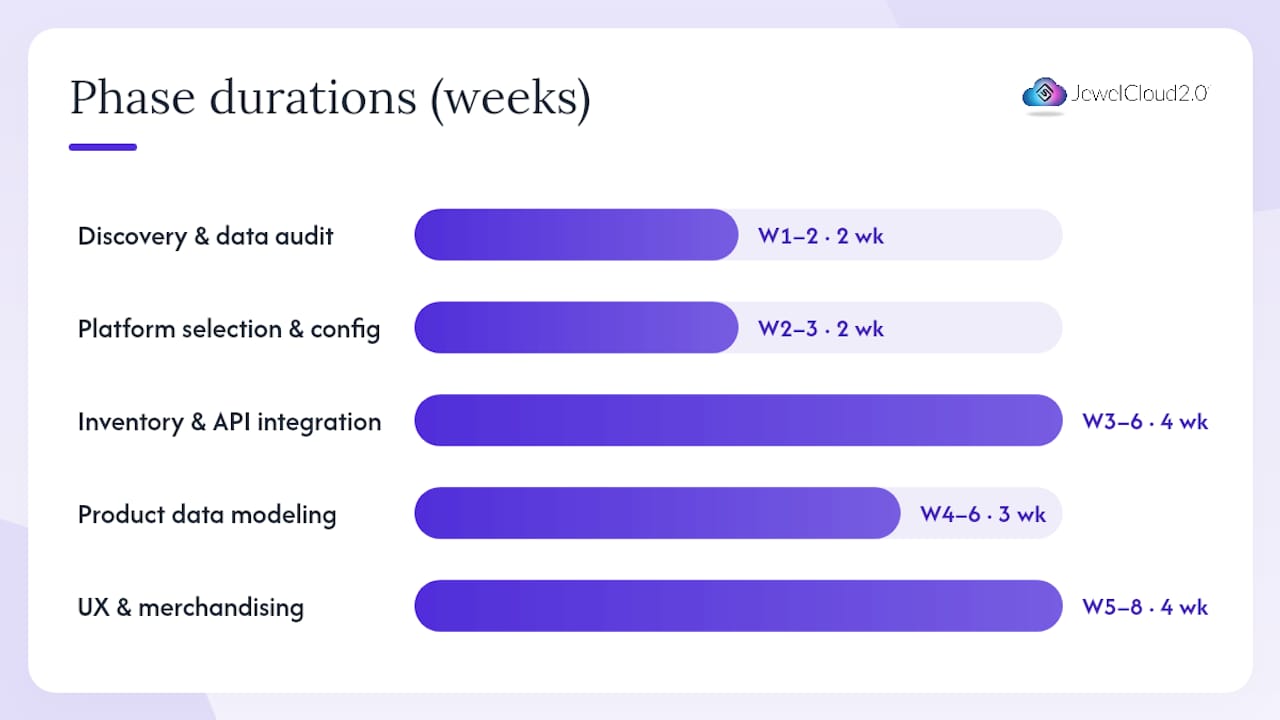
A realistic timeline runs 8–12 weeks for a mid-complexity build. No-code hosted platforms can compress that to days, but they typically trade off custom product-data modeling and advanced B2B features unless they offer API-level integrations.
- Discovery and data audit (weeks 1–2): Map your current inventory sources, identify feed formats (API, CSV, or exchange), and document every required product field. Deliverable: a signed-off data dictionary. Ballpark cost: $2,000–$5,000 for a consultant-led audit.
- Platform selection and configuration (weeks 2–3): Choose between Shopify, WooCommerce, Magento, or a custom build. Configure user roles, tax rules, and currency settings for US operations. Cost variable: custom theme work adds $3,000–$8,000.
- Inventory and API integration (weeks 3–6): Connect supplier feeds, authenticate credentials, and map source fields to your canonical schema. Rapnet and IDEX are common exchange sources; both require membership and API access. Budget $4,000–$12,000 depending on feed complexity.
- Product-data modeling and enrichment (weeks 4–6): Validate 4-Cs data, attach certificate links, and add imagery. Freeze the schema here.
- UX and merchandising (weeks 5–8): Build faceted filters, product pages, and the ring configurator. A published case study for a diamond retailer shows that 4-Cs filtering, certificate display, and a ring builder are the three features buyers use most.
- Payments and legal checks (week 7): Integrate your payment gateway, enable 3D Secure, and review advertising copy for FTC truthfulness compliance.
- Staging and QA (weeks 8–10): Full data reconciliation, certificate-link checks, and order-flow tests at multiple price points.
- Launch and post-launch support (weeks 10–12): Go live, monitor feed sync, and schedule a 30-day reconciliation review.
Pro Tip: Include certificate-number validation in your data pipeline from day one. Catching a malformed GIA number at import is a five-minute fix; catching it after 2,000 SKUs are live is a two-day project.
How do you integrate inventory feeds and map product data correctly?
The most common integration patterns are a real-time REST API, an authenticated nightly feed (API key or OAuth), and a supplier CSV fallback. WooCommerce storefronts frequently use plugins like GemFind Diamond Link to sync dealer inventory feeds, which shows how widespread the need for supplier-specific connectors really is.
Field mapping checklist:
| Source field | Canonical field | Validation rule |
|---|---|---|
carat_wt |
carat_weight |
Numeric, 2 decimal places |
cert_no |
certificate_id |
Alphanumeric, lab prefix match |
cut_grade |
cut |
Enum: Excellent, Very Good, Good, Fair, Poor |
color_grade |
color |
Enum: D–Z |
clarity_grade |
clarity |
Enum: FL, IF, VVS1–SI2, I1–I3 |
img_url_1 |
image_primary |
Valid HTTPS URL, minimum resolution |
kp_flag |
kimberley_process |
Boolean |
Sync frequency matters as much as field accuracy. For loose diamonds, availability changes within hours; a nightly sync is the minimum, and real-time or hourly updates are worth the added infrastructure cost for high-volume catalogs. When two feeds conflict on price or availability, the rule is simple: the more recent timestamp wins, and the system logs the discrepancy for a human review queue.
Kimberley Process provenance flags belong in the feed at the source level, not added manually after import. Jewelcloud’s DiamondLink® feature standardizes these supplier feeds and reduces the custom field-mapping work that typically consumes the most integration hours.
Pro Tip: Start your first live feed with a single supplier and a small SKU count — 50 to 200 stones. Validate every field, then scale. A clean small feed is worth more than a messy large one.
What makes a diamond product page actually convert?
High-value buyers need more information on a single product page than almost any other ecommerce category. A premium jewelry UX prioritizes privacy, trust signals, and appointment-style flows alongside the standard buy button.
- Hero image and 360° viewer: at least three high-res angles plus a 3D or video viewer; buyers who can rotate a stone convert at higher rates than those who see a single flat image.
- 4-Cs snapshot: a compact visual summary (Cut, Color, Clarity, Carat) above the fold, not buried in a tab.
- Certificate thumbnail and lookup link: a clickable GIA or IGI report number that opens the lab’s own verification page in a new tab.
- Side-by-side comparison tool: lets buyers shortlist two or three stones without losing their place.
- Price transparency: show the per-carat price alongside the total; B2B buyers expect it.
- Financing options: for stones above a certain price point, a financing partner integration (e.g., Affirm for B2C or net-terms for B2B) reduces friction.
Faceted filters should cover Cut, Color, Clarity, Carat range, shape, and price band as a minimum. Add fluorescence and lab as secondary filters. Keep the filter panel persistent on scroll so buyers never lose their search context.
Pro Tip: Standardize your image file-naming convention before bulk upload: SKU_angle_resolution.jpg. It saves hours of manual cleanup when you add a second supplier feed.
How do B2B pricing and dealer account onboarding work?
B2B pricing for a diamond storefront is not a single price list. It is a layered system where the same SKU can carry a different price depending on the account’s tier, volume history, and credit terms.
- Tiered pricing: assign price multipliers or fixed markups by account group (e.g., Tier 1 dealer, Tier 2 retailer, public MSRP).
- Trade-only catalogs: hide wholesale pricing and certain SKUs from unauthenticated visitors entirely.
- MAP enforcement: if you distribute to retailers, build MAP (Minimum Advertised Price) rules into the platform so no account can display a price below the floor.
- Volume discounts: configure quantity-break pricing at the SKU or category level.
Dealer account onboarding checklist:
- Collect business license and resale certificate (KYC basics for US dealers)
- Run a trade-reference or credit check before approving net terms
- Set credit limit and payment terms (net-30 or net-60) in the account record
- Assign the correct price-list group and catalog visibility
- Send a welcome email with login credentials and a link to your B2B catalog guide
For jewelry retail growth, the platform’s account-management layer is what separates a real B2B storefront from a consumer site with a password gate.
What security and legal requirements apply to US diamond storefronts?
Payment security and US advertising rules are the two areas where diamond dealers most often underestimate the compliance work involved.
Security requirements:
- PCI-DSS compliance for all card transactions; use a hosted payment page or tokenization to reduce your scope
- TLS 1.3 for all data in transit
- AES-256 encryption for stored customer and order data
- Role-based access controls with least-privilege principles
- Audit logs retained for a minimum of 12 months
- 3D Secure 2.0 for international card transactions
US legal and advertising notes:
- The FTC requires that diamond quality claims (cut grade, color, clarity) match the grading certificate on file
- “Conflict-free” claims must be backed by documented Kimberley Process chain-of-custody records, integrated into your product data at the SKU level
- State sales-tax obligations vary; consult a US tax professional for nexus rules after South Dakota v. Wayfair
PCI-compliant gateways, 3D Secure, and financing options are standard requirements for high-value jewelry transactions.
Security note: Role-based access controls are especially critical for diamond storefronts because wholesale pricing, supplier credentials, and customer credit terms all live in the same system. A single over-privileged account is a significant liability.
This article provides general information, not legal or compliance advice. Confirm current requirements with a qualified US attorney or compliance professional.
Your staging and launch QA checklist
A structured QA process prevents the two most expensive launch-day problems: wrong prices and broken certificate links.
- Pull a full data snapshot to staging and reconcile SKU count against the source feed.
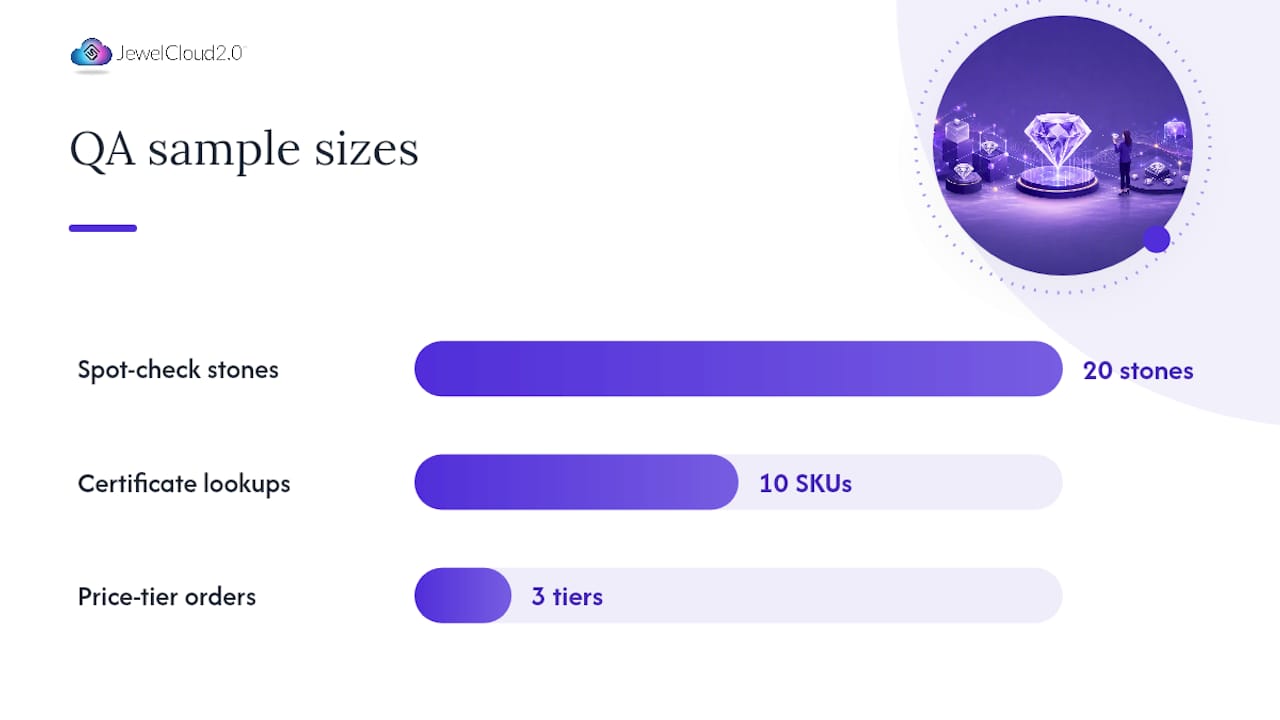
- Spot-check 20 random stones: verify 4-Cs data, certificate link, image load, and price display.
- Run a sample order at three price points (under $1,000, $1,000–$10,000, over $10,000) and confirm the correct payment flow, tax calculation, and confirmation email.
- Test certificate-number lookup for at least 10 SKUs against the GIA or IGI verification portal.
- Verify that dealer-tier pricing is invisible to unauthenticated sessions.
- Test insured-shipping rate calculation for high-value orders.
- Confirm rollback procedure: document the steps to revert to the previous data snapshot within two hours if a critical error is found post-launch.
Pro Tip: Assign one team member as the “certificate owner” during QA. That person checks every certificate link personally. Distributed responsibility means no one checks anything.
| Launch checkpoint | Owner | Pass criteria |
|---|---|---|
| Data reconciliation | Integrator | SKU count matches feed exactly |
| Certificate link audit | Certificate owner | All sampled links resolve |
| Price parity check | Merchandiser | Dealer price < retail price on all SKUs |
| Payment flow test | QA engineer | Successful charge and refund at each tier |
| Rollback drill | DevOps | Revert completed in under 2 hours |
How do you keep operations running after launch?
Daily operations for a diamond storefront are heavier than most ecommerce categories because inventory turns fast and pricing shifts with market conditions.
- Daily reconciliation: compare live SKU count and availability flags against the supplier feed; flag discrepancies for manual review within four hours.
- Price audits: run an automated check each morning to catch feed-price changes that exceed a defined threshold (e.g., more than 5% movement overnight).
- Certificate verification workflow: re-verify certificate links for any stone that has been on the site for more than 90 days without a sale.
- Returns and insured shipping: document your return-authorization process and confirm that your shipping carrier provides declared-value coverage for high-value parcels.
Supplier onboarding template:
- Collect API credentials, feed format documentation, and a test data file
- Run a test push of 10–20 SKUs through your validation pipeline
- Confirm all required fields are present and correctly formatted
- Sign off on sync frequency and conflict-resolution rules before going live
For ecommerce integration benefits at scale, caching product data at the CDN layer and queuing high-volume feed updates through an async job processor keeps page load times stable even when a supplier pushes thousands of SKUs simultaneously.
Connecting to grading labs and certificate verification services
Certificate verification is not optional for a credible diamond storefront. Every listed stone should carry a certificate number that resolves to a live record at the issuing lab.
GIA (Gemological Institute of America) and IGI (International Gemological Institute) both offer public report-check tools. Your integration should store the certificate ID as a structured field and render it as a direct link to the lab’s verification URL. For GIA, that is https://www.gia.edu/report-check; for IGI, https://www.igi.world/verify-your-report/. Build the URL construction into your product-data template so every new SKU gets the link automatically.
For suppliers, DiamondLink® from Jewelcloud standardizes how certificate metadata travels through the feed, reducing the manual work of matching certificate IDs to SKUs after import. Provenance data, including Kimberley Process flags, can travel in the same structured feed, giving your storefront a single source of truth for both quality and origin claims.
Jewelcloud makes your B2B diamond storefront faster to launch
Building a B2B diamond storefront from scratch means months of custom field mapping, supplier negotiation, and QA cycles. Jewelcloud shortens that path significantly. As a B2B jewelry platform built specifically for the trade, it centralizes structured product data, supports dealer catalogs with role-based pricing, and handles inventory syncing across supplier feeds — without requiring you to build every integration yourself.

The DiamondLink® feature handles supplier feed standardization, so your team spends less time on field mapping and more time on merchandising. Onboarding follows a clear path: discovery call, feed connector setup, schema validation in a sandbox environment, and then production go-live. Most suppliers are live within days, not weeks. If you need a fully designed storefront as well, Jewelcloud’s vendor web design service covers the full build alongside the platform integration. To see what the platform can do for your operation, visit the About page and request a walkthrough.
A perspective on what actually goes wrong in diamond storefront builds
The most common mistake I see in diamond storefront projects is not a technical one. It is a sequencing problem: teams build the front end before the data is clean. A beautiful product page with a malformed certificate number or a stale availability flag does more damage to buyer trust than a plain page with accurate data. The storefront is only as good as the feed behind it.
Three tips that experienced implementers rarely hear early enough: validate your certificate links before you build the product page template, not after. Standardize your image file-naming convention at the supplier level, not at import. And start your first live integration with your most reliable supplier, not your largest one. A clean small feed teaches you more about your pipeline than a messy large one ever will.
Sources
- GemFind Diamond Link — WordPress plugin
- Diamond Website Design Case Study | BYL Diamonds Build
- Best Jewelry Website Design | Jewelry Web Design Company
- Start a Diamonds Business Online | Nevuto
Store all vendor API credentials and test data in your staging environment only. Never commit credentials to a public repository.