


A diamond inventory feed is the automated pipeline that pushes your loose stone and finished jewelry data, prices, and availability from a vendor’s system straight into your website or storefront. The recommended approach for most retailers and wholesalers is API-first, with a scheduled CSV or XML feed as backup, plus validation rules that catch bad data before it reaches shoppers. Done right, it gives you real-time availability, accurate certificate details, and automatic delisting the moment a stone sells.
TL;DR:
- API-first feeds are essential for managing large inventories over a few thousand SKUs or multiple vendors, providing near real-time updates via webhooks.
- Automating updates for critical fields like SKU, quantity, price, the 4Cs, and certificate links minimizes errors and ensures accurate product availability on your site.
- Starting with a pilot that includes one vendor and 200 to 500 stones helps catch mapping errors early, reducing risks during full-scale implementation.
- Validation and continuous monitoring are crucial after deployment to prevent schema mismatches, stale data, or broken links from impacting customer trust.
- JewelCloud offers jewelry-specific data feeds that support API and CSV integration, optimized for accuracy, scale, and ease of use across various platforms.
Table of Contents
- What Is a Diamond Inventory Feed and How Should You Build One?
- Why Automating Diamond Inventory Updates Matters
- What to Automate First in Your Diamond Inventory
- How Are Diamond Inventory Updates Actually Built?
- How to Implement a Diamond Inventory Feed Step by Step
- How JewelCloud Models Diamond Feeds and Certificates
- What Does an Automated Diamond Feed Cost and Return?
- How Do You Secure a Diamond Inventory Feed?
- What Happens When a Diamond Feed Fails?
- An Editorial Take on Feed Automation Priorities
- How JewelCloud Turns Vendor Data Into a Selling Powerhouse
- Where to Verify Feed Setup Details
- Sources
- FAQ
What Is a Diamond Inventory Feed and How Should You Build One?
Think of a diamond inventory feed as the nervous system connecting your vendor’s warehouse to your website’s buy button. When a supplier updates a stone’s price or marks it sold, that signal needs to travel to your site within minutes, not days. Get this wrong and you’re selling stones that no longer exist, which is the fastest way to lose a customer’s trust and your own credibility.
Here’s the checklist to hand your developer or vendor before the first line of code gets written:
- Pick your feed type by scale. API-first for anything over a few thousand SKUs or multiple vendors; scheduled CSV/XML for smaller, single-supplier catalogs.
- Lock in essential fields early. SKU, quantity, price, the 4Cs (carat, cut, color, clarity), and a certificate reference link.
- Prioritize three integration tasks. Field mapping, automated validation, and ongoing monitoring, in that order.
Skip any one of those three priorities and you’ll spend more time firefighting than selling.
Why Automating Diamond Inventory Updates Matters
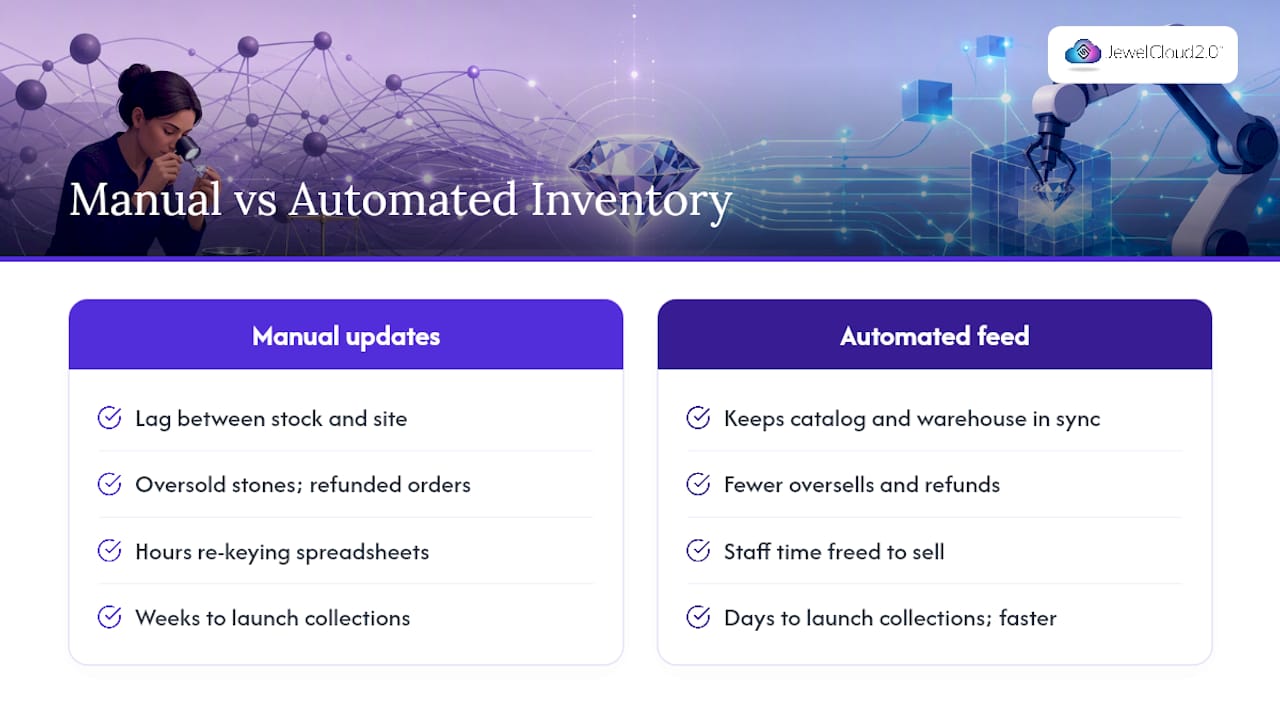
Manual inventory updates create a lag between what’s actually in stock and what your website shows. That lag turns into oversold stones, refunded orders, and customers who don’t come back. An automated feed closes that gap and keeps your online catalog and your vendor’s warehouse in sync across every channel you sell through, from your own site to a marketplace listing.
The operational savings add up fast. Staff who once spent hours re-keying stone data into spreadsheets can redirect that time toward selling, and new collections launch in days instead of weeks because the data pipeline is already built. There’s a conversion angle too: retailers pulling from shared supplier networks that include accurate certificate links and real images see fewer abandoned carts, because shoppers researching a specific stone want proof it’s the one they’re looking at, not a placeholder photo.
What to Automate First in Your Diamond Inventory
Don’t try to automate everything on day one. Start narrow, prove the concept, then expand.
- Automate the critical fields first: quantity, unique SKU, retail price, the 4Cs, and a working certificate link.
- Build in two core behaviors: automatic delisting the moment a stone sells, and automatic reservation when an order is pending payment.
- Run a pilot before a full rollout: limit the first phase to one vendor or a subset of SKUs, usually 200 to 500 stones, so you can catch mapping errors without risking your whole catalog.
Getting these three right buys you most of the value with a fraction of the engineering risk of a full-catalog cutover.
How Are Diamond Inventory Updates Actually Built?
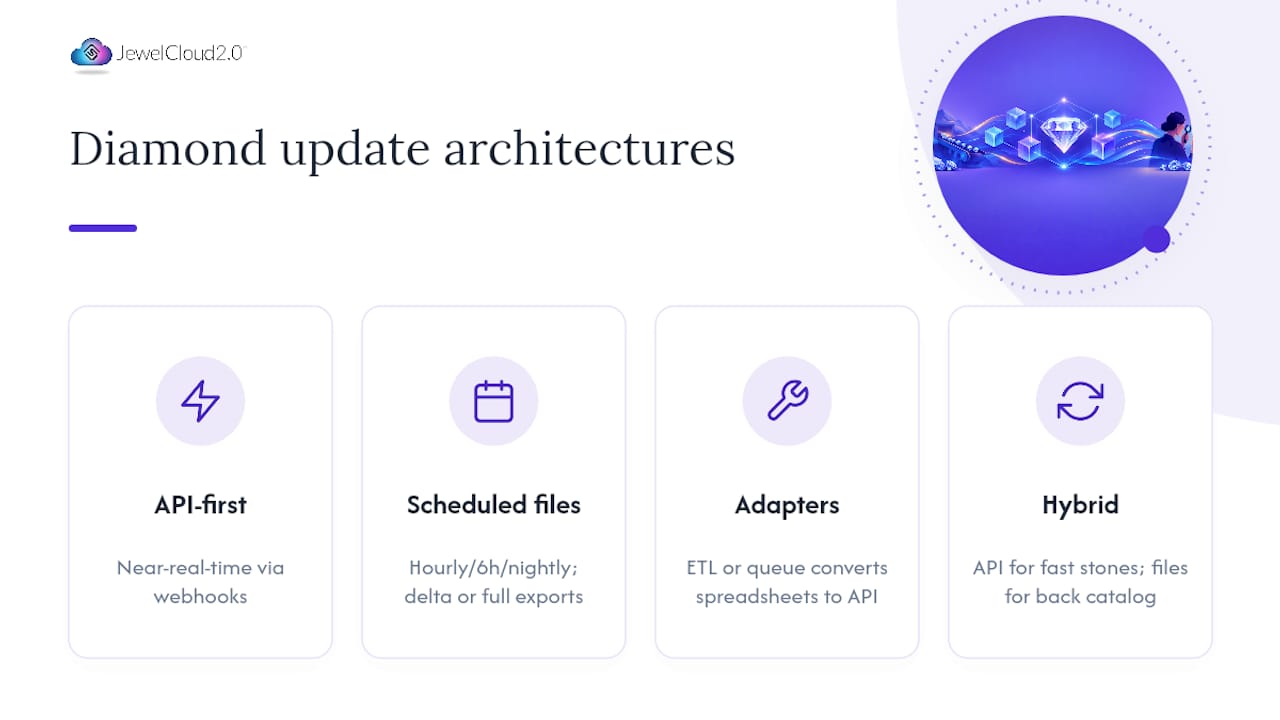
Three architectures dominate the trade, and each fits a different stage of growth.
API-first connects your system directly to a vendor’s endpoint, usually REST, occasionally SOAP, and either pushes updates via webhooks when something changes or pulls on a set interval. Webhooks get you close to real-time visibility, which matters most when you’re carrying high-value stones where a double-sell is expensive and embarrassing.
Scheduled CSV or XML feeds trade immediacy for simplicity. A file lands every hour, every six hours, or nightly, and you import it. The tradeoff is a delta export, which sends only what changed, versus a full export, which resends the entire catalog every time. Delta feeds are lighter and faster to process; full feeds are easier to reconcile because there’s no ambiguity about what’s missing.
Adapters and middleware bridge the gap when a vendor only offers a spreadsheet and your platform expects an API call. An ETL layer or message queue can translate one format into the other, which is often the fastest path to automation without waiting on a vendor to build new infrastructure. A hybrid setup using API for fast-moving, high-value stones and scheduled files for the back catalog is common across the trade for good reason: it balances engineering cost against business need.
Whichever path you choose, version your schema and validate every payload before it touches your live catalog.
How to Implement a Diamond Inventory Feed Step by Step
Treat this like any product launch: design, build, test, deploy, then watch it closely.
- Design. Finalize your field list, decide how you’ll model SKUs (one SKU per stone is the safer default for loose diamonds), and settle on where certificate PDFs and images will be hosted.
- Develop. Build a mapping matrix that ties every vendor field to your platform’s field, generate sample payloads, and stand up the API endpoint or feed export.
- Test. Run the feed against a staging environment first, apply automated validation rules (missing certificate, price of zero, duplicate SKU), and load-test with your full expected volume.
- Deploy. Plan the cutover carefully, backfill historical data if needed, and set your update schedule.
- Operate. Monitor continuously, reconcile vendor counts against your live catalog weekly, and set alerts for failed imports.
Pro Tip: Run your validation rules against a sample file before go-live, not after. Catching a mislabeled clarity field in staging costs you an hour. Catching it live, after a customer has ordered the stone, costs you a return and an apology.
Most teams underestimate the testing phase and pay for it during their first real vendor update.
How JewelCloud Models Diamond Feeds and Certificates
JewelCloud approaches this problem the way a jewelry specialist should: by treating each stone as its own record rather than forcing loose diamonds into a generic retail SKU structure built for shirts and sneakers. Its API vs CSV inventory guidance argues for an API-first approach where accuracy and scale matter most, while still supporting CSV or XML as a practical fallback during integration.
A multi-stone setting isn’t one product with a quantity count. It’s a setting record linked to individual loose-stone records, each carrying its own certificate, its own 4Cs, its own availability status. Collapse that structure and reconciliation turns into guesswork.
That SKU-per-stone modeling approach reduces ambiguity when a stone in a multi-stone piece sells or gets swapped. On the integration side, JewelCloud supports platform plugins for Shopify, WooCommerce, and Magento alongside direct API access and an XML fallback, so the same underlying feed can serve a small boutique site and a high-volume marketplace listing without rebuilding the pipeline twice.
What Does an Automated Diamond Feed Cost and Return?
Budget for two cost categories. One-time costs cover initial integration work, mapping design, and testing. Recurring costs cover hosting, middleware subscriptions, and ongoing feed maintenance as vendors change their formats.
Calculate ROI by adding up what manual entry currently costs you in staff hours, then adding the revenue you’re losing to oversold stones and slow assortment updates. For context on jewelry pricing and realized pricing, see what is a Return to Tiffany Heart Tag Bracelet worth. A jeweler manually updating 300 SKUs a week is paying for that labor whether or not a sale results from it. A managed feed or a vendor membership tends to pay for itself fastest once you’re juggling more than two or three vendor sources, since the coordination overhead of manual updates grows with every added supplier.
How Do You Secure a Diamond Inventory Feed?
Treat vendor credentials like you’d treat a vault combination. Use scoped API keys or OAuth tokens tied to specific permissions, and rotate them on a schedule rather than leaving the same key active for years.
All data in transit should run over HTTPS, with credentials encrypted at rest and images stored on a secure CDN or S3 bucket with locked-down access policies. Apply least-privilege access so a vendor’s account can only touch its own catalog, and keep an audit log of every feed change so you can trace exactly who updated what, and when.
What Happens When a Diamond Feed Fails?
Feeds break in predictable ways: a schema mismatch after a vendor changes their export format, a partial upload that leaves half a catalog stale, or a broken image link that shows a shopper a blank box instead of a diamond. Build automated validation and a reconciliation report that flags mismatches daily. When something fails, the safest fallback is marking the affected items unavailable, retrying the import automatically, and routing anything that still fails to a human for review.
An Editorial Take on Feed Automation Priorities
Most retailers over-engineer their first integration by trying to automate every field and edge case before launch. That’s backwards. Start with an API-first pilot scoped to four to eight weeks, one vendor, and the handful of fields that actually drive a sale: price, availability, and certificate accuracy. Bring in a developer or integration partner, one person from merchandising who understands the vendor relationship, and someone who’ll own ongoing monitoring, because a feed nobody watches eventually drifts out of sync quietly, and you won’t know until a customer complains.
The gap between “we have a feed” and “we have a feed we trust” is entirely about who’s watching it after launch.
— Anthony
How JewelCloud Turns Vendor Data Into a Selling Powerhouse
If you’ve read this far, you already know the hard part isn’t wanting automation, it’s building and maintaining the pipeline correctly. That’s exactly the gap the JewelCloud® Product Feed is built to close: structured, jewelry-specific data feeds that handle certificate references, SKU-per-stone modeling, and real-time availability without your team hand-coding the mapping matrix from scratch.

For retailers who want live diamond availability displayed directly on their site, DiamondLink® handles the front-end display side of the same feed data. Setup typically starts with a conversation about your current vendor relationships and platform, whether that’s Shopify, WooCommerce, Magento, or a custom build, followed by a mapping review before anything goes live. Suppliers looking to distribute their catalog to qualified retail partners can review the Jewelry Vendor Membership - Gold plan, while the Vendor Membership - Silver plan is available for suppliers ready to get their inventory in front of retail buyers. Request a walkthrough to see how your own vendor data would map into the feed before committing to anything.
Where to Verify Feed Setup Details
For hands-on configuration examples, Rapaport’s Instant Inventory feed setup guide walks through integration widgets, filtering rules, and pricing logic. Punchmark’s vendor directory documents which suppliers offer subscribable feeds, useful when you’re sourcing your first vendor connection.
Sources
FAQ
What Is a Diamond Inventory Feed?
A diamond inventory feed is an automated data pipeline that transmits stone details, pricing, and availability from a vendor’s system to a retailer’s website or platform. It typically runs through an API, a scheduled CSV/XML export, or a combination of both.
Should I Choose an API Feed or a CSV Feed?
API feeds suit larger catalogs or multiple vendors where near-real-time accuracy matters most, while scheduled CSV or XML feeds work well for smaller, single-supplier operations. Many retailers run a hybrid, using API for fast-moving inventory and CSV for the back catalog.
What Fields Are Essential in a Diamond Feed?
The non-negotiable fields are SKU, quantity, price, the 4Cs (carat, cut, color, clarity), and a certificate reference with a working link to the lab report. Standardized certificate data, including direct PDF links, reduces post-sale disputes significantly.
How Long Does Implementation Usually Take?
A focused pilot covering one vendor and core fields typically takes four to eight weeks from design through go-live. Full-catalog rollouts across multiple vendors take longer, depending on how many legacy formats need mapping.
Does JewelCloud Offer a Managed Feed Solution?
Yes. The JewelCloud® Product Feed delivers structured, standardized diamond and jewelry data to retailer websites. Current pricing details can be found on the JewelCloud website.