


DiamondLink, built by GemFind and powered by Jewelcloud, is a retail diamond sourcing app that lets jewelry retailers display and sell virtual diamond inventory directly on their websites without holding a single stone in stock. For most mid-market US jewelry retailers, it’s a strong operational fit. Here’s why it earns that verdict quickly:
- Virtual inventory access: Connect to curated US diamond suppliers and display their stock on your site in real time.
- No physical carrying costs: Sell diamonds through a dropship model, so your capital stays free.
- Buyer-intent analytics: Track searches by cut, clarity, color, and carat to inform your next buying decision.
- Mark-up controls: Set global or per-stone pricing without manual uploads.
Scheduling a demo with Jewelcloud is the fastest way to confirm fit. A 30-minute session typically covers supplier selection, mark-up setup, and a live look at the widget on a test storefront.
Table of Contents
- What does DiamondLink actually do for sourcing and merchandising?
- Business benefits for retailers and suppliers
- How does DiamondLink integrate with your online store?
- What does DiamondLink cost, and is there a free trial?
- Platform compatibility and integration details
- How DiamondLink analytics reveal buyer intent
- What suppliers need to provide during vendor onboarding
- Support, security, and trust signals to verify
- Is DiamondLink the right fit for your store?
- Key Takeaways
- The operational reality most retailers overlook
- Get DiamondLink through Jewelcloud and schedule your demo
- Useful sources
What does DiamondLink actually do for sourcing and merchandising?
DiamondLink is a searchable diamond widget you embed in your existing website. Shoppers filter by cut, carat, clarity, color, and cost, and the results pull live from your curated supplier feeds. The experience feels native to your store, not like a third-party redirect.
- Supplier curation: You choose which US diamond suppliers appear in your catalog. Connections include feeds from Idex, Polygon, RapNet, and JewelCloud (included by default).
- Virtual inventory display: Stones appear on your site with images, videos, and grading certificates without you owning them.
- Mark-up management: Set a global mark-up percentage or override it per stone. Pricing updates automatically.
- Media and certificate support: High-resolution images, video, and GIA or AGS grading reports attach to each listing, which also improves SEO by adding rich, structured product data.
- Platform availability: Works on Shopify, Magento 2, and WooCommerce, and connects to JewelCloud for supplier data.
Pro Tip: Before you go live, upload at least three vendor feeds and test the widget filters on mobile. DiamondLink is designed to be responsive across devices, and catching display issues before launch saves you a support call later.
Business benefits for retailers and suppliers
For retailers, the most immediate gain is assortment depth without the capital commitment. You can list thousands of diamonds on your site the day your feeds go live, which is something a traditional in-store inventory model simply cannot match. Retailers also report faster collection launches because adding a new supplier feed takes hours, not weeks.
- Reduced carrying costs: No physical stock means no insurance, storage, or depreciation on unsold stones.
- Better online conversion: Richer product data, including certificates and video, gives shoppers the confidence to buy online rather than walk into a competitor’s store.
- In-store selling tool: Retailers pull up supplier inventory on a tablet during customer consultations, showing live options without the stone being on the premises.
For suppliers and vendors, DiamondLink opens a qualified retail distribution channel without the overhead of managing individual retailer relationships manually. Your inventory reaches retailers who are actively curating their catalogs, which means the leads are more qualified than a generic marketplace listing. Suppliers also benefit from vendor data visibility and a structured dropship order flow that reduces back-and-forth.
How does DiamondLink integrate with your online store?
Setup follows a predictable sequence, and most retailers are live within a few days of completing their supplier agreements.
- Choose your install path. Shopify retailers install directly from the Shopify App Store. Magento 2 and WooCommerce stores use an embed or API/data feed connection.
- Select and connect suppliers. Log in to your DiamondLink dashboard, choose from available US diamond suppliers, and authenticate each feed. Have your supplier credentials ready before this step.
- Configure mark-ups. Set a global mark-up percentage first, then override individual stones or categories as needed. This is where pricing strategy matters most.
- Map certificate formats and media. Confirm that your supplier feeds include GIA or AGS certificate images and that video assets are formatted correctly for your storefront theme.
- Test the widget. Run filter searches across cut, clarity, color, and carat on a staging version of your site. Check mobile rendering and confirm that the “buy” or “request” button routes correctly.
- Publish and monitor. Go live, then check analytics within the first week to see which searches are generating clicks and which filters shoppers use most.
For in-store use, the tablet workflow is straightforward: open the widget on a browser or the Shopify app, pull up a customer’s preferred specs, and walk through live supplier inventory together. No stone needs to be on hand. According to user reviews, this in-studio use case is one of the most consistently praised aspects of the app.
What does DiamondLink cost, and is there a free trial?
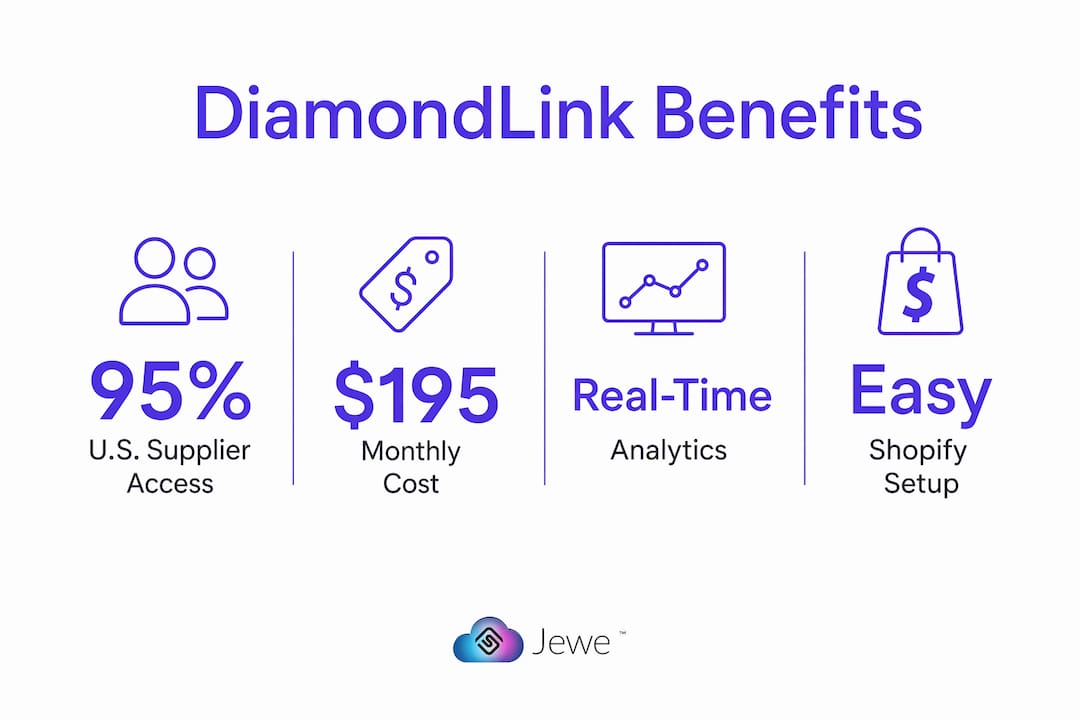
The Shopify App Store lists DiamondLink at $195/month. That monthly fee covers the widget, supplier feed connections, analytics, and platform support. It does not typically cover custom web development or marketing services, which are separate line items if you need a bespoke storefront integration or ad campaign management.
- No commission model: You keep your margin. The fee is flat, not a percentage of sales.
- Demo availability: Jewelcloud offers demos. Use that session to ask about onboarding timelines, custom mark-up rules, and what happens if a supplier feed goes down.
- Budget for year one: Factor in the monthly subscription plus any web design work if your theme needs modification to accommodate the widget cleanly.
Questions worth asking during a demo: What is the average time from signup to a live widget? Are there setup fees? What support is included in the base plan?
Platform compatibility and integration details

| Platform | Install Method | Key Considerations |
|---|---|---|
| Shopify | App Store install | Fastest path; native integration with Shopify checkout |
| Magento 2 | Embed / API feed | Requires developer setup; more customization possible |
| WooCommerce | Embed / data feed | WordPress-based; confirm theme compatibility before launch |
Supplier data feeds connect through Idex, Polygon, RapNet, and JewelCloud. Each feed has its own authentication and data format requirements, so confirm with your supplier which feed type they use before you begin onboarding. API rate limits and file format specs are worth validating with the GemFind technical team during your demo, especially if you plan to run a high-volume catalog.
For hosted Shopify stores, the path is cleanest. Custom or headless storefronts on Magento or WooCommerce may need a developer to handle the embed correctly, which is worth scoping before you commit.
How DiamondLink analytics reveal buyer intent
DiamondLink tracks searches, clicks, and conversions by attribute, giving you a real-time picture of what your shoppers actually want. Analytics show who viewed your diamond listings and when, which cuts are searched most, and where shoppers drop off in the selection process.
That data has two practical uses. First, it tells your buying team which attributes to prioritize when selecting new suppliers or negotiating with existing ones. If round brilliants in the 1.0–1.5 carat range dominate your search logs but your conversion rate there is low, the issue is likely pricing or certificate availability, not demand. Second, the search data feeds directly into ad targeting, letting you build Facebook and Google audiences around the exact attributes your shoppers are already searching.

Pro Tip: Cross-reference DiamondLink search data with your POS sales records monthly. The gap between what shoppers search online and what they actually buy in-store often reveals a pricing or presentation problem you can fix without adding new inventory.
What suppliers need to provide during vendor onboarding
Vendors joining the DiamondLink network through Jewelcloud need to prepare a few things before their inventory goes live for retailers.
- Pricing feed: A structured data file with current wholesale prices, stock flags, and SKU identifiers.
- Certificate images: GIA, AGS, or equivalent grading report images linked to each stone’s SKU.
- High-resolution photos and video: At least one image per stone; video is increasingly expected by shoppers and improves conversion.
- Stock availability flags: Real-time or daily-updated availability so retailers don’t sell stones that are already committed elsewhere.
Onboarding time varies by the completeness of your data package. Suppliers who arrive with a clean, structured feed and media assets ready typically go live faster. The diamond vendor sign-up page on Jewelcloud outlines the process and lists what to prepare. Retailers should share that link with any supplier they want to bring onto their DiamondLink feed.
Support, security, and trust signals to verify
DiamondLink’s support reputation, based on Shopify app reviews, centers on stability and reliability rather than rapid feature releases. Users consistently describe the app as low-maintenance and effective for core inventory management.
- Support channels: GemFind provides technical support and onboarding resources. Confirm response time SLAs during your demo.
- Security basics: Verify that supplier data transmission uses encrypted connections and that your customer order data stays within PCI-compliant workflows. DiamondLink itself does not process payments directly, which limits your PCI scope.
- Trust checklist: Public pricing on the Shopify listing, demo availability, visible vendor onboarding pages, and positive independent reviews all check out.
- Feature velocity trade-off: User feedback notes the app favors stability over experimental features. If your roadmap requires heavy customization or rapid new-feature deployment, discuss that expectation explicitly during your evaluation.
Is DiamondLink the right fit for your store?
Work through this checklist before committing to a trial.
- Store size and SKU model: DiamondLink works best for retailers who want to expand assortment depth without buying inventory. If you already carry a large in-house stock and need a complex PIM, the fit is narrower.
- Dropship readiness: Confirm your fulfillment workflow can handle supplier-direct orders. You need a clear process for passing customer orders to vendors and tracking shipment.
- Platform compatibility: Shopify stores have the smoothest path. Magento and WooCommerce installs need a developer.
- Marketing resources: The analytics are only valuable if someone on your team will act on them. If you have no one managing digital ads or merchandising, the data sits unused.
- Supplier relationships: You get more from DiamondLink when you bring existing supplier relationships into the platform rather than starting from scratch.
Red flags to watch for: opaque pricing beyond the listed $195/month, no demo availability, missing certificate or media support from a supplier, or a vendor who cannot provide a structured data feed. A suggested pilot scope is 90 days with two to three supplier feeds, tracking widget conversion rate and in-store tablet usage as your primary success metrics.
Key Takeaways
DiamondLink is the most practical virtual diamond sourcing tool for US jewelry retailers who want to expand their online assortment without carrying physical inventory, at a publicly listed $195/month on the Shopify App Store.
| Point | Details |
|---|---|
| Virtual inventory model | Display and sell diamonds from curated US suppliers without holding stock. |
| Pricing signal | Shopify App Store lists the app at $195/month with no commission on sales. |
| Analytics drive decisions | Search and click data by cut, clarity, and color helps you refine procurement and ad targeting. |
| Platform fit matters | Shopify install is fastest; Magento 2 and WooCommerce require developer setup. |
| Jewelcloud powers the network | Jewelcloud connects retailers to suppliers and is included in the DiamondLink feed by default. |
The operational reality most retailers overlook
DiamondLink’s strongest selling point is not the widget itself. It’s the combination of curated supplier access and buyer-intent data in a single, low-maintenance package. Most retailers who struggle with virtual inventory tools do so because they treat the feed as a set-and-forget catalog. They install the widget, connect one supplier, and wonder why conversion is flat.
The retailers who get real value from this tool are the ones who treat the analytics as a buying signal. When your search logs show consistent demand for VS1 round brilliants in the 1.2-carat range and your conversion there is low, that’s a pricing or presentation problem you can solve. It’s not a demand problem. That distinction changes how you use the platform entirely.
The customization limits are real, and if your brand requires a heavily bespoke diamond search experience, you’ll feel the constraints. But for the majority of mid-market retailers who need a reliable, well-supported tool that works on day one and stays working, DiamondLink delivers exactly that. The stability-over-features trade-off is a feature, not a bug, for this audience.
Get DiamondLink through Jewelcloud and schedule your demo
Jewelcloud gives retailers direct access to DiamondLink and the supplier network behind it. Before you reach out, pull together your inventory goals (how many supplier feeds you want to start with), a sample of your current product catalog, and a list of any preferred diamond suppliers you already work with. That preparation makes your demo conversation specific and productive.

Retailers ready to expand their online diamond assortment without the inventory risk can learn more about Jewelcloud and request a demo directly. Suppliers looking to reach qualified retail partners can start the process at the diamond vendor sign-up page. If you need help scoping a custom storefront integration, Jewelcloud’s web design team can walk you through options built specifically for jewelry retailers.
Useful sources
- DiamondLink for Retailer, GemFind Digital Solutions: Primary product page verifying features, supported platforms, and supplier feed connections.
- GemFind DiamondLink on the Shopify App Store: Confirms $195/month pricing, Shopify integration, and virtual inventory functionality.
- Shopify App Store reviews for DiamondLink: User feedback on stability, in-studio tablet use, and customization expectations.
- GemFind Launches E-Commerce Version of DiamondLink, National Jeweler: Covers the e-commerce launch, platform support (WordPress, Magento 2, Shopify), and analytics capability.
- About Jewelcloud: Brand context, supplier network overview, and vendor onboarding resources.
- AppNavigator summary for DiamondLink: Independent corroboration of user sentiment and in-studio utility.