


“Faceted filters” means two different things in jewelry, and both matter to anyone buying or selling online. A facet is the flat, polished surface cut into a gemstone to control how it reflects light. A faceted filter is the search tool on a jewelry website that lets shoppers narrow results by attributes like stone shape, metal, and price. This guide covers both, plus how they work together when your product data is built right.
TL;DR:
- Consistent, standardized attribute data is essential for filters to accurately reflect live inventory and prevent zero-result pages.
- Proper attribute naming across suppliers allows filters for shape, metal, and style to work effectively and avoid confusing duplication.
- Filter options should be category-specific and generated dynamically from in-stock items rather than static lists to ensure relevance.
- Visual cues like icons and swatches enhance filter usability, especially on mobile devices with touch interactions.
- Implementing structured data feeds, like JewelCloud’s, streamlines filter accuracy and simplifies catalog management for multi-vendor jewelry collections.
Table of Contents
- What Is a Facet on a Gemstone?
- What Does Faceted Filtering Mean for Jewelry Shopping?
- Which Filter Attributes Matter Most by Jewelry Category?
- How Do You Build Faceted Filters That Actually Work?
- How Should Shoppers Use Filters to Find Faceted Gemstone Jewelry?
- Why Structured Product Data Powers Better Jewelry Filters
- Where Is Faceted Filtering Headed for Jewelry Shoppers?
- How Jewelcloud Supports Faceted Filters and Structured Catalogs
- Sources
- FAQ
What Is a Facet on a Gemstone?
A facet is a flat, polished plane cut into a gemstone specifically to bend and bounce light back toward the viewer’s eye. Cutters arrange dozens of these tiny mirrors across a stone in structured zones, and each zone has a name and a job.
- Table — the large flat facet on top, usually the first thing you notice
- Crown — the upper portion of angled facets between the table and the girdle
- Girdle — the thin band that forms the stone’s widest edge
- Pavilion — the lower cone of facets that reflects light back up through the crown
- Culet — the tiny point (or flat facet) at the very bottom, sometimes absent in modern cuts
Facet arrangement determines brilliance, scintillation, and how evenly color reads across the stone. A round brilliant relies on 57 or 58 facets to maximize sparkle, while a step cut like an emerald cut uses long, rectangular facets that produce a calmer, glassier flash. Mixed cuts blend both approaches on a single stone. Machine cutting delivers consistent facet angles at scale, while hand faceting can achieve more deliberate light performance on one-of-a-kind stones, a distinction worth noting in product metadata for shoppers comparing similar-looking pieces.
What Does Faceted Filtering Mean for Jewelry Shopping?
Faceted filtering is the navigation system that lets a shopper narrow a jewelry catalog by more than one attribute at once, without leaving the results page. Instead of scrolling through 400 rings, a shopper clicks “yellow gold,” then “cushion cut,” then a price slider, and the assortment shrinks to a manageable dozen. This pattern is standard on modern retail sites, and it works by mapping each product to a set of structured attributes the shopper can combine.
Typical controls include:
- Multi-select checkboxes for stone shape or metal type
- Price range sliders
- Visual swatches for metal color instead of plain text labels
- Icon buttons for common shapes (round, oval, emerald, pear)
None of it works if the underlying product data is messy. A filter labeled “Gemstone” pulling from a field that’s sometimes populated as “Center Stone” will quietly break, and platforms like Shopify’s app ecosystem list dedicated jewelry filter tools precisely because generic e-commerce filters weren’t built for this level of category nuance.
Which Filter Attributes Matter Most by Jewelry Category?
Rings, earrings, necklaces, and bracelets each need their own attribute set, plus a shared layer of universal filters that apply across the whole catalog.
- Rings: center stone shape, ring style (solitaire, halo, three-stone), ring size
- Earrings: earring type (stud, hoop, drop), back type (push, screw, lever), drop length
- Necklaces: chain type (cable, box, rope), chain length, pendant style
- Bracelets: bracelet style (tennis, bangle, chain), length, closure type
- Universal: metal type, gemstone type, price range, collection or designer
Consistent naming across these fields is what makes the filter usable. If one supplier feed lists “Cushion” and another lists “Cushion Cut,” a shopper filtering by shape only sees half the inventory. That’s a data problem, not a design problem, and it’s why attribute mapping matters more than the filter widget itself when a retailer pulls inventory from multiple vendors.
How Do You Build Faceted Filters That Actually Work?
Most broken filter menus trace back to one root cause: inconsistent product data. Fix that first, then layer on the UX decisions that keep shoppers moving instead of bouncing.
- Standardize attribute values before you build anything. Decide once whether it’s “Cushion” or “Cushion Cut,” then enforce that naming across every supplier feed and product entry.
- Auto-map filters to live inventory. Filters should generate from what’s actually in stock, not a static list, so shoppers never click into a shape or metal option that returns zero results, a discipline BigCommerce points to as the foundation of working faceted search.
- Limit filters to the current category. A necklace page showing “ring size” options confuses shoppers and adds clutter that category-scoped filtering eliminates.
- Optimize for speed and mobile. Indexed queries keep filter results near instant, and collapsible filter panels with touch-friendly tap targets matter more on phones than desktops now.
- Add visual cues. Shape icons and metal color swatches let shoppers recognize an option instantly instead of parsing text, a small change specialized jewelry plugins build in by default.
- Track zero-result rate and filter-to-conversion paths. If a filter combination returns nothing more than occasionally, either your inventory or your mapping needs attention.
Pro Tip: Audit your filter menu quarterly by clicking every combination a real shopper might try. If more than a handful return zero results, the fix is almost always in your attribute data, not your filter software.
Duplicate filters like “Size” and “Sizes” sitting side by side are a common symptom of unmapped feeds, and they erode shopper trust fast, even when the underlying inventory is solid.
How Should Shoppers Use Filters to Find Faceted Gemstone Jewelry?
Start broad, then narrow by the attribute that matters most to you, not the one that’s easiest to click.
- Pick your category first (rings, earrings, necklaces, bracelets), then filter by stone type, shape, and price in that order.
- Pair shape with setting style for a specific look. A cushion cut inside a halo setting reads very differently than an emerald cut in a bezel.
- Check the listing for a dedicated cut or facet field, and look for photos that actually show light play across the stone, not just a flat studio shot.
- If your results feel too thin, loosen a secondary filter like price or metal before you abandon your main criteria like shape or gemstone.
Pro Tip: If a listing’s photos don’t clearly show facet sparkle, ask the retailer for a close-up angled shot before you buy. A stone with well-cut facets throws visible light even in a phone photo.
Why Structured Product Data Powers Better Jewelry Filters
Every filter recommendation above depends on one thing: clean, consistent product data behind the scenes. That’s the layer Jewelcloud focuses on. The platform standardizes fields like stone shape, metal type, and setting style across supplier catalogs, so a retailer pulling inventory from multiple vendors gets one consistent taxonomy instead of a dozen conflicting label sets.
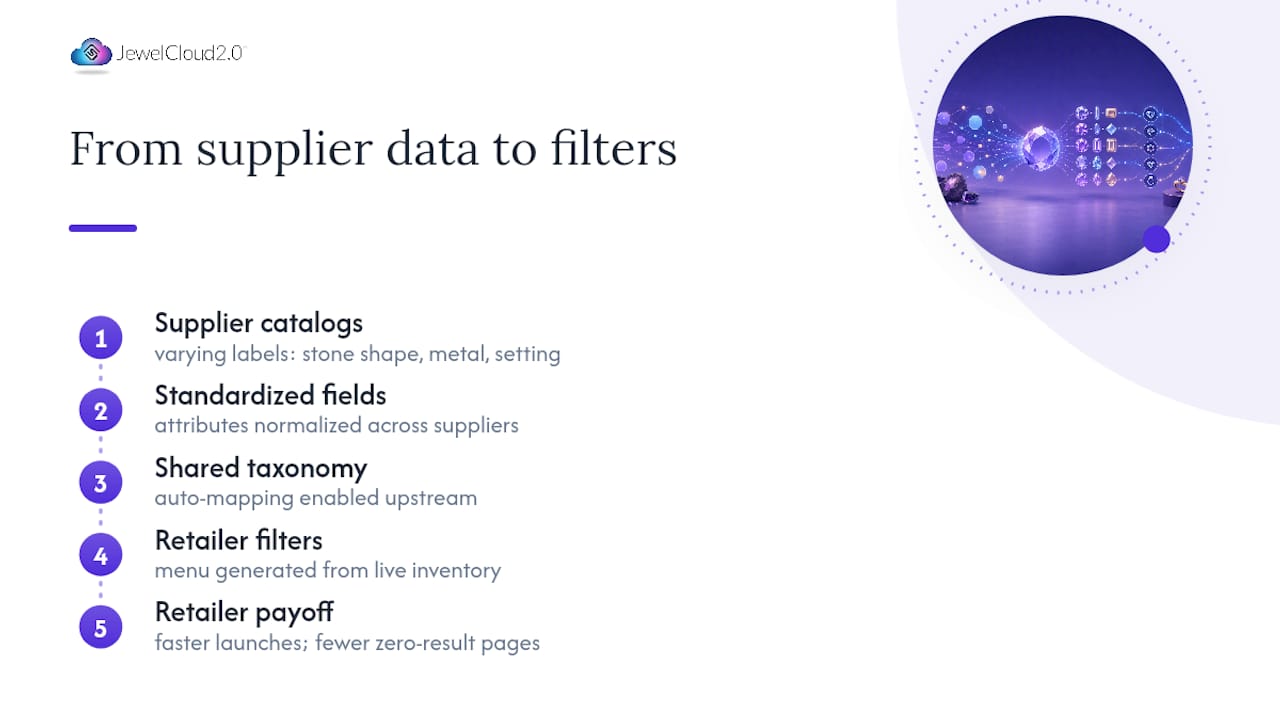
That standardization is what makes auto-mapping possible. When attribute names are normalized upstream, a retailer’s filter menu can generate directly from live inventory instead of a manually maintained list that drifts out of date. The practical payoff for retailers: faster assortment launches, filters that actually match what’s in stock, and far fewer shoppers hitting a dead end on a zero-result page.
Where Is Faceted Filtering Headed for Jewelry Shoppers?
Visual filters, shape thumbnails, metal swatches, and eventually AI-suggested filter combinations will keep shrinking the gap between what a shopper wants and what they click. None of it works without clean data underneath. AI can recommend a filter path, but it can’t invent an accurate stone shape from a mislabeled product feed. Data hygiene stays the bottleneck no matter how smart the front end gets.
— Anthony
How Jewelcloud Supports Faceted Filters and Structured Catalogs
An alternative to manually re-tagging every supplier’s inventory by hand is to use structured feeds that arrive standardized and ready to power accurate filters from day one.

The JewelCloud® Product Feed standardizes supplier data so retailers can build filters that actually match live inventory, without the empty-option frustration that comes from mismatched attribute names. Suppliers looking to get their catalogs in front of qualified retail partners can explore the Jewelry Vendor Membership options, while retailers who need the filter UI and mobile experience built out can look at web design for jewelers. If you’re ready to see what a standardized feed looks like for your catalog, visit the JewelCloud Product Feed page and start the conversation.
Sources
- facet | Definition, Types, & Facts | Britannica
- Faceted filtering: what it is and how it works | Prefixbox blog
- Faceted search and navigation for e-commerce | BigCommerce
- Specialized Jewelry Filter & Search plugin — WordPress plugin page
FAQ
What Does Faceted Filtering Mean?
Faceted filtering is a navigation pattern that lets shoppers narrow a product catalog by combining multiple attributes at once, such as metal type, stone shape, and price, without leaving the results page.
What Does “Faceted” Mean in Jewelry?
In jewelry, “faceted” describes a gemstone that has been cut with flat, polished surfaces arranged to reflect and bend light, improving its brilliance and sparkle.
What Is the 2:1:1 Rule for Jewelry?
There’s no established, universally recognized “2:1:1 rule” in gemology or jewelry design; definitions circulating online vary and aren’t tied to a standard cutting or proportion guideline.
What’s the Difference Between a Facet and a Filter?
A facet is a physical, polished cut surface on a gemstone that controls light reflection. A filter is a digital search control on a shopping site that narrows product results by attributes like shape, metal, or price.
Does Jewelcloud Offer Structured Product Data for Jewelry Filters?
Yes. The JewelCloud® Product Feed standardizes supplier product data so retailers can build accurate, inventory-matched filters; current pricing is available on the JewelCloud site.