


Effective gemstone catalog management runs on a single, structured item-and-lot system that links every inventory record to its lab certificate, normalized attributes, media, and connected sales and accounting flows. The immediate next step is simple: pick your unique ID scheme, start tagging lots, and attach certificate numbers before you touch pricing or photography. Platforms like certain B2B jewelry platforms build catalog structure around exactly this sequence.
TL;DR:
- A gemstone catalog must link each item to lab reports, attributes, and media, using unique identifiers and consistent data standards before pricing or photography.
- Proper separation of item and lot records prevents chaos, with lab report linkage, cost history, ownership status, and audit trails essential for accuracy and dispute resolution.
- Standardized fields like species, weight, origin, and treatment, along with high-quality, consistently named images, ensure reliable searchability and presentation.
- Accurate inventory handling relies on rigorous receiving protocols, barcode or QR code labeling, regular stock counts, and immediate flagging of discrepancies.
- Integrating POS, e-commerce, and supplier feeds requires careful mapping, fixed update schedules, and validation to maintain accurate, scalable product data.
Table of Contents
- What Are the Key Components of a Gemstone Catalog System?
- What Data Fields Belong in Every Gemstone Record?
- How Should You Photograph and Present Catalog-Ready Gemstones
- How Do You Track Gemstone Inventory With Barcodes and Lot Management
- Which Integrations Matter Most for a Gemstone Catalog
- Standardizing and Migrating Supplier Catalog Data
- Your 30/60/90-Day Catalog Rollout Plan
- How JewelCloud Approaches Catalog Standardization
- Ready to Put Your Catalog on Structured Rails?
- Sources
What Are the Key Components of a Gemstone Catalog System?
A working catalog rests on a handful of structural pieces, and skipping any one of them is usually what causes chaos six months later.
Start with the item record versus the lot/parcel model. A single, well-documented stone (a 2-carat sapphire with its own report) gets its own item record. A parcel of 50 melee diamonds bought as one purchase gets a lot record, with individual stones broken out only when they’re sold, set, or reweighed. Mixing these two models under one field structure is the single most common design mistake in small gemstone databases.
Every record needs lab report linkage: lab name, report number, issue date, and a stored copy of the certificate itself. CIBJO’s Retailers’ Reference Guide exists precisely because terminology drifts between labs and suppliers, and a catalog that doesn’t standardize this early inherits every inconsistency downstream.
Beyond identification, a complete system tracks:
- Cost and valuation history — cost per carat, a base-currency snapshot at time of purchase, and any revaluation dates
- Ownership and memo status — owned, on memo, on consignment, or client-held, with role-based visibility so sales staff don’t see cost basis
- Audit trail and versioning — every edit to weight, grade, or price logged with a timestamp and user
That last point matters more than it sounds. A stone that gets reweighed after cutting, or reappraised after a market shift, needs a visible history. Insurance disputes and consignment disagreements almost always come down to who changed what, and when.
What Data Fields Belong in Every Gemstone Record?
The gap between a usable catalog and a pile of spreadsheet notes comes down to field discipline. Every stone or lot needs core identifying attributes, reference data tying it to an authority, commercial numbers, and operational tags that make it findable months later.
Core attributes cover species or gem name, weight in carats, dimensions, shape, cut, color, clarity, and treatment status. The GIA Gem Encyclopedia is worth keeping open as a reference standard when naming species, since “sapphire” alone isn’t a catalog field, corundum family, color, and origin together are.
| Field category | Examples | Why it matters |
|---|---|---|
| Identification | Species, weight, dimensions, shape, cut, color, clarity | Enables search and comparison across the catalog |
| Reference | Origin, lab, certificate number, report image, treatment notes | Supports provenance and buyer trust |
| Commercial | Cost, asking price, price per carat, currency, vendor ID | Drives pricing rules and margin reporting |
| Operational | Lot ID, storage location, status, tags, yield tracking | Keeps physical stock aligned with digital records |
For technical buyers and gem lab staff, advanced catalogs also carry refractive index, specific gravity, and fluorescence, properties the GemID reference database compiles for common species and that make excellent search filters for sourcing teams hunting a specific optical profile.
A few habits keep these fields useful instead of decorative:
- Normalize color grades to one internal scale, even if suppliers use three different ones
- Treat “treatment status” as mandatory, never optional, on colored stones
- Assign a lot/parcel ID before a stone ever gets a price
- Tag matching pairs and sets so they don’t get separated accidentally during a sale
How Should You Photograph and Present Catalog-Ready Gemstones
A record with perfect data and a blurry phone photo still won’t sell. The minimum photo set for any catalog-ready stone includes a top-down shot, a profile angle showing depth, a scale reference (a coin or ruler in frame), and an image of the certificate itself.
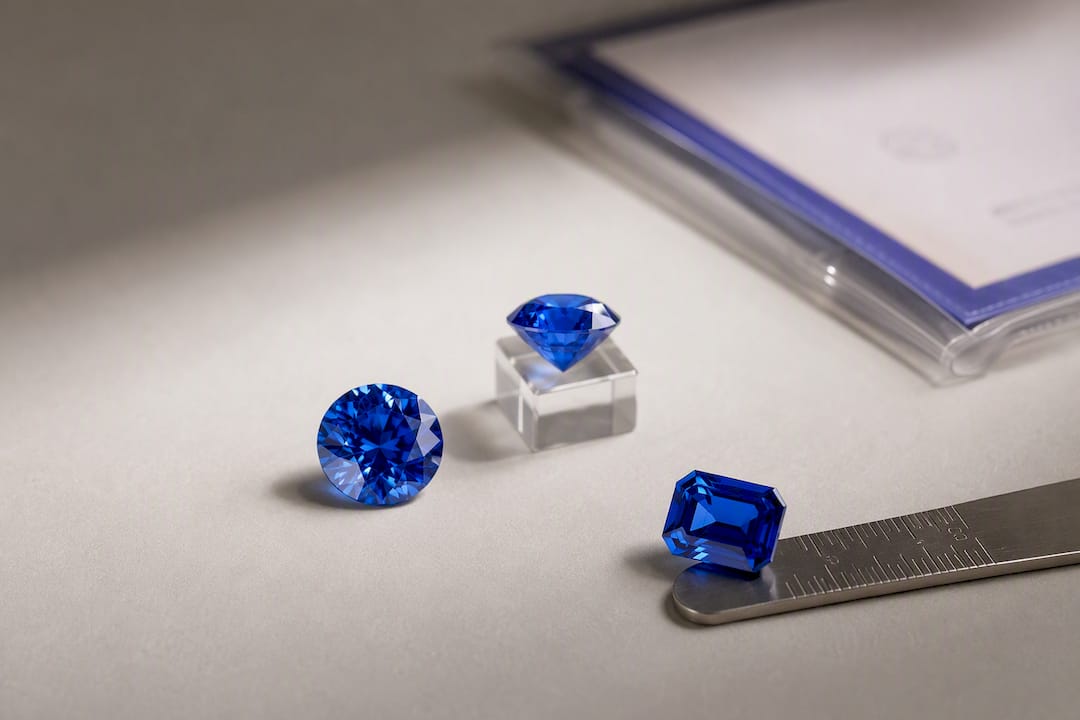
Beyond that baseline, some houses add 360-degree spins or AR-ready 3D models, particularly for signature pieces or online-only sales. These add real conversion value but come with a tradeoff: 3D capture takes longer per stone and requires more careful file management. Guidance on jewelry 3D imaging suggests reserving it for higher-value pieces rather than routine parcel stock, where the cost per unit rarely pays off.
A few standards keep media from becoming its own liability:
- Name every file with the lot or item ID first, never a generic sequence number
- Attach the certificate PDF directly to the inventory record, not just the image folder
- Use a consistent neutral background and lighting setup across the whole catalog, not per photographer
- Keep a fixed camera distance and color-correction profile so stones don’t look inconsistently graded in photos alone
The real test is whether an image survives the trip from inventory record to buyer sheet to storefront listing without losing its link to the lot. A photo that gets renamed or recompressed along the way is a photo that will eventually get attached to the wrong stone.
How Do You Track Gemstone Inventory With Barcodes and Lot Management
Receiving is where most catalog errors originate, so it deserves the tightest process. When a lot arrives, capture the source, lot number, lab report, initial weight, and a baseline photo before the stone goes anywhere near a display case or a client.
- Log the receiving record the moment a parcel or stone arrives, including supplier ID and any shipment documentation, since customs messaging systems may require provenance data on imported lots.
- Split lots deliberately. When a parcel gets broken into individual stones, record the split date, resulting weights, and reconcile cost-per-carat across the new records so nothing “loses” value on paper.
- Label consistently. Barcodes work for internal stock control; QR codes do more, since they can resolve to a public “gem passport” page showing certificate and provenance to a client scanning from a display case.
- Run cycle counts on high-turnover categories weekly, and a full stocktake on high-value inventory quarterly at minimum.
- Flag red flags immediately. unmatched certificate numbers, weight discrepancies over a fraction of a carat, or missing provenance on any imported stone.
Trade guidance on gemstone inventory practices consistently points to barcoding and consistent lab-report linkage as the two controls that most reduce shrinkage in small operations.
If discrepancies show up there, you’ve caught the problem before it compounds across the rest of the catalog.*
Which Integrations Matter Most for a Gemstone Catalog
Not every integration deserves equal priority. POS and ecommerce syncing usually comes first, since it stops the double entry that causes stock counts to drift between your storefront and your back office. Accounting platforms like QuickBooks or Xero come next, closing the loop between inventory value and financial reporting without rekeying every transaction.
Supplier catalog feeds are where things get messy. Most arrive as CSV, JSON, or through an API, and almost none use your field names. Mapping “wt_ct” to “weight_carats” and “orig” to “origin” sounds trivial until you’re doing it across a dozen suppliers with a dozen different conventions.
A few practices keep the data flow clean:
- Decide upfront what gets pushed to public storefronts (asking price, images, attributes) versus what stays internal (cost, vendor ID, margin)
- Snapshot currency at time of purchase for every cost field, so a later exchange-rate shift doesn’t quietly rewrite your historical margins
- Set permission tiers so a public-facing gem passport link never exposes internal cost or supplier data
- Sync supplier feeds on a fixed cadence rather than ad hoc, so nobody is selling from stale stock counts
Standardizing and Migrating Supplier Catalog Data
Every supplier structures data differently, and the migration step is where most catalogs either succeed or quietly accumulate years of bad records. Before importing anything, validate the source file for required columns, unique identifiers, and attached lab reports. A supplier feed missing a certificate number for graded stones should get flagged, not imported blind.
Mapping strategy comes next. Normalize species names against a standard reference like the Gem Society’s gemstone encyclopedia, unify units so carat and gram entries don’t sit side by side unconverted, and standardize treatment and origin fields to one controlled vocabulary rather than whatever phrasing each supplier used.
Some supplier data will always arrive incomplete. When migrating a large batch, the practical fix is enforcing a minimum-viable record: species name, weight, one photo, and a certificate or report number. Everything else becomes optional metadata you clean up later, rather than a blocker that stalls the whole import.
- Require unique identifiers on every row before import, not after
- Fix obvious errors (unit mismatches, misspelled species) at the source file when the supplier relationship allows it
- Transform on import only when going back to the supplier isn’t practical
- Set a recurring sync schedule with each vendor so catalog data doesn’t quietly drift out of date
Pro Tip: Keep a running log of every field-mapping decision you make during migration. The second supplier you onboard will use different column headers than the first, and that log saves you from relearning the same mapping twice.
Retailers handling multiple vendor feeds often find it faster to map supplier fields into shoppable collections rather than building each mapping from scratch.
Your 30/60/90-Day Catalog Rollout Plan
Moving off spreadsheets works best in phases, not all at once.
- Days 1 to 30: Lock in core fields, assign unique IDs to every item and lot, shoot a baseline photo set, and get physical labels on inventory.
- Days 31 to 60: Connect POS and ecommerce integrations, finish supplier field mappings, and run a test stocktake on one category.
- Days 61 to 90: Verify the audit trail is capturing every edit, finalize pricing rules, and open role-based portals for staff or wholesale buyers.
| Phase | Priority focus | Key check |
|---|---|---|
| 30 days | Core fields, unique IDs, photo baseline | Every item has an ID and one photo |
| 60 days | Integrations, supplier mappings | Test stocktake reconciles with records |
| 90 days | Audit trail, pricing rules, portals | Certificates match items 1:1, no gaps |
Track inventory accuracy, time-to-list for new stock, and SKU fill rate on your online catalog as your core KPIs through this rollout.
How JewelCloud Approaches Catalog Standardization
Working through supplier feeds for long enough teaches you that the hard part of gemstone catalog management is never the software. Its the discipline of mapping messy vendor columns into one clean structure before anything gets a price tag. JewelCloud’s own experience normalizing product data from designers, manufacturers, and diamond dealers reflects that same lesson: the catalogs that scale are the ones where species names, treatment fields, and certificate numbers were standardized before the first listing ever went live.
One workflow insight worth stealing: build your minimum-viable record requirement before you accept a single new supplier feed. It forces the standardization conversation early, when it’s still cheap to fix.
For hands-on onboarding help, JewelCloud’s own resources for retailers, vendors, and manufacturers are worth a look before you commit to a structure by hand.
— Anthony
Ready to Put Your Catalog on Structured Rails?
If you’ve been managing gemstone inventory through spreadsheets and supplier emails, the payoff of moving to structured data isn’t a nicer-looking catalog. It’s fewer hours spent reconciling stock counts by hand and fewer listings that go out with a missing field. Some platforms handle the field mapping and standardization work for you, taking messy supplier feeds and turning them into consistent, ecommerce-ready product data across species names, treatment status, certificates, and pricing.

Retailers can browse participating suppliers without carrying the inventory themselves, and suppliers get a distribution channel that reaches retail partners without rebuilding their catalog for every platform. If you’re not sure whether your current supplier data is clean enough to migrate, JewelCloud’s guide on jewelry ecommerce catalog management walks through the same standardization steps covered here in more depth.
The fastest way to see the fit is to look at the platform overview directly and evaluate it against a small pilot import: pick one supplier feed, map the fields, and see how quickly it turns into a listable catalog.
Sources
- GIA Gem Encyclopedia | Complete List Of Gemstones
- CIBJO Retailers’ Reference Guide (Gemstones)
- List of Gemstones: Precious and Semi-Precious Stones - Gem Society
- Gemstone Reference Database | RI, SG, Fluorescence — GemID
- Gemstone Inventory Management Best Practices