


The right jewelry brand retailer onboarding workflow delivers three things: clean, channel-ready product records, inventory and pricing that stay in sync, and a governed publishing process nobody has to babysit. The single best approach is a PIM-orchestrated intake, paired with automated mapping and validation, feeding scheduled or webhook syncs into Shopify, WooCommerce, and Magento.
Most jewelry catalogs enter this process in rough shape. Industry benchmarks put average jewelry and watch product-data quality around 80%, against a target closer to 90%, with gaps concentrated in metal purity, certification numbers, and exact sizing. A platform like JewelCloud exists to close that gap by structuring feeds specifically for jewelry, rather than treating rings and bracelets like generic SKUs.
The onboarding workflow that scales is the one that refuses bad data before it ever reaches a shopper’s screen, not the one that cleans it up after the fact.
Pro Tip: Require machine-readable fields for metal purity, gemstone origin and treatment, carat weight, and ring size ranges at intake. Catching these gaps before mapping begins saves days of rework later.
- Structured intake beats manual spreadsheet cleanup every time.
- Certification standards (GIA, for example) anchor trust in every listing.
- Real-time sync protects against overselling one-of-a-kind pieces.
Key Takeaways
A jewelry brand retailer onboarding workflow succeeds when a jewelry-specific schema, automated validation, and near-real-time inventory sync replace manual spreadsheet handoffs between suppliers and retailers.
| Point | Details |
|---|---|
| Start with a pilot | Test one SKU family for two to six weeks before scaling the full catalog. |
| Enforce required fields at intake | Metal purity, gemstone treatment, certification number, and sizing must be structured, not free text. |
| Match sync frequency to risk | Unique, high-value jewelry needs near-real-time sync; stable lines can run on batch feeds. |
| Automate validation, keep manual review for exceptions | Rule engines catch most errors; certification and hallmark checks often still need a human. |
| Use a platform built for jewelry | JewelCloud provides jewelry-specific schema, connectors for Shopify, WooCommerce, and Magento, and governance logs for approvals. |
Resources to Start Your Onboarding Pilot
Ready to move from plan to pilot? Start with JewelCloud’s vendor benefits overview for supplier-side onboarding details, or review the jewelry brand ecommerce integration guide for platform-side setup. For a non-jewelry onboarding template to compare milestones against, Dropship XL’s MVP design onboarding guide outlines a useful general sequence.
- JewelCloud vendor membership for suppliers ready to distribute catalogs.
- Structured product data guide for schema reference.
- Jewelry supplier integration practices for platform-specific mapping details.
Table of Contents
- What Is the Jewelry Brand Retailer Onboarding Workflow?
- What Data Does a Jewelry Product Schema Need?
- How Should Suppliers Deliver Product Data?
- What Quality Checks Belong Before a Listing Goes Live?
- What Does Onboarding Typically Cost and How Long Does It Take?
- What Belongs on a Go-Live Checklist?
- How JewelCloud Simplifies Retailer Onboarding
What Is the Jewelry Brand Retailer Onboarding Workflow?
A jewelry brand retailer onboarding workflow is the sequence that moves a supplier’s raw product information into a retailer-ready, sellable catalog record. It runs through seven stages: supplier intake, data audit, field mapping, normalization and enrichment, validation, governance and approval, then publish and sync. Skipping any stage tends to surface later as returns, mismatched sizing, or a certification number that doesn’t resolve to a real report.
This mirrors the general discipline behind supplier product data onboarding, but jewelry adds constraints generic retail feeds never face: metal purity has to match a controlled vocabulary, gemstone treatments need disclosure, and sizing has to be numeric and filterable rather than buried in a product description.
- Supplier intake. Collect raw files, images, and certification documents through a portal, SFTP drop, or API submission.
- Data audit. Score completeness against required fields and flag gaps before mapping starts.
- Field mapping. Map supplier-specific column names to the platform’s canonical schema.
- Normalization and enrichment. Standardize units, controlled vocabularies, and fill gaps with supplier-confirmed values.
- Validation. Run automated rule checks and route exceptions to manual review.
- Governance and approval. A data lead signs off before anything reaches a live catalog.
- Publish and sync. Push approved records to retailer storefronts and keep inventory current.
Each stage needs an owner, or accountability gets lost between the supplier and the platform:
| Stage | Primary Owner | Supporting Role |
|---|---|---|
| Supplier intake | Supplier / brand data lead | Integrator |
| Field mapping & normalization | Integrator / developer | Platform owner (JewelCloud) |
| Validation & governance | Platform owner | Brand data lead |
| Publish & sync | Platform owner | Retailer catalog admin |
For a single pilot SKU family, plan on two to six weeks depending on how clean the source feed already is. A supplier with tight, structured product data can clear the pilot in under two weeks; a supplier working from loose spreadsheets often needs the full six. Run one category first, confirm it hits your acceptance criteria, then scale to the rest of the line.
What Data Does a Jewelry Product Schema Need?
Jewelry breaks generic ecommerce schemas because the details that drive a purchase decision (metal purity, stone treatment, exact ring size) are the same details most feeds bury in free text. A dedicated schema fixes that by forcing these attributes into structured, filterable fields from day one.
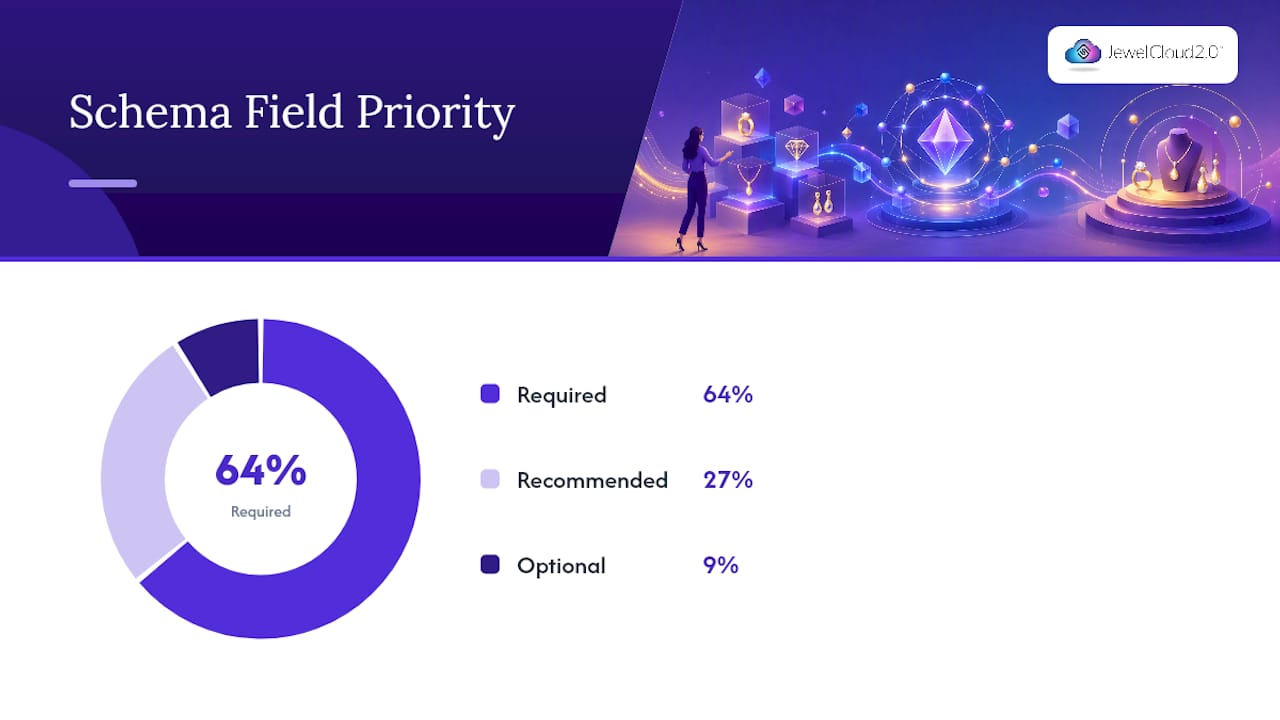
Required fields are non-negotiable because search filters, comparison tools, and increasingly AI shopping agents depend on them being present and standardized. Recommended fields round out the shopper experience. Optional fields add polish but won’t block a listing from going live.
| Field | Priority | Why It Matters |
|---|---|---|
| SKU, title, brand | Required | Core identity and catalog uniqueness |
| metal_type, metal_purity | Required | Drives filters, pricing, and disclosure compliance |
| gemstone_type, gemstone_treatment | Required | Legal disclosure and buyer trust |
| total_carat_weight, individual_stone_weights | Required | Comparison shopping and appraisal accuracy |
| certification_number, certification_body | Required | Verifiable authenticity (GIA, AGS, IGI) |
| ring_size_machine_readable | Required | Filterable sizing, prevents fulfillment errors |
| chain_length_mm, finish | Required | Sizing precision for necklaces and finish variants |
| stone_origin, hallmark_image | Recommended | Provenance storytelling and authentication proof |
| production_lead_time | Recommended | Sets accurate shopper expectations |
| personalization options | Recommended | Engraving, sizing adjustments, custom setting choices |
| lifestyle copy, editorial tags | Optional | Merchandising polish, not structural necessity |
A minimal machine-readable record for a diamond ring looks like this:
{
  "sku": "RNG-1042-14K",
  "title": "14K White Gold Solitaire Ring",
  "metal_type": "gold",
  "metal_purity": "14K",
  "gemstone_type": "diamond",
  "gemstone_treatment": "none",
  "total_carat_weight": 1.02,
  "certification_number": "GIA2185550123",
  "certification_body": "GIA",
  "ring_size_machine_readable": "6.5"
}
- Use a consistent SKU prefix logic (product family plus metal or size code) so variants stay traceable without duplicate parent records.
- Composed sets (a ring and matching band) need a parent SKU plus linked child SKUs, not one flattened record.
- Treat certification_number as a unique key. Two SKUs sharing one cert number is almost always a data error, not a coincidence.
How Should Suppliers Deliver Product Data?
Suppliers deliver jewelry product data through five common paths: CSV over SFTP, Excel templates, JSON APIs with OAuth authentication, webhooks for event-driven updates, and direct plugins for Shopify, WooCommerce, or Magento. Which one you accept first depends entirely on how often that supplier’s inventory actually changes.
A basic CSV header for the required fields looks like this:
sku,title,metal_type,metal_purity,gemstone_type,total_carat_weight,certification_number,ring_size_machine_readable
The equivalent API payload carries the same fields as JSON, just wrapped for programmatic delivery rather than a spreadsheet row. Batch CSV feeds work fine for stable, high-volume, lower-value lines. Unique or high-value jewelry, where one sold ring should immediately disappear from every channel, needs near-real-time sync with conflict resolution rules like newest-wins or a defined source-of-truth hierarchy.
A batch feed that runs once a night is a fine fit for costume jewelry restocked weekly. It is a liability for a one-of-a-kind diamond piece that could sell twice before the next sync.
Pro Tip: If a supplier can’t commit to API or webhook delivery yet, start them on SFTP CSV with a tight sync cadence, then migrate once the pilot proves the schema is clean.
For platform-specific integration, Shopify, WooCommerce, and Magento each need custom attribute mapping for metal, stone, and certification fields, since none of them ship with jewelry-specific fields out of the box. Images and certificate links typically map as metafields or custom attributes, and most retailers rely on a connector or plugin rather than building that mapping layer from scratch.
What Quality Checks Belong Before a Listing Goes Live?
Every SKU should clear five checks before publishing: required-field completeness, image resolution and alt-text presence, controlled-vocabulary enforcement for metals and gemstones, numeric range validation for weights and sizes, and uniqueness checks on SKUs and certification numbers.
- Run a completeness scan and reject any SKU missing a required field.
- Check image resolution (2000px minimum is a reasonable floor) and confirm alt text exists.
- Validate metal and gemstone values against a controlled vocabulary list, not free text.
- Confirm carat weight and ring size fall within believable numeric ranges.
- Cross-check SKU and certification number uniqueness against the live catalog.
| Test Case | Acceptance Criteria |
|---|---|
| New SKU submission | required fields present, image ≥2000px |
| Certification format | Matches GIA numeric pattern, or routes to manual review |
| Duplicate check | No existing SKU or cert number match in live catalog |
Most of this runs automatically through rule engines built into a PIM or product content layer, with manual review reserved for anything the rules flag rather than reject outright. Exceptions get logged with a reason code and a reviewer name, so six months later nobody has to reconstruct why a listing went live without a hallmark image.
What Does Onboarding Typically Cost and How Long Does It Take?
A pilot SKU family generally runs four to six weeks from discovery to go-live, broken into four phases:
| Phase | Duration |
|---|---|
| Discovery | 1 week |
| Sample intake & mapping | 1 to 2 weeks |
| Validation & pilot fixes | 1 to 2 weeks |
| Go-live prep | 1 week |
Staffing typically involves a project manager overseeing the timeline, a data engineer handling mapping and integration, a catalog editor managing enrichment, a supplier contact resolving data gaps, a platform admin running validation, and a retailer catalog manager confirming what publishes to their storefront. None of these need to be full-time for the pilot, but each needs a named owner.
Budget across four buckets:
- Setup and integration fees for connecting feeds to your storefront platform.
- Per-SKU enrichment costs, especially for suppliers submitting incomplete source data.
- PIM or platform subscription costs for ongoing catalog management.
- Image remediation and staff training hours.
Automation cuts recurring costs on mapping and validation fast. Certification linking and hallmark verification, though, tend to stay partly manual, since a human still needs to confirm a cert number resolves to a real, matching report.
What Belongs on a Go-Live Checklist?
Before flipping a supplier’s catalog live, confirm six things: pilot signoff, a rollback plan, inventory sync confirmation, verified pricing rules, validated image and certificate links, and retailer access permissions set correctly.
- Get written pilot approval from the brand data lead.
- Confirm a rollback plan exists if the sync misbehaves post-launch.
- Verify inventory sync is live and pulling correctly.
- Double-check pricing rules against the supplier’s wholesale terms.
- Validate every image and certificate link resolves.
- Confirm retailer permissions match the intended catalog access.
Once live, track five metrics daily:
- Feed error rate
- Missing-attribute rate
- Inventory drift incidents
- SKU publish latency
- Returns tied to data errors
When something breaks, triage first, temporarily unpublish the affected SKUs, patch the data flow, notify stakeholders, then run a root-cause postmortem. Reconciliation cadence should match risk level: daily for stable catalogs, sub-daily for high-value or one-of-a-kind inventory, which is exactly where retailers expand assortments fastest once the data pipeline is trustworthy.
Why Jewelry Needs Its Own Onboarding Workflow
Generic product onboarding treats every item as interchangeable. Jewelry isn’t. A missing ring size range or an undisclosed treatment doesn’t just look sloppy, it drives returns and erodes trust in a category where buyers already worry about being misled. I’ve watched cross-channel launches stall for weeks over a single unresolved certification field. Get the schema right at intake, and the payoff is faster time-to-shelf and listings that AI shopping agents can actually parse and trust.

How JewelCloud Simplifies Retailer Onboarding
Building this workflow from scratch means stitching together a PIM, a validation engine, and separate connectors for every storefront platform. JewelCloud gives brands and retailers that stack already built, with a jewelry-specific schema instead of a generic retail template forced to fit rings and gemstones.

The platform includes jewelry-optimized field mapping, publisher feeds ready for syndication, native connectors for Shopify, WooCommerce, and Magento, ongoing inventory sync, and governance logs that record who approved what and when. For suppliers, vendor membership offers a direct path to distribute structured catalogs to qualified retailers without holding physical inventory against sales that may never happen.
If your team is ready to move past spreadsheets and one-off integrations, start with a pilot category on the JewelCloud platform and see how quickly a properly structured feed clears validation and goes live.