


The fastest, lowest-risk route to connect your suppliers is this: standardize product data into a jewelry-aware feed, then push it to your storefront via an API or managed connector. Start by mapping a small number of SKUs through a test sync before touching your live catalog.
Choose your method based on supplier capability:
- API/REST: Use when your supplier offers live endpoints. Best for real-time pricing, inventory, and automated order submission on high-volume SKUs.
- Scheduled CSV/FTP: Use when your supplier can only export flat files. Reliable for catalogs that change daily or less frequently.
- Webhook: Use when you need event-driven updates (price changes, stock drops) without constant polling.
Your next step: Map five representative SKUs across metal type, gemstone, and size variants. Run a test sync against a staging environment. If you want a faster path, request a sandbox through Jewelcloud and import a pre-structured jewelry feed in hours, not weeks.
Pro Tip: *Don’t start with your full catalog.
Key Takeaways
Successful jewelry supplier integration starts with clean, standardized product data and a sync method matched to your supplier’s technical capability — everything else follows from those two decisions.
| Point | Details |
|---|---|
| Standardize data first | Build a canonical jewelry attribute map before any connector goes live to prevent import errors. |
| Match sync method to supplier | Use REST API for real-time needs; scheduled CSV works for slow-moving or made-to-order catalogs. |
| Start with 5–20 SKUs | A small pilot surfaces data problems at a fraction of the cost of a full-catalog launch. |
| Monitor daily after go-live | Track sync latency, error rate, and inventory mismatch count to catch drift before shoppers do. |
| Jewelcloud as managed path | Jewelcloud’s pre-standardized feed and connectors reduce per-supplier mapping time from weeks to days. |
Table of Contents
- What integration methods work best for jewelry supplier connections?
- How do you build a jewelry product data model that imports cleanly?
- How should you sync inventory and pricing across your jewelry catalog?
- Which platforms and connectors do you need to plan for?
- What does a solid QA and go-live checklist look like?
- How do you onboard suppliers and get their data integration-ready?
- What does a realistic integration project timeline and budget look like?
- How does Jewelcloud solve the hardest jewelry integration problems?
- What most retailers get wrong about supplier integration
- Jewelcloud gives you a faster path to a connected jewelry catalog
- Sources
What integration methods work best for jewelry supplier connections?
Jewelry supplier integration, in technical terms, means establishing a reliable data pipeline between a supplier’s catalog and your storefront, POS, or marketplace. The method you choose shapes every downstream decision: how fresh your inventory is, how much developer time you spend, and how gracefully the system handles errors.
The four main methods:
- API/REST: Your system calls the supplier’s endpoints on demand. Supports live pricing, real-time inventory, and order submission. Requires developer resources and a supplier that maintains stable API documentation.
- EDI/iPaaS: Electronic Data Interchange, often orchestrated through an integration platform. iPaaS platforms like Cleo Integration Cloud offer prebuilt connectors that reduce custom development when suppliers support EDI standards. Best for enterprise-scale supply chains with strict SLA requirements.
- Scheduled CSV/FTP: The supplier drops a flat file on a schedule; your system ingests it. Low technical barrier, but latency can run 4–24 hours. Acceptable for slow-moving or made-to-order jewelry.
- Dropship/3PL: The supplier ships directly to your customer. You route orders; the supplier fulfills. Understanding supplier responsibilities in a dropship model is critical before committing to this path, especially for high-value items with insurance and signature requirements.
Decision rules by situation:
- Supplier has a REST API + you sell high-value, fast-moving SKUs → use API with real-time polling.
- Supplier is EDI-capable + you have an ERP → use iPaaS middleware.
- Supplier can only export CSV + catalog changes weekly → use scheduled FTP with daily ingestion.
- You want zero inventory risk + supplier handles fulfillment → use dropship with order-routing automation.
- You need event-driven stock alerts (e.g., last unit sold) → add webhooks on top of your primary method.
Jewelry-specific constraints complicate every option. Variants multiply fast: a single ring style in three metals, five karat options, and ten sizes creates 150 SKUs. Certificate PDFs and high-resolution images add payload weight. Returns on high-value pieces require documented condition checks. Factor these into your SLA and error-handling design before you commit to a method.
How do you build a jewelry product data model that imports cleanly?
Sloppy supplier data is the single biggest cause of failed integrations. Before any connector goes live, you need a canonical attribute model that every supplier maps to.
Required fields for a jewelry SKU:
- SKU, title, and long description
- Metal type, metal karat (e.g., 14K, 18K, 950 platinum)
- Gemstone type, carat weight, clarity grade, cut grade, color grade
- Ring/bracelet/necklace size or length
- Item weight (grams), dimensions (mm)
- Certificate number, certifying lab (GIA, AGS, IGI)
- Country of origin, HS code
- MOQ, lead time (days)
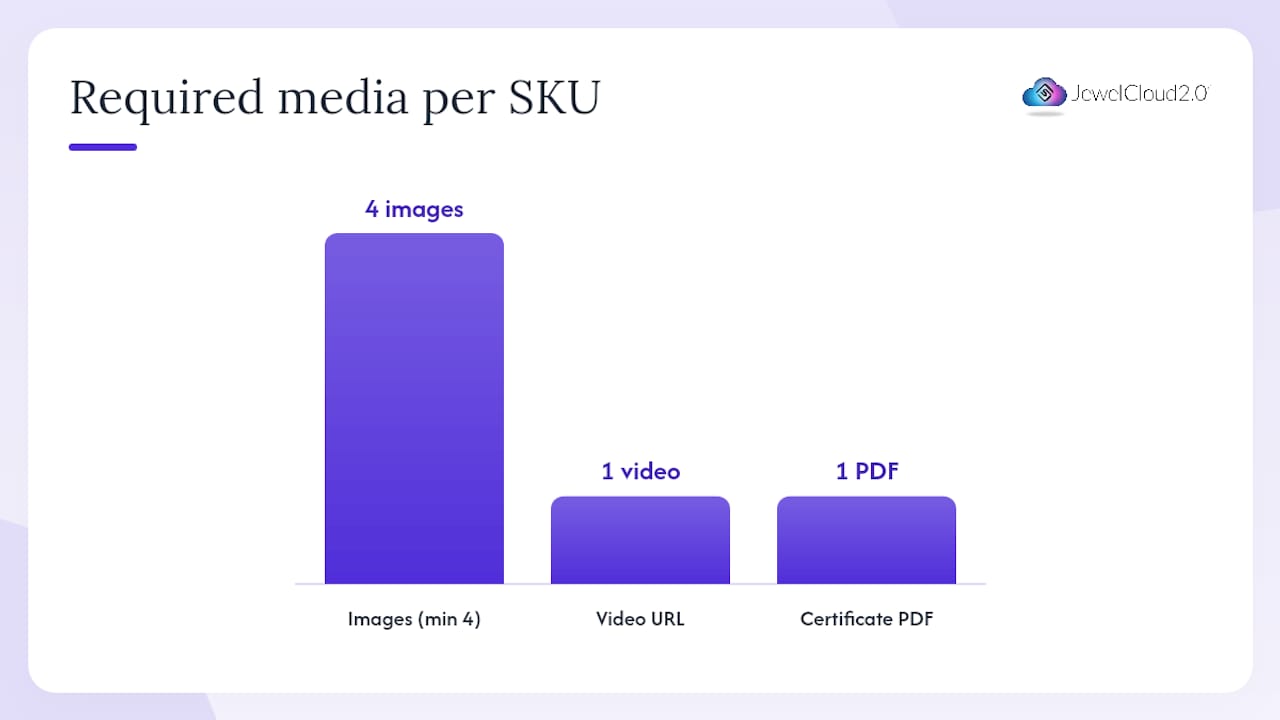
- Image URLs (minimum four angles), video URL, certificate PDF URL
Variants vs. separate SKUs: Use variable products when the only difference is size or metal color and the base price is the same. Create separate SKUs when gemstone weight, certificate number, or price differs per unit. A 1.2ct diamond solitaire and a 1.4ct version are never the same SKU, even if the setting is identical.
Image and certificate rules: Name files with the SKU as the prefix (e.g., SKU12345_front.jpg). Minimum resolution should be adequate for clear display across platforms. Host on a CDN with HTTPS. Attach certificate PDFs as a separate asset field, not embedded in the image. Jewelry inventory platforms that track certificate numbers and gemstone metadata across POS and marketplace channels confirm these fields must survive every sync without truncation or reformatting.
Common field mismatches to catch before import:
- Metal karat expressed as “14K” by one supplier and “585” (millesimal fineness) by another
- Gemstone weight in carats vs. total carat weight for multi-stone pieces
- Image URLs that expire or require authentication tokens
- Certificate numbers stored as integers (leading zeros stripped)
Data-quality checks to run before every import:
- Validate SKU uniqueness across all supplier feeds.
- Confirm all required fields are populated (no nulls in metal, gemstone, or price).
- Check image URLs return HTTP 200 and file size is above 100KB.
- Verify certificate numbers match the certifying lab’s format.
- Flag any price below your cost floor as a likely data error.
A 5-stage integration framework used for WooCommerce jewelry stores places attribute mapping as stage two, right after supplier vetting, because data problems caught at mapping cost a fraction of what they cost post-launch.
Pro Tip: Build your canonical attribute map in a shared spreadsheet before writing a single line of code. Every supplier maps to your model, not the other way around.
How should you sync inventory and pricing across your jewelry catalog?
Real-time sync sounds appealing, but it is not always the right call. The correct cadence depends on how fast your inventory moves and how much server load you can absorb.
Sync patterns and when to use them:
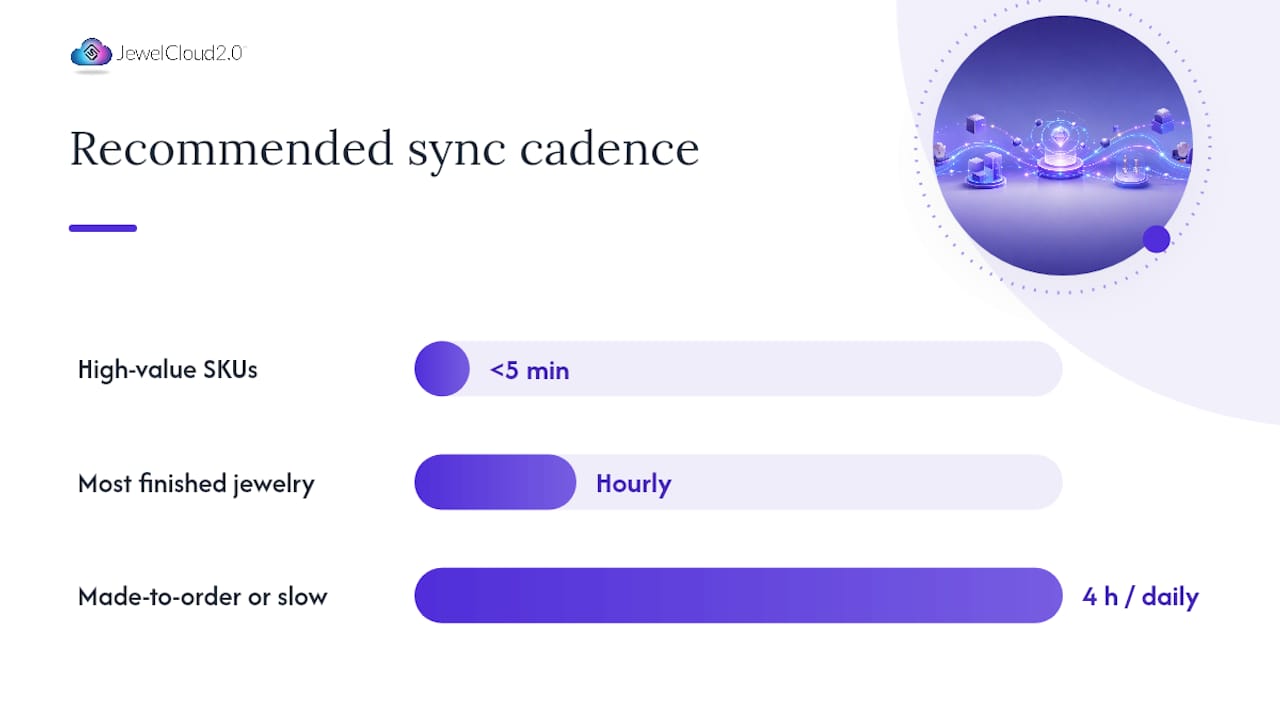
- Real-time webhook or API polling (under 5 minutes): Reserve this for high-value, limited-quantity SKUs where an oversell is costly. Diamond solitaires and one-of-a-kind pieces belong here.
- Hourly polling: Suitable for most finished jewelry with moderate turnover. Balances freshness against API rate limits.
- 4-hour or daily CSV: Acceptable for made-to-order or slow-moving fashion jewelry where same-day stock changes are rare.
For suppliers like Stuller, REST APIs provide live pricing, inventory, and automated order submission for high-volume stores, while CSV feeds serve retailers with simpler needs. That split is a useful model for your own supplier tier decisions.
Availability models to design for:
- Source-of-truth sync: Your storefront reflects the supplier’s live count. Simple, but you inherit their data quality.
- Reserved inventory: Allocate a portion of supplier stock to your channel to prevent oversells during peak traffic. Multi-channel jewelry platforms support channel-specific allocation and unit reservation to avoid exactly this problem.
- Backorder display: Show “ships in X days” when stock hits zero rather than hiding the product. Requires a lead-time field in your product data model.
Pricing patterns:
Apply markup rules as a percentage or fixed margin on top of the supplier’s wholesale price. Store the supplier cost and your retail price as separate fields so you can adjust margins without re-importing. For multi-currency storefronts, convert at the time of display using a live exchange rate, but round to a clean price point (e.g., $1,299 not $1,298.73) to avoid fractional pricing that erodes shopper confidence.
Common pitfalls:
- Duplicated SKUs when two suppliers carry the same manufacturer style number
- Image drift when a supplier updates product photos but your CDN cache holds the old version
- Certificate field overwritten during a price-only sync
- Inconsistent naming (e.g., “Yellow Gold” vs. “YG” vs. “14KY”) breaking faceted filters
Pro Tip: Log every sync run with a timestamp, record count, and error count. A simple reconciliation report run each morning catches drift before shoppers do.
Which platforms and connectors do you need to plan for?
Your integration architecture needs to account for every endpoint that touches product, inventory, order, and fulfillment data. Missing one creates a gap that shows up as an oversell or a missing tracking number.
Core endpoints every integration must cover:
- Product create and update (title, attributes, images, price)
- Inventory quantity update (per location for multi-warehouse setups)
- Price update (independent of product update for speed)
- Order creation and routing to the correct supplier
- Fulfillment status and tracking number push-back to the storefront
- Return/refund initiation and status sync
Platform-specific considerations:
- Shopify: Product variants are capped at 100 per product and three option types. Use metafields for certificate numbers, gemstone grades, and lab names that don’t fit standard variant options. Shopify’s inventory API supports multi-location natively.
- WooCommerce: Attribute taxonomy must be configured before import; importing attributes that don’t exist in the taxonomy creates orphaned data. Use the WooCommerce REST API for programmatic product creation rather than CSV import for anything above a few hundred SKUs.
- Magento: Multi-website setups require scoped pricing and inventory per store view. Configurable products handle jewelry variants well, but attribute sets must be defined at the catalog level before any import runs.
- Marketplaces: Each marketplace (Amazon, eBay, Etsy) has its own listing schema. Map your canonical jewelry attributes to each marketplace’s required fields separately. Certificate and gemstone fields often require marketplace-specific category attributes.
- POS systems: POS sync needs bidirectional inventory updates. A sale at the counter must decrement the same inventory pool your online store draws from, or you will oversell.
Connector options:
- Native apps: Fastest to deploy, least flexible. Good for standard Shopify or WooCommerce setups with a supplier that already has a published app.
- Middleware/iPaaS: Platforms reviewed on G2 (such as Cleo Integration Cloud) offer prebuilt connectors for EDI and API orchestration, reducing custom development for complex multi-supplier setups.
- Managed connectors: A vendor manages the connector on your behalf, handles mapping updates when the supplier changes their schema, and provides SLA-backed uptime. This is the lowest-maintenance option for retailers without in-house developers.
- Custom API integration: Maximum control, highest cost. Justified when supplier APIs are non-standard or when your business logic (custom pricing, bundle rules, certificate workflows) cannot be expressed in a generic connector.
Jewelcloud’s product feed and connector model takes the managed approach: supplier data is pre-standardized into a jewelry-aware feed, so retailers ingest consistent attribute sets, images, and certificate assets without building per-supplier mapping from scratch. That model cuts the mapping phase from weeks to days for retailers connecting multiple brands.
For a broader view of how storefront architecture and API patterns fit together, ecommerce platform fundamentals are worth reviewing before finalizing your connector strategy.
What does a solid QA and go-live checklist look like?
Launching without a QA checklist is how retailers end up with $8,000 rings priced at $8.00 because a decimal shifted during import.
Pre-launch tests to run:
- Import five sample SKUs and verify every attribute renders correctly on the storefront
- Confirm images load from CDN at full resolution on mobile and desktop
- Place a test order through each payment method and verify it routes to the correct supplier
- Check that certificate PDFs attach to the order confirmation email
- Verify inventory decrements correctly after a test purchase
- Confirm pricing matches the supplier’s current wholesale price plus your markup rule
Post-launch monitoring KPIs:
- Sync latency (time between supplier update and storefront update)
- Error rate per sync run (target: below 1% of records)
- Mismatch count (SKUs in supplier feed not found in your catalog)
- Image load failure rate
- Order routing success rate
Rollback steps if a sync goes wrong:
- Pause the sync job immediately.
- Revert the last import using your staging snapshot.
- Switch affected SKUs to manual fulfillment temporarily.
- Identify the root cause (schema change, credential expiry, rate limit hit) before re-enabling.
The 5-stage WooCommerce integration framework places QA as the final stage before go-live, with explicit checkpoints for data mapping accuracy and order routing validation. That sequence holds for any platform.
How do you onboard suppliers and get their data integration-ready?
Supplier onboarding is where most integration projects lose time. The fix is a structured readiness checklist sent to every supplier before a single line of code is written.
Supplier readiness checklist:
- Confirm available export formats (CSV, XML, API, EDI)
- Request a sample file with at least 20 SKUs covering all product types
- Collect API credentials, base URL, and rate limit documentation
- Confirm image hosting (supplier CDN vs. file transfer)
- Gather certificate PDF delivery method (URL, FTP, email)
- Agree on a data refresh cadence and the supplier’s SLA for updates
Sample data template columns for jewelry SKUs:
supplier_sku | title | metal_type | metal_karat | gemstone_type | gemstone_carat | clarity | cut | color | ring_size | weight_g | cert_number | cert_lab | image_url_1 | image_url_2 | image_url_3 | image_url_4 | cert_pdf_url | wholesale_price | lead_time_days | country_of_origin
Ask suppliers to populate 20 rows before the integration kickoff meeting. Gaps in that sample reveal data problems you would otherwise discover mid-development.
Communication playbook:
- Send the readiness checklist and sample template at contract signing.
- Schedule a 30-minute data review call within the first week.
- Define testing windows: supplier agrees to freeze catalog changes during the two-week QA period.
- Set SLA expectations: supplier commits to updating their feed within 24 hours of any price or inventory change.
- Establish an escalation contact on both sides for data emergencies.
Jewelcloud functions as a digital distribution channel that increases supplier visibility to qualified retail partners, which means suppliers who join the platform arrive with structured, pre-validated data rather than raw exports. That shortcut is significant: a retailer connecting through Jewelcloud skips the supplier data-prep phase almost entirely.
Pro Tip: Require a signed data agreement that specifies update frequency, image quality standards, and certificate accuracy. Verbal commitments evaporate when a supplier’s team changes.
What does a realistic integration project timeline and budget look like?
Integration projects almost always take longer than expected when data quality is unknown at the start. These ranges assume a single supplier and a standard storefront.
Project phases and indicative timelines:
- Discovery and vendor selection: 1–2 weeks. Define requirements, evaluate connector options, confirm supplier capabilities.
- Data mapping and sample import: 1–3 weeks. Build the canonical attribute map, clean sample data, run a test import.
- Development or connector configuration: 2–8 weeks. Wider range reflects the difference between configuring a managed connector (2–3 weeks) and building a custom API integration (6–8 weeks).
- QA and pilot launch: 1–2 weeks. Run the pre-launch checklist, fix errors, soft-launch with a limited SKU set.
- Full deployment and monitoring setup: 1 week. Enable full catalog, configure alerts, hand off to operations.
Total: 6–16 weeks from kickoff to stable production, depending on complexity.
Indicative cost ranges:
- DIY plugin or CMS connector: Low upfront cost, but expect significant time investment for mapping and troubleshooting. Suitable for single-supplier, low-SKU-count setups.
- Custom API integration: Developer time typically runs $5,000–$25,000+ depending on scope, supplier API complexity, and the number of endpoints required.
- Managed connector or platform service: Recurring subscription or platform fee. Lower upfront cost, faster time-to-market, and ongoing maintenance handled by the vendor.
- One-time vs. recurring: Expect a one-time setup or onboarding fee plus a recurring sync or platform fee. The recurring cost covers API maintenance, schema updates when suppliers change their feeds, and SLA-backed uptime.
Undocumented edge cases are the norm, not the exception.
How does Jewelcloud solve the hardest jewelry integration problems?
Most of the complexity in jewelry supplier integration comes from data inconsistency: every supplier formats metal types, gemstone grades, and certificate fields differently. Jewelcloud addresses this at the feed level rather than leaving it to each retailer to solve independently.
The Jewelcloud product feed standardizes jewelry product data into a consistent attribute set, images, and certificate assets so retailers can ingest clean data without building per-supplier mapping for every new vendor they add. That means a retailer connecting a second or third supplier through the platform does not restart the mapping process from scratch.
What the platform covers:
- Structured product data feed with jewelry-specific attributes (metal, karat, gemstone, certificate, size, weight)
- Inventory sync to keep availability accurate across connected storefronts
- Order routing to the correct supplier based on SKU ownership
- Certificate and image asset delivery alongside product records
- Connectors for Shopify, WooCommerce, Magento, and custom sites
For suppliers, Jewelcloud acts as a digital distribution channel that puts their catalog in front of qualified retail partners without requiring each retailer to build a custom connection. Suppliers load their data once; retailers pull from a standardized feed.
The Jewelcloud platform is built specifically for the B2B jewelry market, which means the data model already accounts for the fields that generic ecommerce platforms miss: certificate numbers, gemstone grading details, memo and consignment status, and multi-image requirements. Retailers who have tried to force jewelry data into a generic product schema know exactly how much cleanup that approach generates.
For retailers managing multiple supplier relationships, the platform’s product syndication approach reduces the per-supplier maintenance burden that accumulates when each vendor uses a different export format.
What most retailers get wrong about supplier integration
The conventional wisdom says to pick the best connector and start importing. That advice skips the step that determines whether the integration succeeds: data hygiene.
Every integration failure I have seen in this space traces back to the same root cause. The retailer or developer assumed the supplier’s data was clean and structured. It rarely is. Metal karat expressed in three different formats across one supplier’s catalog, certificate numbers stored as integers with leading zeros stripped, images hosted on an expiring CDN link — these are not edge cases. They are the norm.
The practical fix is to treat data preparation as a project phase, not a pre-project task. Budget two to three weeks for it. Require a sample file before the development contract is signed. Run your validation rules against that sample and share the error report with the supplier before anyone writes code.
The second mistake is scaling too fast. Retailers who launch with a full catalog on day one have no baseline to compare against when something goes wrong. Start with a small set of SKUs across your highest-margin categories. Prove the sync, the order routing, and the certificate delivery work correctly. Then expand.
Managed connectors and platforms like Jewelcloud exist precisely because the per-supplier data problem is expensive to solve repeatedly. If your roadmap includes five or more supplier relationships, the economics of a managed feed almost always beat custom development within the first year.
Jewelcloud gives you a faster path to a connected jewelry catalog
Connecting suppliers one by one, cleaning their data manually, and maintaining custom integrations is a significant operational cost. Jewelcloud offers a different starting point: a B2B jewelry platform where supplier data arrives pre-structured, pre-validated, and ready to publish to your storefront.

Retailers on Jewelcloud expand their assortments without carrying physical inventory, using real product data from participating brands and suppliers. Suppliers gain a qualified retail distribution channel without building individual retailer connections. The feed covers the attributes, images, and certificates that jewelry data requires, and connectors for Shopify, WooCommerce, and Magento mean your storefront is supported. To get started, explore vendor benefits or reach out to schedule a discovery call and see the feed in action with your own SKUs.
Sources
These resources support the technical decisions covered in this article.
Integration frameworks and platform references:
Supplier API documentation:
Jewelcloud platform documentation and onboarding: