


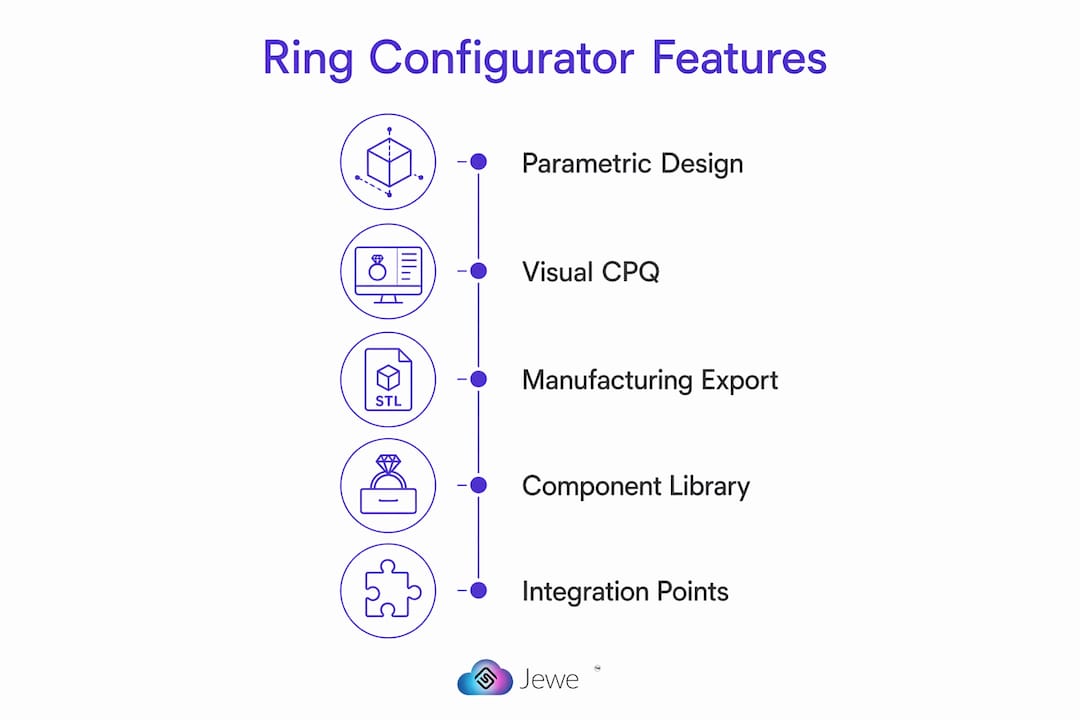
Ring configurator software is a browser-accessible tool that assembles parametric ring components, generates photorealistic PBR renders, and exports manufacturing-ready files in STL and STEP formats. For wholesale-first jewelers, the single capability package worth prioritizing is parametric geometry combined with Visual CPQ (real-time pricing) and production-ready export.
- Parametric geometry: adjustable band width, stone size, and setting type with constraint enforcement
- Visual CPQ: instant pricing updates as metal, gemstone, and accent selections change
- Production-ready export: STL and STEP files validated for casting tolerances
- PBR rendering: photorealistic previews that work on mobile browsers without GPU hardware
Pro Tip: If a vendor cannot hand you a sample STL export from a live sandbox in under five minutes, that is your answer about their production readiness.
Table of Contents
- What does ring configurator software actually do?
- Which features must your ring configurator software include?
- Why manufacturing export and validation cannot be optional
- How to structure your component library so the configurator scales
- What integration points should you expect from a ring design platform?
- How should you evaluate vendors and compare pricing models?
- What does a realistic 90-day implementation look like?
- How does Jewelcloud’s RingBuilder® fit your buyer checklist?
- Key Takeaways
- The part most jewelers skip until it’s too late
- See RingBuilder® in action with your own catalog
- Useful sources
What does ring configurator software actually do?
At its core, a ring design app pulls from a modular component library (heads, shanks, settings) and assembles combinations dynamically. The buyer adjusts parameters in real time, sees a 3D preview update instantly, gets a live price, and can share a client preview link or download a spec sheet. No back-and-forth with a CAD technician. No waiting on a quote.
The technology serves four distinct buyer profiles:
- Wholesale suppliers who need to distribute configurable product data to retail partners at scale
- Manufacturers who want orders to arrive as validated CAD files, not hand-sketched briefs
- Drop-ship retailers who sell custom rings without holding inventory
- Retail jewelers who want to offer a custom ring builder experience in-store or online
Browser-based parametric editors remove the need for specialized GPU hardware, letting retailers deliver high-fidelity experiences on phones and tablets. That matters because a customer sitting across from a sales associate can configure a ring on an iPad in real time, which closes the gap between inspiration and commitment.
Pro Tip: Choose a browser-based, mobile-capable configurator over a legacy desktop CAD workflow. Your retail partners will not install software, but they will open a browser tab.
Which features must your ring configurator software include?
Use this checklist in every vendor conversation and RFP.
- Parametric, production-ready geometry with real-time sliders for band width, stone size, and setting types, with constraint enforcement that prevents impossible configurations
- STL and STEP export with topology validation and manufacturing tolerances baked in
- Visual CPQ with real-time pricing for metals and gemstones, inventory-aware quoting, and downloadable spec sheets
- PBR photorealistic rendering that renders in seconds and works on mobile browsers
- Shareable client preview links so retailers can send a configuration to a customer for approval
- Admin tools: component library management, role-based access, audit logs, and sandbox/demo mode
- Implementation services: onboarding support, staff training, and ongoing model maintenance from the vendor
Visual CPQ links changes in metal and gemstone selections to instant pricing, removing manual quoting bottlenecks that slow your sales cycle. Static image builders cannot do this. That distinction drives the entire ROI case for parametric systems.
Pro Tip: Require a sandbox demo with live pricing before signing any contract. If the pricing engine is not connected in the demo, it probably will not be connected at go-live either.

Why manufacturing export and validation cannot be optional
Integrating manufacturing rules and automated validations prevents designs that cannot be cast from ever reaching your production floor. The checks that matter most:
- Minimum shank thickness: prevents rings that crack during casting or sizing
- Prong depth and geometry: confirms stones will seat and hold securely
- Stone seat geometry: validates that the girdle fits the setting without manual adjustment
- Wall tolerances: catches thin walls that fail during 3D printing or lost-wax casting
Clean topology in your exported geometry means fewer manual fixes at the bench, predictable quoting, and faster lead times. A configurator that exports messy mesh files shifts the cleanup cost to your manufacturer, who will charge you for it.
Modern browser configurators can deliver STL and STEP exports with validated geometry, so there is no technical reason to accept a system that produces only static images or renders without a downloadable CAD file.
Pro Tip: Enforce manufacturing rules both server-side and client-side. Server-side checks block bad orders; client-side constraints improve the buyer’s experience by preventing impossible selections in real time.
How to structure your component library so the configurator scales
Poor product-data governance is the most common reason configurator implementations fail, not the visualization technology itself. The underlying quality of CAD geometry and consistent component libraries determines the configurator’s reliability.
- Define canonical naming conventions for every head, shank, and setting before importing a single file
- Author each component with full SKU-level metadata: metal, finish, gemstone specs, weight, and supplier codes
- Validate against manufacturing rules before publishing any component to the live library
- Publish to sandbox first and run QA with sample prints before promoting to production
- Synchronize metadata with your PIM or ERP so pricing and availability stay current
- Version-control geometry and metadata; maintain immutable export snapshots for every sold configuration so manufacturing can reproduce a past order even after library updates
- Schedule periodic topology audits as your catalog grows to catch drift before it causes production rejects
Configuring rings from a modular library enables thousands of variations without modeling every style manually. That combinatorial power only holds if the underlying components are clean and consistently named.
Pro Tip: Enforce a single source of truth for material pricing. If your Visual CPQ pulls from a spreadsheet that three people edit, your quotes will drift. Connect it directly to your ERP or pricing API.
What integration points should you expect from a ring design platform?
A production-grade online ring designer connects to your existing stack at several points:
- Product-data API: pushes component updates and new SKUs to retail partner sites automatically
- Order export endpoint: delivers validated CAD files and spec sheets to your production system when an order is placed
- Pricing and pricelist API: pulls live metal and gemstone prices so Visual CPQ stays accurate
- E-commerce connectors: native or webhook-based integrations with platforms your retail partners already use
- PIM/ERP synchronization: real-time or scheduled sync depending on how frequently your catalog and pricing change
Performance matters as much as connectivity. Client-side rendering, CDN delivery of 3D assets, and mobile optimization all affect how quickly a shopper’s configuration loads. For large catalogs, load-test the configurator before go-live. A slow ring visualization tool loses customers before they reach the buy button.
Deployment options typically include a SaaS widget you embed in an existing site, a white-label hosted experience under your domain, or a private cloud deployment for enterprise security requirements.
Pro Tip: Insist on API documentation with example payloads and sandbox access before contracting. A vendor who cannot provide working API docs in the sales process will not provide them after you sign.
How should you evaluate vendors and compare pricing models?
Selection criteria to weight in every proposal review:
- Production-ready export proof: ask for a sample STL and STEP from a live sandbox, not a screenshot
- Visual CPQ fidelity: verify that pricing updates in real time as you change every configurable parameter
- Component governance tools: confirm the admin interface supports versioning, audit logs, and role-based access
- API maturity: review the docs, check for webhooks, and ask about rate limits
- References and case studies: request contacts at wholesale suppliers with comparable catalog sizes
On pricing, you will encounter four common models: SaaS subscription (monthly or annual), per-seat admin pricing, per-configure transaction fees, and white-label or enterprise licensing. Parametric, production-ready systems cost more upfront than static image builders, but they save time and rework by producing CAD files ready for manufacturing. Implementers consistently report wishing they had chosen parametric systems from the start.
Red flags to walk away from: no CAD export at all, static-image-only builders marketed as “3D,” no sandbox access during the sales process, and vague SLA language around uptime and support response times.
Security considerations include data ownership clauses (who owns your CAD files and component library), backup frequency, and user access controls. For wholesale suppliers, confirm that your product data is not shared with competing retailers on the same platform.
What does a realistic 90-day implementation look like?
| Phase | Duration | Key Tasks |
|---|---|---|
| Discovery | Weeks 1–2 | Define templates, catalog scope, integration targets, and stakeholder roles |
| Modeling and library build | Weeks 3–6 | Import component geometry, apply naming conventions, set manufacturing rules |
| Sandbox integration | Week 7 | Connect pricing API, test e-commerce connectors, validate order export |
| QA and pricing sync | Week 8 | Sample print verification, pricing accuracy checks, user acceptance testing |
| Go-live | — | Staged rollout to a subset of retail partners |
| Post-launch support | — | Staff training, issue triage, and catalog expansion |
For risk mitigation, verify at least three sample prints from the sandbox before go-live, plan a staged rollout rather than a full cutover, and document a rollback plan in case the pricing sync fails.
- Confirm sample STL/STEP exports pass your manufacturer’s preflight checks
- Run pricing accuracy tests across at least 20 SKU combinations before opening to retail partners
- Train staff on the admin interface before go-live, not after
How does Jewelcloud’s RingBuilder® fit your buyer checklist?
Jewelcloud’s RingBuilder® maps directly to the must-have criteria above. It delivers parametric assembly from a modular component library, PBR photorealistic rendering, Visual CPQ with real-time pricing, and STL/STEP export for manufacturing-ready output.
- Parametric export: configurations produce CAD-ready files suitable for 3D printing and casting
- Visual CPQ: pricing updates in real time as metal, gemstone, and setting selections change
- PBR rendering: photorealistic previews that work in a browser without specialized hardware
- API access: product-data and order-export endpoints for integration with your existing stack
- Distribution layer: Jewelcloud connects suppliers to qualified retail partners, so your configurable products reach more storefronts without additional sales effort
That distribution layer is what separates Jewelcloud from a standalone configurator. Wholesale suppliers get a digital channel to retail partners who are already on the platform, with structured product data standardized for accuracy and scalability across every connected retailer.
Pro Tip: When you request a RingBuilder® demo, bring three to five sample SKUs from your current catalog and ask the team to configure them live. That single exercise will tell you more than any slide deck.
Key Takeaways
Wholesale and retail jewelers need ring configurator software that combines parametric geometry, Visual CPQ, and manufacturing-ready STL/STEP export to reduce rework, speed fulfillment, and scale custom offerings without adding headcount.
| Point | Details |
|---|---|
| Prioritize parametric export | Require STL and STEP output with topology validation before evaluating any other feature. |
| Visual CPQ is non-negotiable | Real-time pricing tied to metal and gemstone parameters eliminates manual quoting delays. |
| Data governance drives ROI | Clean component libraries with canonical naming and version control prevent production errors at scale. |
| Integration depth matters | Confirm API docs, e-commerce connectors, and PIM/ERP sync before signing a contract. |
| Jewelcloud RingBuilder® | Maps parametric export, Visual CPQ, and PBR rendering to a B2B distribution network for wholesale suppliers. |
The part most jewelers skip until it’s too late
Most conversations about ring configurator software focus on the visual experience, and that is understandable. A photorealistic 3D render is the thing a customer sees. But the operational risk lives upstream, in the geometry and the rules.
When manufacturing constraints are not enforced at the point of configuration, the errors compound quietly. A shank that is 0.2mm too thin does not fail in the configurator. It fails at the casting stage, after your manufacturer has already invested time and metal. The rework cost is real, and it lands on you.
What actually changes the economics for wholesale suppliers is not the render quality. It is the moment your retail partners can place a configured order that arrives at your production floor as a validated CAD file with a deterministic price attached. That removes a human from the quoting loop, compresses lead times, and lets you scale custom offerings without scaling your team proportionally. The technology has been available for years. The suppliers who have adopted it are not going back.
See RingBuilder® in action with your own catalog
Jewelcloud gives wholesale suppliers and retail jewelers a direct path from custom ring configuration to production-ready distribution. RingBuilder® combines parametric assembly, real-time Visual CPQ pricing, PBR rendering, and STL/STEP export in a single B2B platform, connecting your configurable products to qualified retail partners already on the network.

Bring three to five of your current SKUs to a live demo and ask the team to walk through a full configuration cycle: component selection, pricing update, and STL export. That is the proof point that matters. Request your RingBuilder® demo and see exactly how your catalog fits the platform before you commit.
Useful sources
- Jewelry Studio — Browser-based 3D Jewelry Design: Covers browser-based configurator capabilities, STL/STEP export, and the case for parametric systems over static builders.
- Salsita — 3D Ring Configurator demo: Demonstrates parametric constraint enforcement, Visual CPQ with real-time pricing, and manufacturing rule integration.
- iJewel3D ring configurator documentation: Technical reference for modular component library architecture and variant combinatorics.
- Pencil Design — configurators and production-ready export: Covers the role of structured product data, geometry quality, and version control in configurator reliability.
- Threekit — Engagement Ring Configurator: Explains how Visual CPQ systems link 3D models to real-time pricing databases to automate quotes.
- Tashvi AI — AI jewelry design: Covers AI-assisted design workflows that respect manufacturing constraints and produce manufacturable outputs quickly.