


For most U.S. Shopify jewelers, Jewelcloud’s Shopify Jewelry App is the strongest starting point for a production-ready diamond search integration. It combines structured product data, live supplier feeds, and storefront customization in a single platform built specifically for the complexities of jewelry retail. The core value is straightforward: when your inventory syncs automatically from verified suppliers and your filters map cleanly to GIA’s 4Cs framework, you eliminate the oversell risk that plagues stores relying on manual catalog updates.
Here is what that means in practice for your store:
- Structured data from day one. Jewelcloud normalizes supplier feeds into consistent SKUs, certification fields, and 4C attributes before they reach your storefront.
- Live supplier network access. You can expand your diamond catalog without carrying physical inventory, connecting to wholesale suppliers through a single integration.
- Native Shopify compatibility. The app installs into your existing theme and supports custom CSS, so the search UI looks like your brand, not a third-party widget.
- Immediate next step. Request a demo, confirm live inventory sync during onboarding, and test the full checkout flow before going live.
Table of Contents
- What does a Shopify diamond search app need to do?
- How do you evaluate and pick the right app for your store?
- Why does structured supplier data matter so much?
- What do pricing models and implementation timelines look like?
- How does Shopify installation and performance actually work?
- Key Takeaways
- What most merchants underestimate about rolling out a diamond search app
- Jewelcloud’s Shopify Jewelry App gives you the full stack
- Useful sources and next steps
What does a Shopify diamond search app need to do?
A diamond search tool is not just a filter widget. For a Shopify jeweler, it is the engine that connects your supplier relationships to your shopper’s buying decision. These are the capabilities that separate a commerce-ready app from a demo that looks good but breaks under real conditions.
Real-time inventory sync. Stale supplier data causes oversells, which damage customer trust faster than almost any other e-commerce failure. Your app needs automated feed updates with a documented update cadence, not a nightly batch job that leaves your morning shoppers looking at stones already sold.
Advanced filtering for the 4Cs and beyond. Shape, carat, color, clarity, and cut are the baseline. A production-ready app also filters by certification (GIA, IGI, AGS), fluorescence, polish, symmetry, and lab-grown versus natural origin. Shoppers who know what they want will leave a store that cannot surface it quickly.

Pricing and markup engines. You need tiered markup rules per vendor, per price band, and per product category. A flat percentage markup across your entire catalog will either erode margin on high-value stones or price you out of the market on smaller ones.
Storefront integration with full CSS control. An iframe embed gets you live fast, but it limits your branding and often hurts page speed. Native Shopify app blocks with editable CSS give you a search experience that feels like your store, not a rental.
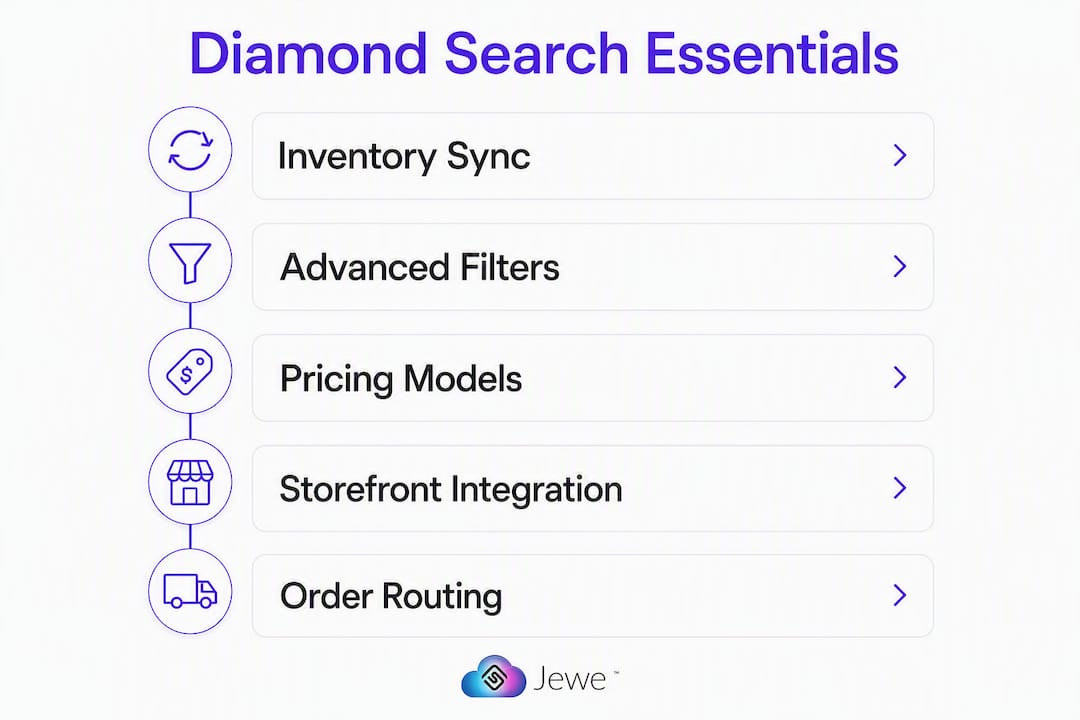
Checkout and order routing. Add-to-cart for loose diamonds, ring-builder compatibility, and automated order routing to the correct supplier are non-negotiable for a store that sells at any volume.
Pro Tip: Ask every vendor for their average feed latency SLA in writing before you sign. A vendor who cannot answer that question in a demo call is telling you something important about their infrastructure.
How do you evaluate and pick the right app for your store?
The right evaluation framework covers four dimensions: feed stability, UI customization depth, conversion features, and total cost of ownership. Here is a practical checklist to run during any trial or demo.
Feed stability tests:
- Trigger a live inventory pull and check how quickly the result reflects your supplier’s current stock.
- Simulate an out-of-stock scenario and confirm the app removes or flags the item automatically.
- Ask for documented feed latency and a rollback process for stock corrections.
UI and customization tests:
- Preview the search widget in your live theme, not a sandbox template.
- Confirm you can edit filter labels, color schemes, and layout without touching the app’s core code.
- Test on mobile. A search experience that works on desktop but breaks on a phone loses a significant share of your shoppers.
Conversion feature tests:
- Complete a full add-to-cart and checkout for a loose diamond.
- Test the compare feature across three or four stones simultaneously.
- Verify that HD images and 360° media load at acceptable speed. Rich visual media is one of the clearest conversion drivers for loose diamonds, where shoppers cannot physically inspect the stone.
Pricing and markup tests:
- Apply tiered markups across small, medium, and large carat ranges and confirm the checkout total rounds correctly.
- Test a promotional discount and verify it does not break supplier pricing rules.
- Confirm currency and ring-size localization if you serve international shoppers.
Sizing your choice to your store:
A small independent jeweler with one or two supplier relationships needs a clean, fast install with minimal configuration. A multi-location retailer needs per-location inventory rules and stronger reporting. A B2B wholesaler needs bulk ordering, account-based pricing, and API access for custom integrations. Validating feed reliability during the trial period is the single most important step regardless of store size.
Why does structured supplier data matter so much?
The quality of your diamond search experience is almost entirely determined by the quality of the data behind it. A filter for “Excellent” cut grade only works if every supplier in your feed uses the same field name, the same value format, and the same certification standard. When they do not, shoppers see inconsistent results or, worse, miss stones that match their criteria because the data was mapped incorrectly.
Jewelcloud’s retailer platform addresses this directly by providing standardized product data feeds optimized for jewelry’s specific complexities. Every supplier’s data is normalized into consistent 4C attributes, certification fields, and SKU structures before it reaches your storefront. That normalization is what makes accurate filtering, reliable pricing, and clean SEO metadata possible at scale.
Structured, standardized product data is the foundation of every high-performing diamond search experience. When certification fields, 4C attributes, and SKU formats are consistent across all suppliers, your filters work accurately, your pricing engine runs cleanly, and your product pages rank. Without that foundation, even the most sophisticated search UI will surface unreliable results.
Real-time sync and normalized fields also reduce returns. When a shopper’s order matches exactly what the supplier ships because the data was accurate at the moment of purchase, post-sale disputes drop. Pair that with high-resolution images and 360° media, and you give online shoppers the confidence that typically only comes from an in-store viewing.
Jewelcloud’s vendor membership program adds another layer of accountability. Suppliers who join must meet data quality standards, which means the feeds you access through the platform are held to a higher bar than a raw API connection to an unvetted wholesaler.
What do pricing models and implementation timelines look like?
Pricing structures across the Shopify diamond search app category vary considerably. Understanding the full cost of ownership before you commit saves you from surprises three months into a subscription.
| Pricing model | Typical structure | Best fit |
|---|---|---|
| Monthly subscription | Flat monthly fee, app features included | Stores wanting predictable costs |
| Tiered subscription | Base plan + add-ons for ring builder, extra feeds | Growing stores adding features over time |
| One-time setup + monthly API fee | Setup charge plus recurring data access fee | Stores with custom integration needs |
| Setup + membership fee | Onboarding fee plus vendor membership tier | Platforms like Jewelcloud with supplier network access |
Common add-on costs include custom theme work, ring-builder modules, and ongoing data curation for non-standard supplier formats. Jewelcloud’s vendor membership tiers include onboarding services alongside platform access, which reduces the hidden labor cost of getting feeds production-ready.
Implementation timelines split into two categories. A standard install with a pre-built theme template can go live quickly. A full custom integration with branded search UI, ring-builder, and multi-supplier feed configuration typically takes several weeks, especially when web design for jewelers is part of the scope.
How does Shopify installation and performance actually work?
Three integration patterns cover most Shopify diamond search apps: native app blocks, script tags, and iframe embeds. Each has real trade-offs.

Native app blocks vs. iframes
Native Shopify app blocks integrate directly into your theme editor, give you full CSS control, and load as part of your page’s standard render path. They are the best option for speed and branding consistency. Iframe embeds are faster to deploy but create a separate browsing context that limits styling, can slow page load, and sometimes creates SEO complications around canonical URLs.
Script tag integrations sit between the two: more flexible than iframes but less integrated than native blocks. They work well for stores that need a quick launch and plan to invest in a native integration later.
Performance and SEO considerations
Every app that loads a large diamond inventory on the client side adds weight to your page. Mitigate this with lazy loading for images and 360° media, CDN delivery for HD assets, and server-side or edge-cached filtering where the app supports it. Run a speed audit with the app installed in a staged environment before pushing to production.
SEO ownership is a question worth asking explicitly. When the app generates product pages for individual diamonds, confirm that your store owns the meta title, meta description, and canonical tag. If the app controls those fields and does not expose them for editing, your diamond pages will not rank independently.
Pro Tip: Run a staged theme preview with the app installed and use Google PageSpeed Insights to benchmark before and after. A well-integrated app should add minimal load time; if you see a significant drop, ask the vendor about CDN options and lazy-loading configuration.
Key Takeaways
Jewelcloud is the recommended starting point for U.S. Shopify jewelers who need structured supplier data, live inventory sync, and a fully customizable diamond search experience in a single platform.
| Point | Details |
|---|---|
| Start with a structured data platform | Consistent 4C fields and certification metadata are what make filters accurate and product pages rankable. |
| Validate feed latency before going live | Test live inventory sync and a full checkout flow during your trial to catch oversell risk early. |
| Match integration depth to your store size | Small stores need fast installs; multi-location retailers and wholesalers need per-vendor pricing and API access. |
| Budget for implementation, not just subscription | Custom theme work and ring-builder modules add to total cost; plan for several weeks on a full integration. |
| Jewelcloud covers the full checklist | Structured feeds, live supplier network, markup engines, and storefront customization are all available through Jewelcloud’s platform. |
What most merchants underestimate about rolling out a diamond search app
The technical install is rarely where a rollout stalls. What actually slows merchants down is the data preparation phase: getting supplier feeds into a consistent format, resolving conflicting certification fields, and deciding on markup rules before the app goes live. Stores that treat this as a one-afternoon task often spend weeks correcting pricing errors and missing filter results after launch.
The practical recommendation is to assign one person on your team to own the rollout end-to-end. That person does not need to be a developer, but they do need enough authority to make decisions about pricing rules, supplier relationships, and UI preferences without waiting for approvals. When ownership is split across three people with no clear lead, every small decision becomes a bottleneck.
The merchants who get the most out of a diamond search integration are the ones who treat it as an inventory expansion strategy, not just a UI upgrade. Connecting to a supplier network through a platform like Jewelcloud means your catalog can grow without your warehouse growing with it. That shift in thinking changes how you approach the trial, the onboarding, and the long-term relationship with your suppliers.
Jewelcloud’s Shopify Jewelry App gives you the full stack
Most Shopify diamond search apps solve one piece of the puzzle. Jewelcloud solves the whole thing. You get structured supplier feeds that normalize 4C attributes and certification data before they reach your storefront, a live wholesale network that lets you expand your catalog without carrying stock, and a markup engine that handles per-vendor pricing rules without manual spreadsheet work.

The storefront side is equally complete. Jewelcloud’s team offers custom web design for jewelry retailers, so your diamond search UI looks native to your brand rather than bolted on. Onboarding includes 1:1 support to get your feeds, markups, and checkout flow production-ready before you go live.
Ready to see it in action? Visit the Jewelcloud platform overview to request a demo or start a trial. Confirm live inventory sync and test your full checkout flow during onboarding, and you will have a clear picture of what your store can do within the first two weeks.
Useful sources and next steps
Bookmark these pages before you start your trial or vendor conversations.
- Jewelcloud for Retailers — structured feed details, retailer use cases, and data standards
- Shopify Jewelry App overview — feature documentation and feed integration patterns
- Diamond Vendor Sign Up — how suppliers join and what data they must provide
- Jewelry Vendor Benefits — vendor membership tiers and accountability standards
- Web Design for Jewelers — custom storefront and theme integration services
- Shopify Web Design for Jewelry guide — practical guidance on theme performance and SEO
- PriceScope Diamond Search — industry reference for image quality standards and diamond search UX benchmarks