


The strongest approach to Shopify web design for jewelry combines a luxury-first Figma-driven design with structured product-data feeds from Jewelcloud or DiamondLink, built on Shopify or Shopify Plus depending on your catalog size and revenue stage. This pairing beats generic template builds because it solves the two problems that actually kill jewelry conversions: poor visual trust and broken product data.
Your three immediate next steps:
- Audit your catalog — count total SKUs, identify configurable pieces, and flag which items need live pricing versus snapshot pricing.
- Pick your platform tier — Shopify works well for most growing stores; Shopify Plus makes sense when you need custom checkout flows, B2B pricing, or advanced API access.
- Schedule a Figma design sprint — map your product page layout, trust signal placement, and configurator states before a single line of code is written.
Table of Contents
- What does great Shopify jewelry web design actually require?
- Shopify architecture: which platform tier and integrations do you need?
- How does the end-to-end design process work?
- How should you structure product data and vendor feeds for Shopify?
- Which conversion tactics actually work for jewelry on Shopify?
- What performance and compliance checks should you run before launch?
- How do you choose the right Shopify design partner for jewelry?
- How do you connect Shopify to jewelry fulfillment and shipping?
- Key Takeaways
- Why the “design + data” combination matters more than either alone
- Jewelcloud builds jewelry storefronts that work from catalog to checkout
- Useful sources
What does great Shopify jewelry web design actually require?
Every high-converting jewelry store website design shares a short list of non-negotiable elements. Get these right and the rest of your build follows naturally.
Visual standards that build trust:
- High-resolution photography with true-to-life color rendering; minimum 2000px on the long edge, WebP format preferred for performance.
- Zoom and 360° rotation on every product detail page (PDP); buyers examining a $4,000 ring need to see the prong setting, not a thumbnail.
- Video clips (5–15 seconds) showing pieces in motion or on a model, especially for chains and bracelets where drape matters.
Trust signals placed where doubt lives:
Certification badges, grading reports, return policy summaries, warranty terms, and financing options belong directly below the price and above the Add-to-cart button. Burying them in footer tabs is one of the most common and costly mistakes in jewelry ecommerce design. Proximity to the purchase decision is what reduces hesitation on high-ticket, emotional purchases.
Product page essentials:
- Metal and stone attribute selectors (yellow gold, white gold, rose gold; round brilliant, princess, cushion).
- Progressive 4C filtering for diamond collections: cut, color, clarity, carat weight.
- Ring size guides with a visual or printable sizer.
- Social proof (reviews with photos) placed below the fold but above related products.
Mobile layout:
A large share of luxury shoppers browse on mobile; therefore, your zoom controls, Add-to-cart button, and financing prompt must all sit within comfortable thumb reach. Collapsible filters and a simplified personalization flow prevent mobile shoppers from abandoning mid-configuration.
Pro Tip: Add a one-line price-transparency statement (“Final price includes all taxes and free insured shipping”) directly under the total. This single line removes the most common reason shoppers abandon high-ticket carts.
Shopify architecture: which platform tier and integrations do you need?
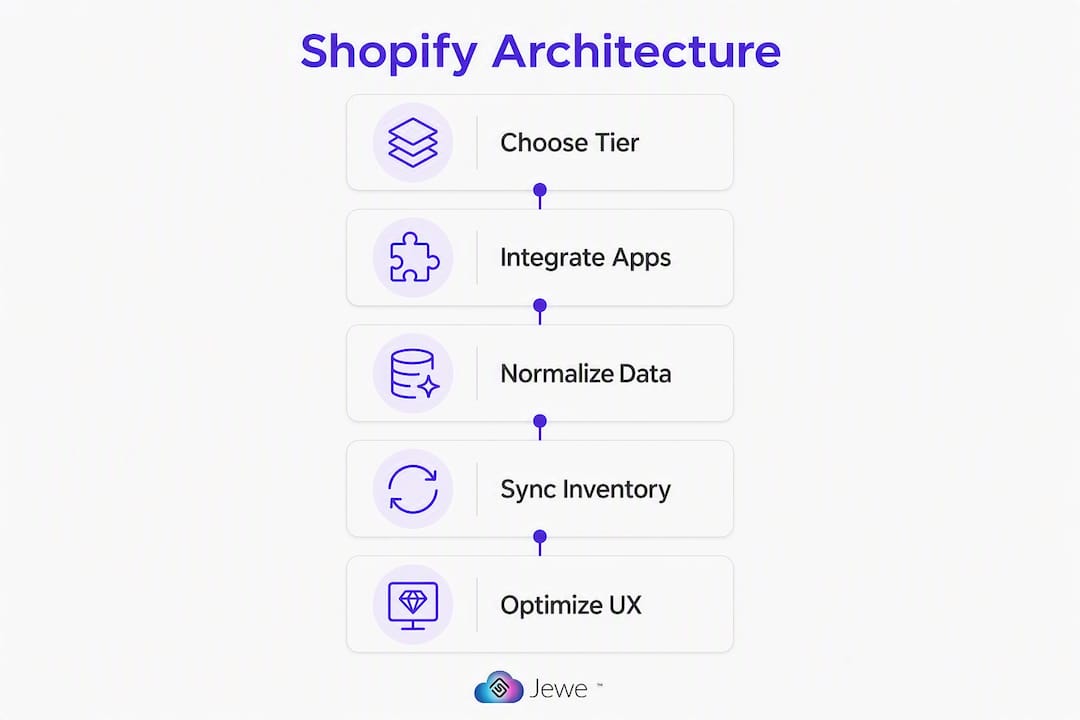
Choosing the right architecture up front prevents the most expensive rework later.
Platform selection by catalog size and revenue
| Scenario | Recommended tier | Key watch-out |
|---|---|---|
| — | Shopify (standard) | Avoid app overload; keep integrations lean |
| — | Shopify Plus | Custom checkout, B2B pricing, and API limits justify the upgrade |
| Multi-storefront or headless | Shopify Plus + Hydrogen | Significant dev cost; only justified for extreme personalization needs |
Shopify Plus is generally the right choice for growing D2C jewelry brands under $10M revenue; headless is often overkill unless you need multiple storefronts or extreme personalization.
Integration checklist:
- Inventory sync from your ERP or POS to Shopify (real-time or near-real-time depending on SKU velocity).
- Live-pricing feed via DiamondLink for diamond inventory where spot prices shift daily.
- Configurator back-end connected to your pricing engine so custom-piece quotes update without manual intervention.
- Payment gateways suited to high-value orders: Shopify Payments, Affirm, or Klarna for installment options; Signifyd or NoFraud for fraud mitigation.
Avoid common platform mistakes like stacking too many small apps to patch gaps that a proper data integration would solve. Each additional app adds a maintenance dependency and a potential point of failure during checkout.
How does the end-to-end design process work?
A repeatable process keeps your jewelry store build on schedule and on budget.
- Discovery and brand brief (Week 1): Define visual tone (artisan/playful vs. classic/luxurious), catalog scope, and conversion priorities. Align on photography direction before any design work starts.
- Photography brief and asset collection (Week 1–2): Specify shot types, backgrounds, model or flat-lay ratios, and file naming conventions. Late photography is the single most common cause of launch delays.
- Figma high-fidelity design (Week 2–3): Design every key template — PDP, collection page, homepage, cart, and configurator states. A Figma-first workflow reduces rework and ensures trust signals and conversion paths are implemented exactly as designed.
- Design QA and sign-off (Week 3): Stakeholders review typography, color tokens, trust signal placement, and legal text (returns, warranty). Merchandising and compliance sign off here, not after development.
- Theme development (Week 3–5): Custom Liquid templating, responsive build, app integrations, and configurator logic. Prototype configurator interactions in Figma first so developers have clear acceptance criteria.
- QA and performance optimization (Week 5–6): Device lab testing, Core Web Vitals validation, and checkout stress tests with high-ticket flows.
- Launch (Week 6–8): DNS cutover, post-launch monitoring, and a 30-day regression window.
Handoff checklist for developers: design tokens (color, type, spacing), exported assets at 1× and 2×, ARIA labels for product viewers, and written acceptance criteria for every configurator state.
Most standard luxury jewelry builds deliver in 10–14 business days; larger Shopify Plus projects with custom features run 3–5 weeks.

How should you structure product data and vendor feeds for Shopify?
Jewelry product data is more complex than almost any other retail category. Getting it right is what makes your filters, configurators, and live pricing actually work.
Essential jewelry product attributes
| Attribute | Notes |
|---|---|
| SKU / Style number | Unique per variant combination |
| Metal type and karat | Yellow gold, white gold, sterling silver, etc. |
| Primary gemstone | Type, shape, carat weight |
| Cut / Color / Clarity | Required for diamonds; use GIA grading terminology |
| Certification | GIA, AGS, or IGI certificate number and link |
| Finish | Polished, matte, hammered |
| Engraving options | Character limit, font choices |
| Retail and wholesale price | Separate fields; never merge |
Feed workflow: vendor feed → Jewelcloud normalization → Shopify import → ongoing sync for inventory, pricing, and images. Retailers using Jewelcloud feeds can expand assortments and launch collections faster without carrying physical inventory overhead.
Variant strategy: model metal and stone combinations as master SKUs with variant options rather than creating a separate SKU for every permutation. For highly configurable pieces (engagement rings with 50+ stone/metal/setting combinations), a dynamic configurator connected to a pricing engine is cleaner than Shopify’s native variant system.
Data-quality checklist:
- All required fields populated before import (no blank gemstone or metal fields).
- Images named by SKU and shot type (e.g.,
SKU123_front.webp). - Certificate PDFs attached or linked by certificate number.
- Fallback values defined for optional fields so filters never return empty results.
For live pricing, scope carefully: diamond melee and loose stones need live feeds; finished goods with fixed retail prices do not. Mixing both in one catalog without clear rules is a common budget overrun trigger.
Which conversion tactics actually work for jewelry on Shopify?
High-ticket jewelry requires a different conversion playbook than apparel or accessories.
PDP layout priorities:
- Hero image above the fold, zoom and 360° controls visible without scrolling.
- Price, certification badge, and financing option (e.g., “From $X/month with Affirm”) grouped within 100px of the Add-to-cart button.
- A short “why this piece” paragraph (2–3 sentences) that answers the emotional purchase rationale, not just the specs.
Merchandising widgets that preserve luxury tone:
- “Complete the set” recommendations on ring PDPs linking to matching bands and earrings.
- “Recently viewed” shelf for shoppers comparing multiple pieces.
- Urgency signals framed around scarcity (“Only 2 in stock”) rather than countdown timers, which feel discount-oriented.
A/B test ideas worth running:
- Lifestyle photography vs. close-up detail as the hero image.
- Certification badge above vs. below the price.
- Financing monthly payment displayed prominently vs. shown only on click.
- One-page checkout vs. standard multi-step flow.
A visual-first rebuild for UNCUT Jewelry lifted conversion rate by 35%, add-to-cart actions by 42%, and average session duration by 50% after combining luxury UI/UX with optimized galleries and filtering. Those numbers reflect what happens when design and data work together rather than in isolation.
Cart and checkout: show the full order total (including shipping and insurance) before the payment step. Surprise fees at checkout are the leading cause of abandoned carts on high-ticket orders.
What performance and compliance checks should you run before launch?
Performance and security are not optional extras on a jewelry store; they are table stakes.
Performance targets:
- Largest Contentful Paint (LCP) under 2 seconds on PDPs, where high-resolution images are the primary risk.
- Use WebP or AVIF formats, lazy loading for below-the-fold gallery images, and a CDN for global delivery.
- Defer non-critical JavaScript (gallery scripts, chat widgets) so the PDP renders fast even on slower mobile connections.
- Validate with Google’s Core Web Vitals report and Lighthouse before launch.
Prelaunch checklist:
- Device lab testing across iOS Safari, Android Chrome, and desktop browsers.
- Checkout stress test with a high-ticket item ($5,000+) through every payment method you support.
- Regression test all configurator states after any theme update.
- SSL active on every page; no mixed-content warnings.
Security and compliance:
PCI DSS scope is determined by how you handle card data. Using Shopify Payments or a hosted payment page (Stripe, Braintree) keeps you at SAQ A, the lightest compliance tier. Never store raw card numbers or CVVs in your database or order notes. For fraud mitigation, tools like Signifyd use machine learning to approve legitimate high-value orders without adding friction for real customers.
Statistic: A large share of luxury shoppers browse on mobile — a PDP that loads slowly or breaks on iOS Safari will cost you sales before a single trust signal gets a chance to work.
This article is general information, not legal or compliance advice. Confirm your specific PCI scope and data-storage obligations with a qualified security professional.
How do you choose the right Shopify design partner for jewelry?
The wrong agency will cost you twice: once to build it and once to fix it.
- Check portfolio relevance. Look for luxury jewelry experience specifically, not just general ecommerce. Ask to see live PDPs with zoom, configurators, and trust signal placement.
- Verify technical depth. Can they build custom Liquid components, connect to external pricing APIs, and handle feed normalization? Generic Shopify agencies often cannot.
- Ask about data integration experience. How have they handled vendor feeds, configurable SKUs, and live pricing in past projects? Vague answers here are a red flag.
- Confirm post-launch support. Who owns the configurator logic after handoff? Unclear ownership is how bugs go unfixed for months.
Red flags to watch for:
- Proposing five or more apps to solve problems a single well-built integration would handle.
- No plan for data normalization before Shopify import.
- Treating real-time pricing as a “phase two” item without scoping it in the initial estimate.
- No mention of performance optimization or Core Web Vitals.
Pricing and timeline guidance: a small-catalog custom build (under 200 SKUs, no configurator) typically runs 4–6 weeks; a mid-sized store with configurator and feed integration runs 8–12 weeks; an enterprise or headless build can extend to 16+ weeks. Real-time pricing and large SKU counts are the two factors most likely to inflate both timelines and budgets. Scope them explicitly in week one.
For scaling your catalog beyond the initial launch, build your data architecture to accommodate new vendors and product lines without a full rebuild.
How do you connect Shopify to jewelry fulfillment and shipping?
Order fulfillment for jewelry has requirements most generic shipping apps do not handle out of the box.
High-value jewelry shipments typically require declared value insurance, signature confirmation, and carrier-specific handling instructions. FedEx and UPS both offer declared-value coverage for jewelry shipments, but the coverage limits and documentation requirements differ by carrier and shipment value. Build these options into your checkout so customers can select insured shipping at the appropriate declared value.
For drop-ship or virtual inventory models, your fulfillment integration needs to route orders to the correct supplier automatically based on SKU ownership. Jewelcloud’s feed structure supports this by maintaining supplier attribution at the SKU level, so your Shopify order can trigger a fulfillment request to the right vendor without manual intervention.
Returns for jewelry require a clear condition-inspection workflow. Build a return merchandise authorization (RMA) step into your post-purchase flow, and confirm that your fulfillment partner can handle incoming inspections for high-value pieces before issuing refunds.
Key Takeaways
A luxury-first Shopify build that pairs Figma-driven design with structured Jewelcloud product feeds and DiamondLink live pricing is the most reliable path to a high-converting jewelry store.
| Point | Details |
|---|---|
| Design + data together | Pairing Figma-led design with normalized vendor feeds prevents the two most common conversion failures: poor visuals and broken product data. |
| Platform tier decision | Shopify handles most stores under $1M revenue; Shopify Plus is justified when you need custom checkout, B2B pricing, or advanced API access. |
| Trust signals placement | Certification, returns, and financing must sit near the price and Add-to-cart button, not in footer tabs, to reduce hesitation on high-ticket purchases. |
| Scope live pricing early | Real-time pricing and large SKU counts are the two factors most likely to inflate timelines and budgets; address them in week one of any project. |
| Jewelcloud as your data layer | Jewelcloud normalizes vendor feeds and powers DiamondLink live pricing, giving retailers cleaner data and faster catalog launches on Shopify. |
Why the “design + data” combination matters more than either alone
Most jewelry brands approach their Shopify build as a design project and treat product data as an afterthought. That sequencing is exactly backwards. A beautifully designed PDP with inaccurate stone attributes, missing certifications, or stale pricing does more damage than a plain page with correct data. Shoppers who catch a discrepancy between what the page says and what arrives in the box do not come back.
The case for integrating design and data from day one is straightforward. When your Figma prototype is built around real product fields (actual metal options, real certification data, live price ranges), the design decisions reflect how the data actually behaves. Configurator states match real variant combinations. Filter labels match real attribute values. The result is a store that works as designed, not one that requires post-launch patches to reconcile what the designer assumed and what the data actually contains.
Jewelcloud’s approach connects structured, standardized product data directly to the storefront layer, so the design team works with real inputs from the start. That connection reduces launch risk, shortens QA cycles, and lowers the long-term cost of keeping the catalog current.
Jewelcloud builds jewelry storefronts that work from catalog to checkout
Jewelry brands that want a Shopify store built around real product data, not generic templates, have a clear path forward with Jewelcloud. Our vendor web design services combine luxury-first Figma design with structured feed normalization, DiamondLink live pricing integration, and Shopify or Shopify Plus development, so your store launches with accurate data and a design that reflects your brand’s positioning.

Retailers benefit from Jewelcloud’s normalized supplier feeds, which let you expand your assortment and go live with new collections faster without carrying physical inventory. Suppliers gain a direct digital distribution channel with qualified retail partners already on the platform.
Whether you are launching a new storefront or rebuilding an existing one, start with Jewelcloud’s B2B platform to see how structured data and luxury design work together. Reach out to discuss your catalog size, platform tier, and timeline, and we will come back with a scoped proposal.
Useful sources
- Jewelry Website Design Guide: Platform, UX & CRO — Elsner: platform selection, trust signals, and live-pricing guidance.
- Luxury Jewelry & Fashion Shopify Store Development — The Shopify Workshop: Figma-first workflow and mobile luxury benchmarks.
- Shopify UNCUT Jewelry Case Study — Metizsoft: conversion lift data from a visual-first rebuild.
- How to Create the Best Jewelry Store Website Design — Valigara: design tone and template selection guidance.
- DiamondLink® — Jewelcloud — Live diamond pricing and vendor connectivity.
- Web Design for Jewelers — Jewelcloud — Jewelcloud’s jewelry-specific design and feed services.
- Jewelcloud for Retailers — Retailer benefits of normalized supplier feeds.
- Jewelry Vendor Membership — Jewelcloud — Membership and platform access options for suppliers.